Outdated Penang Uncle

Showing posts with label free software. Show all posts

Wednesday, January 23, 2013

[Free] Audacity - the real free audio editor

If you google (or bing or yahoo) for audio editor, you will find thousands of "free" audio editors, but how many of them are really free? I found out usually those free software are not really free. Some are time limited trial, some are feature limited and trying to sell you the full feature of the software for 9.90, 19.90, 29.90 or 39.90. However we shouldn't paying for just some simple software. Software usually should be free, except for business use.

I have been using Audacity for editing audio for many occasions, ringtones, audio for video, etc. When I checked the posts that I posted in the past, I noticed that I haven't share this software with you. So here you go:

Audacity Advantages:
  1. It is completely free
  2. It runs on Windows, Mac OS, and Linux
  3. Live recording from microphone, line input, USB/Firewire, etc
  4. Timer record, and sound activated recording
  5. Multi-track recordings
  6. Import and export many types of file (WAV, AIFF, AU, FLAC, OGG, MP2, MP3, AC3, M4A, AAC, WMA) - might need to install additional library
  7. Supports 16, 24, 32-bits
  8. Easy editing
  9. Unlimited undo and redo
  10. Automatic crash recovery
  11. Lots of effects
  12. Tons of plug-ins


Audacity is as good as professional, paid software. Therefore, go download it now:
http://audacity.sourceforge.net/download/


Like this if you are FB user and you think this post is useful. The button is at top right of content of this post.
+1 this post if you are Google+ users and you think this post is useful.
Hope you will enjoy this post, subscribe to my RSS or mailing list or follow me on blogger or twitter. :)
pix source:http://audacity.sourceforge.net

Saturday, January 5, 2013

[free] BluMind - Mind Mapping Software

Tony Buzan invented Mind Mapping. I had the opportunity to attend one of his talk while he was in Penang few years ago. I also attended mind mapping course which trained by the trainer trained by Tony Buzan. Anyway, using papers and pens seems like not too environment friendly. Therefore using software on PC would be the better choice. Tony Buzan's company does offers mind mapping software, but is very costly.

Even though there is free version, but with limited function. If you want more functions, then you have to buy home/student version which cost 49 pound.

Luckily (as always :) ), there is a few mind mapping software that is totally free that we can use.

I am using BluMind these few days for my work. BluMind has installer or portable version. I always like portable version of any software.


Thanks to many the contributed, BluMind has many translated language, including Hindi, Japanese, Chinese (both type), Korean, and many Europe language. It can export to pictures (PNG, JPEG, BMP, etc) and CSV. Also can add icons, add remarks, progress mark. There is a timer, which I think is very good for time keeping, because with limited time, human brain usually will works faster.

Get your BluMind today:
http://blumind.org/


Like this if you are FB user and you think this post is useful. The button is at top right of content of this post.
+1 this post if you are Google+ users and you think this post is useful.
Hope you will enjoy this post, subscribe to my RSS or mailing list or follow me on blogger or twitter. :)
pix source: blumind.org

Thursday, December 27, 2012

WPS Office - Another MS Office Alternative

MS Office is always the main office software being use by main stream business and most of the industry. However if you are just starting a new business or a SOHO or a freelancer, buying a MS Office software can be very costly. Nowadays PC maker tried very hard to save cost, therefore some of the time the PC/laptop you bought is installed with evaluation version of MS Office or some just don't have MS Office at all.

MS Office Home and Student edition cost USD $150. MS Office Home and Business edition cost USD $280. Plus you need to pay additional USD $25 per language pack that you want to include. That's is very expensive.

Luckily there is always a lot of nice people on the world wild web (world wide web) to write free software. There are a lot of alternative to MS Office, among the famous one such as OpenOffice and LibreOffice. WPS Office is a made in China (what is not made in China nowadays? ;) ) alternative to MS Office.


Recently WPS Office has been upgraded to SP2. What so special of WPS Office?
  1. It is very small, setup file 41.6MB only.
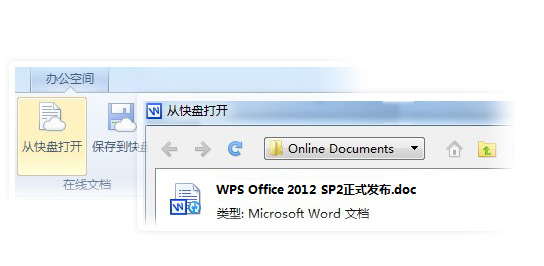
  2. It opens documents on cloud storage.
  3. Auto recovery.
  4. WPS Excel supports long numbers (Unlike MS Excel changed everything to xx.xxE+xx).
  5. Free template from WPS forum.
  6. Directly post to WeiBo (China's twitter).
The only drawback is WPS website is completely written in Chinese. No problem for people that is Chinese educated, but what about other people? I am downloading it right now to see if WPS Office can support English or other language only Windows.

If you are adventurous, go to this link to download it now:
http://www.wps.cn/product/wps2012/sp2/

Update: Confirmed that WPS Office is only in Chinese. Another thing is it will not ask your permission before it take over all the office files to be open by WPS. What a shame, sounds like another non-sense software (Remember Real Player?). I am uninstall it now.


Like this if you are FB user and you think this post is useful. The button is at top right of content of this post.
+1 this post if you are Google+ users and you think this post is useful.
Hope you will enjoy this post, subscribe to my RSS or mailing list or follow me on blogger or twitter. :)
source: wild wild web

Monday, December 17, 2012

[free] CodeBlocks: C++ IDE

I learned C programming during my Uni time. I think nowadays some universities still teaching C++ as part of the IT as well as computer/electronics engineering courses. The software of C or C++ usually is commercial software. You have to stay at the computer lab to finish up the project. Some tried to use pirated software, but this should be avoided. Luckily there are nice people out there that put up their time and effort to write free software for everyone. Example: Code::Blocks.

Code::Blocks is a free C++ IDE. It available in Windows (32 and 64-bits), Linux (32 and 64-bits) and MacOS X. So this is very good news for everyone.


To download, go to:
http://www.codeblocks.org/

Like this if you are FB user and you think this post is useful. The button is at top right of content of this post.
+1 this post if you are Google+ users and you think this post is useful.
Hope you will enjoy this post, subscribe to my RSS or mailing list or follow me on blogger or twitter. :)
pix source: http://www.codeblocks.org/

Tuesday, August 28, 2012

(Give Away) 1AVCenter: complete audio video center

This blog has been running for 3 years and 1 months but I haven't really do any give away. In fact, none. Why? Because I am a stingy Outdated Penang Uncle. Haha.

I have been scouting for my next smartphone for months but I haven't found the right one, or because I still feel like those smartphone that I like is costing too much. So I will continue using my very very outdated HTC Touch Elfin.

Anyway, it is like someone can hear me, because I was planning to run a give away on Facebook page. But the gift would be limited to Malaysian only because the gift card is for using in Malaysia only. But luck strike, Alex from pcwinsoft.com contacted me though twitter if I want to run a give away on this blog. And this is also a good luck for everyone (not limited to Malaysian) because this give away is for everyone in this planet earth, and maybe Martian that already start contacting Curiosity.

So what is 1AVCenter?

Okay, it is not the AV that Japanese used to. AV stands for Audio Video in this case.

In short:
1AVCenter is for record, broadcast and remote surveillance of any audio and/or video source on your PC. You can also share files via secure web server that come with 1AVCenter.

Lengthy version:
Here is what 1AVCenter does:

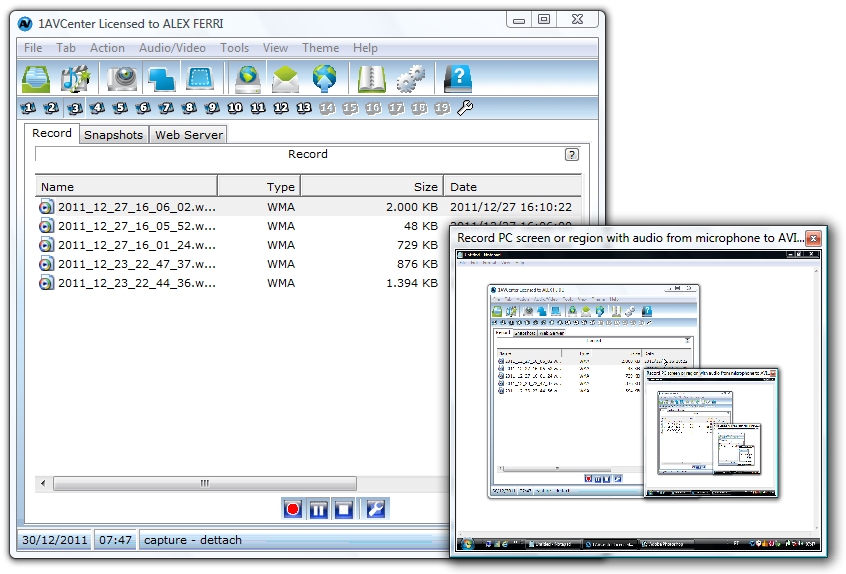
Here is 1AVCenter in action (recording screen):

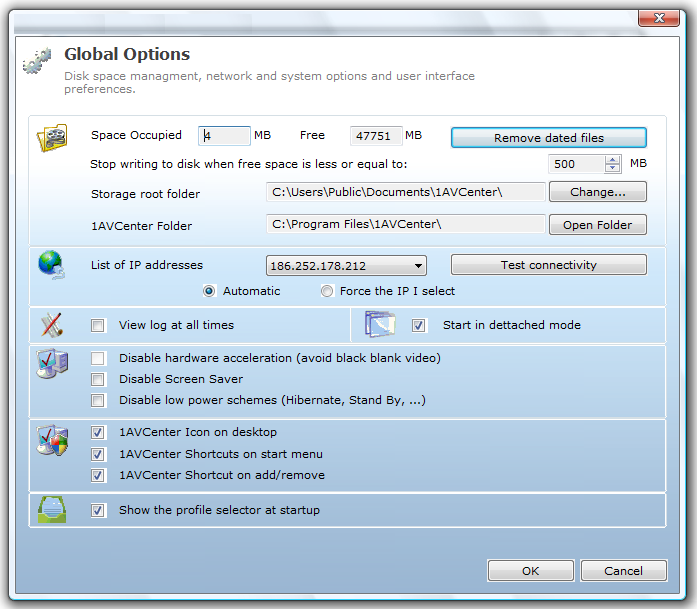
Here is 1AVCenter options:

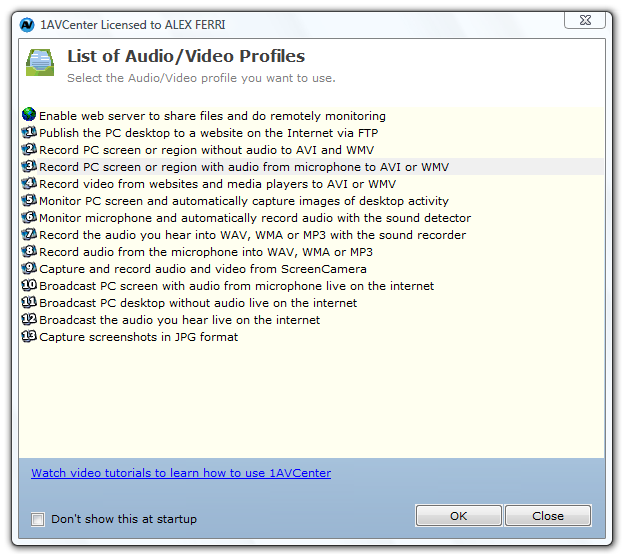
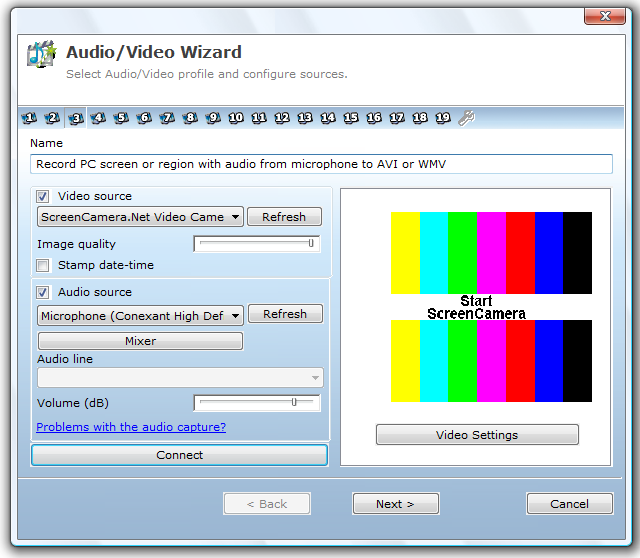
Here is how you can choose audio/video source for recording on 1AVCenter:

The screen capture is just normal, just like any other screen capture program.

So I try out the screen recording feature of 1AVCenter:


It gets 5 cows on Tucows and cost $99.95 (US dollar!) if you buy from pcwinsoft.com website. Now it is absolutely free. How?

1. Download the setup file and install it on your PC/laptop.
http://www.pcwinsoft.com/download/1AVShrInstAG.exe

2. During installation it will ask for "Buy", "Register" and "Try", leave it now without any button on the windows.

3. Go to this link to register with your info and email and wait for the registration key to arrive at your inbox.
http://www.pcwinsoft.com/promotion/OutdatedPenangUncle/registration.asp

4. After you get the registration key, copy the code and go back to the installation windows, click "Register" and enter the code there.

5. Now you just register a $99.95 worth of software for free!

Enjoy your screen capture and recording. :)

Before I forget, this is basic requirement:
  • Intel 1.3GHz
  • 120MB HD
  • 256MB RAM
  • Windows 2000/XP/2003/Media Center/Vista/Windows 7/Windows 8
  • Minimum screen resolution of 800x600

Note: I am too lazy to add audio in the above youtube video, you can screen capture video and audio at same time with 1AVCenter.

Note2: I am not sure how long the give away will be, most probably until pcwinsoft.com says stop. Why not just give it a try now. :)

Note3: I am not responsible if you break your Windows/PC/laptop/car/arms and legs/wallet because of this give away. :P


Like this if you are FB user and you think this post is useful. The button is at top right of content of this post.
+1 this post if you are Google+ users and you think this post is useful.
Hope you will enjoy this post, subscribe to my RSS or mailing list or follow me on blogger or twitter. :)
pix source: pcwinsoft.com

Saturday, August 11, 2012

Find Windows CD Key and others

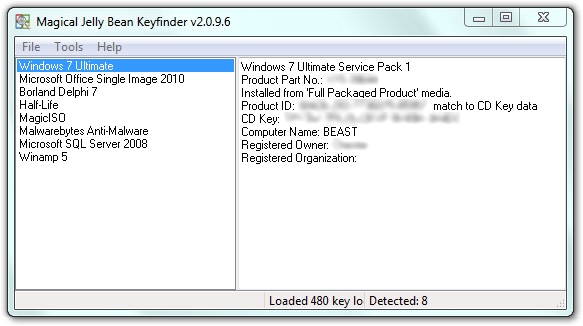
Saw this software / apps at a website. Magical Jelly Bean Keyfinder (no, not Android 4.1) is a free apps that helps to retrieve your Windows, MS Office, Winzip and many more CD Key. Sometime we might misplace the original DVD of the Windows, MS Office or other apps after we copy all the installers into another HD or partitions. So when we want to format and reinstall the Windows and etc, we can't find the CD key. Some might have to spend times and money to get it from Microsoft or other software company, or buy another one?

pix credit: http://www.magicaljellybean.com/keyfinder/


Anyway, with Keyfinder (I don't want to say the full name again), you can retrieve the CD key and save it down on a USB drive or papers.

Where is the catch you might ask. Yes, this apps only support 300+ software (as it claimed), if you want more coverage like 3600+ programs, then you have to buy the full version, which is called Recover Keys, which cost US$24.95 for single license.

Okay to the apps/software:
http://www.magicaljellybean.com/keyfinder/
Official portable version available, woohoo!


Like this if you are FB user and you think this post is useful. The button is at top right of content of this post.
+1 this post if you are Google+ users and you think this post is useful.
Hope you will enjoy this post, subscribe to my RSS or mailing list or follow me on blogger or twitter. :)
source: internet!

Saturday, July 28, 2012

Caffeine: coffee for PC?

This Caffeine is not Starbucks or instant coffee. This Caffeine is a simple program to keep your PC or laptop awake.
Here are the situations I can think of that this Caffeine could useful:
1. you are using someone else laptop/PC, the sleep time on this laptop/PC could just a few minutes and if you are doing a presentation on it, it will be very annoying if every few minutes you need to shake the mouse to get it up from screen off or sleep mode.
2. you are day-dreaming in office, but you don't want the boss to notice it because the screen will be turn-off.
3. some websites will expire if your screen is off and locked, you want the website thinks you are still on it, even though you are not there.

Caffeine might be useful in these situation.
pic credit: http://www.zhornsoftware.co.uk/caffeine/


How it works? Simple, by emulating pressing of F15 key. F15 does not exist on most of the keyboard, therefore it will not change your program or anything, but keep the computer/laptop/PC awake. You can also change the default setting to something else, but you have to do it using switches and launch it via command prompt. You can also make a .bat file with the switches that you want and double click on the .bat file every time you want to keep your PC/laptop awake.

Get your Starbucks for your PC/laptop here:
http://www.zhornsoftware.co.uk/caffeine/


Like this if you are FB user and you think this post is useful. The button is at top right of content of this post.
+1 this post if you are Google+ users and you think this post is useful.
Hope you will enjoy this post, subscribe to my RSS or mailing list or follow me on blogger or twitter. :)
source: http://www.zhornsoftware.co.uk/caffeine/

Friday, July 27, 2012

Stickies: replacement for Sticky Note

I believe a lot of Windows 7 (and Windows Vista) users have used Sticky Note gadget at least once. For those that like to use it or depend on it very often, the sad news is the later version of Windows 7 does not include Sticky Note. This happen to me as well. My first Win7 OS does has Sticky Note, and it did save some tree from some forest on this Earth. However when I got my new laptop, it is a more matured Win7, but Sticky Note disappear from the gadgets. Did Microsoft want to destroy more tree? I don't know.

Anyway, I found this freeware, or free apps which more people call it that way on every single software (except OS). This apps is Stickies.
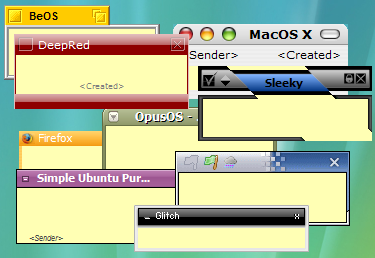
pix credit:http://www.zhornsoftware.co.uk/stickies/

Not only this Stickies does the same thing that the Sticky Note does, but better [my comment in square bracket]:
1. Stickies appearance can be customized for fonts, colors. Buttons may be changed, and styles can be saved [reduce boredom]
 pix credit:http://www.zhornsoftware.co.uk/stickies/

2. Stickies can store text or images [yea, don't think original Sticky Note can store picture]

3. Stickies can snap to each other and to the sides of the screen to keep them neatly lined up [tidiness?]

4. Stickies can be attached to a web site, document or folder so they only show when it's on screen [I like this feature very much and it make sense!]


5. Stickies can be transferred from one machine to another either over a TCP/IP network connection, or by using an SMTP mail server or MAPI client. [okay, you have to do this for 1001 stick notes? otherwise who would need to do this]

6. Stickies can be hidden for a certain period, until a specified date and time, or to wake every day, week or month, to act as reminders [stick note the can remind me at the right time, nice!]

7. Stickies can have alarms set to ensure you notice them at a point you choose [nice!]

8. Free [yes!!!!!!]

To download Stickies:
http://www.zhornsoftware.co.uk/stickies/download.html

To download more skins for Stickies, go to:
http://www.zhornsoftware.co.uk/stickies/skins/search.pl

If you prefer portable version, here you go:
http://portableapps.com/apps/office/stickies_portable


Like this if you are FB user and you think this post is useful. The button is at top right of content of this post.
+1 this post if you are Google+ users and you think this post is useful.
Hope you will enjoy this post, subscribe to my RSS or mailing list or follow me on blogger or twitter. :)
source: Internet!

Wednesday, May 23, 2012

Extracting Flash or SWF with HugFlash

Even though HTML5 is gaining popularity, Flash is still exist in too many websites. In fact, some famous online game website still based on flash games. Some of the time, you wish you can get the pictures or sounds from the flash or swf, since you like them very much, but print screen or record the sounds while running the flash or swf is troublesome. Why not try out HugFlash?

HugFlash is a free utility from a Japanese [http://www.paw.hi-ho.ne.jp/milbesos/] that you can download, unzip and use it.

Here is the picture HugFlash is extracting files from zoo.exe [ZooKeeper]. Yes, not only *.swf, but *.exe HugFlash also can handle it.
HugFlash on Outdated Penang Uncle blogspot dot com

The cute animals from the ZooKeeper that extracted by HugFlash.
HugFlash on Outdated Penang Uncle blogspot dot com

All the mp3 and wav files from ZooKeeper:
HugFlash on Outdated Penang Uncle blogspot dot com

One thing to note is that HugFlash is default to Japanese language. Once you launch it, right click on any place of the small HugFlash windows and choose to change to English.
HugFlash on Outdated Penang Uncle blogspot dot com

Download HugFlash Ver.2.8.4:
http://www.paw.hi-ho.ne.jp/milbesos/download/hugflash2_8_4.zip
You can also visit the website, but it all in Japanese. [I tried google translate, but it turn out to be non-sense sentences].
http://www.paw.hi-ho.ne.jp/milbesos/


Btw, the file explorer I am using is Q-Dir.


Like this if you are FB user and you think this post is useful. The button is at top right of content of this post.
+1 this post if you are Google+ users and you think this post is useful.
Hope you will enjoy this post, subscribe to my RSS or mailing list or follow me on blogger or twitter. :)
source: wild wild web!

Sunday, May 20, 2012

RarmaRadio: Listen to the World

Since early 20th century (a.k.a 19xx) when the first Radio station started broadcasting as a source of information and entertainment, it never looks back. Radio stations nowadays not only have to compete with the TV stations (local/cable/satellite/etc), but also the internet. Even though radio is lack of a screen to see, but it is still a great source of entertainment and information whenever I drive or traveling on public transport. It is dangerous to watch a show on LCD screen when we are driving, so radio still the best choice. :P

Most of the radio stations nowadays have put up their websites and allow us to listen to them through the internet. The problem with that is some of the website required us to register with your email first before you can listen to the radio stream. Before you know it, you have tons of ads or spam mails in your inbox. Not to say the radio station spam you, but having too many emails in inbox is certainly not a good thing. There are a few software out there that can locate the radio stations easily and let us listen to the radio online without the need to register for each station. RarmaRadio is one of my favourite.

There are a few ways to navigate for the radio station, such as genres, network, region(a.k.a. country).

Picture below showing I am listening to JP Hip from Japan. RarmaRadio will show the logo of the radio station if it can find it. RarmaRadio will also shows the type of audio stream, which usually either mp3 or wma or aac. The Bitrate column is a good reference because if you are on slower network, the best to avoid those high Bitrate station. I tried some radio stations with Bitrate of 128k on TM Streamyx 1Mbps, and the result is very bad, the sounds keep on breaking up.
RarmaRadio on Outdated Penang Uncle blogspot dot com

Picture below showing I am listening to EKR from UK. If the station support the song name/artist name, it will show in the box below.
RarmaRadio on Outdated Penang Uncle blogspot dot com

One is the great feature of RarmaRadio is I can record the station with few options:
1. continuously with auto split song or no split (into one big music file)
2. record with timer
3. record current song only
RarmaRadio on Outdated Penang Uncle blogspot dot com

RarmaRadio did a good work to update the list as often as possible, if you find out a station you like to listen but it could not stream correctly, you can feedback to RarmaRadio.

The only disadvantage that I found on RarmaRadio is it will keep on streaming the station you listening to before you switch to another station, if you are on slow network, it will chock both station because RarmaRadio will continue stream the previous station. This feature is good only if you like to switch station very often. I would recommend to stop streaming first before switch to another station.

To download RarmaRadio, go to this link:
http://www.raimersoft.com/rarmaradio.aspx


Like this if you are FB user and you think this post is useful. The button is at top right of content of this post.
+1 this post if you are Google+ users and you think this post is useful.
Hope you will enjoy this post, subscribe to my RSS or mailing list or follow me on blogger or twitter. :)
source: wild wild web

Saturday, May 5, 2012

WakeupOnStandBy to wakeup computer (again?)

Okay, maybe you feel like KM Wakeup is too simple and would like a more complete (complex) solution, why not give it a try on WakeupOnStandBy?


As you can see in the picture above, the interface is much more complicated than KM Wakeup.

The author of this software put up an online manual of it since it is too complicated:
http://www.dennisbabkin.com/php/docs.php?what=wosb
The online manual also indirectly show how many things it can does. 

FAQ:
http://www.dennisbabkin.com/php/faq.php?what=wosb#1

The download link is different for Window 98/ME and other Windows:
Windows 98/ME: http://www.dennisbabkin.com/php/download.php?go=WOSB1714
Windows 2k/XP/Vista/7: http://www.dennisbabkin.com/php/download.php?go=WOSB

I would think only try this if you geek enough. :)


Like this if you are FB user and you think this post is useful. The button is at top right of content of this post.
+1 this post if you are Google+ users and you think this post is useful.
Hope you will enjoy this post, subscribe to my RSS or mailing list or follow me on blogger or twitter. :)
pix source: http://www.dennisbabkin.com/php/images/wosb_top_logo.png

Thursday, May 3, 2012

KM Wakeup that wake up computer

KM Wakeup. No, it is not related to KMPlayer, not at all. It is actually a software acts as an alarm and control when to turn on/off computer, play chosen sounds (alarm clock??) and run applications.


Actually it will not shutdown the computer completely, it will be standby mode. There is no way to get a software to wake up a computer from complete shutdown because the software depend on the OS and as long as the OS not booted yet, the software will not work. However if the computer in standby mode, the software should be able to wake up the computer.

KM Wakeup will works only with hardware and software that are ACPI/APM compatible, which mean Windows OS from Windows 98 onward (until Windows 7) should be able to handle it.Sorry Apple fanboys, no luck for you, again. :P

You can make the computer to wake up or put it to standby in all sort of frequency, including once, daily, which day, weekly, monthly and yearly. About yearly, who would want to wake up a computer once a year? :P

What I can think of the usage is if you have a personal computer at home which primary job is to download stuffs but you don't want it to be switch on all day long (to save some electricity and money), you can set it to turn on at specific time and launch the software (torrent, thunder, qvod, ppstream, pptv, whatever) and then put it to standby at another specific time.

To download KM Wakeup, go to http://kmtools.win-os.pl/download.php?lang=ang

Opps... Forgot to mention, it is FREE! :D


Like this if you are FB user and you think this post is useful. The button is at top right of content of this post.
+1 this post if you are Google+ users and you think this post is useful.
Hope you will enjoy this post, subscribe to my RSS or mailing list or follow me on blogger or twitter. :)
pix source: http://kmtools.win-os.pl/img/kmwakeup.gif

Sunday, April 1, 2012

How to Print PDF to Multiple page in Windows

This is the combination of previous post to complete this post.

Sometime some companies/banks/gov offices/etc etc would publish some info into PDF. These kind of PDF have too much of information that printing it out would just waste of paper, since everything is too small to see if we print it into single piece of paper.

Thanks to Tokyo Subway and Railway Maps PDF, I have found the method to print huge or large PDF into multiple pages, so that it is clearer to see on papers.

There are about 103,000,000 results if we search for "how to print pdf to multiple pages" on google. I looked at a few of them, but some of them did help to provide idea to me. So there is how I did it:

1. Install PDF-XChange Viewer or download portable version and unzip it:
http://www.tracker-software.com/product/pdf-xchange-viewer
Free version can do this job. :-)


2. Open the PDF file using PDF-XChange Viewer.

3. Click "File" -> "Export" -> "Export to Image".

4. Pick your options:
4.a: Page Range: All, or current page, or selected pages.
4.b: Save As: export file format [I picked BMP or TIFF], destination path, and export mode [use default]
4.c: Graphic: page zoom [100%], page background [just pick white], resolution [a bit tricky here, you have to play with it until satisfy, but 300dpi would do the job for me]

5. Click export.

6. Print the image file into multiple pages using this method:
http://outdatedpenanguncle.blogspot.com/2011/09/print-large-image-to-multiple-pages-in.html

I told you that this is a combination of previous post with this port.
Now go print your humongous PDF.


Note: Adobe PDF Reader will never have this export to image feature, stingy Adobe.


Like this if you are FB user and you think this post is useful. The button is at top right of content of this post.
+1 this post if you are Google+ users and you think this post is useful.
Hope you will enjoy this post, subscribe to my RSS or mailing list or follow me on blogger or twitter. :)
source: I wrote this

Saturday, March 24, 2012

Colorblind Assistant

This is a free software which original objective is to help color blind people to identify the color that they see on computer screen. Not only the color name, the software also provide RGB values and HTML color code. This is very useful for logo/icon/website design as well, because sometime when I want to change color on my blog to a color that I seen on other website, I cannot find the exact color. With this software, I can find it out quickly. It also works for animations and movies.


Colorblind Assistant is compatible with all Windows, but best on XP, Vista and Windows 7.

To download, go to the webpage:
http://www.achronism.com/indexadv.php#Software


Like this if you are FB user and you think this post is useful. The button is at top right of content of this post.
+1 this post if you are Google+ users and you think this post is useful.
Hope you will enjoy this post, subscribe to my RSS or mailing list or follow me on blogger or twitter. :)
source: saw it at http://www.raymond.cc/blog/colorblind-assistant/
picture courtesy of http://www.achronism.com/

Sunday, March 18, 2012

Windows Explorer that Remembers

I did post about Explorer++ which become my favorite Windows Explorer. However, recently I have change my mind. Sorry Explorer++, not because you are not nice, but I have found other Windows Explorer that meet my needs. I like to open many windows, not only multiple of tabs in Chrome or FireFox, but Windows Explorer as well. There are a few Windows Explorer replacement that has multi tabs, but I don't think all of them can match Q-dir.

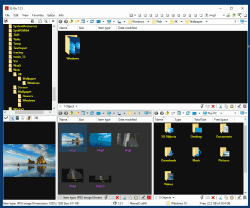
Q-dir not only allow up to 4 windows within the same windows, but I can open many more tabs in each windows. Best of all, I can save the state, so that after a Windows reboot, I can quickly recover my works, without need to look into the paths.

Usually after reboot, we have to open Windows Explorer, click on my documents and then search and search and search, which is very troublesome. With Q-dir, I just need to reload the previous state and it will open back all the windows and tabs and at the paths when I saved it.

Another advantage of the save state feature is I can upgrade Q-dir whenever I feel like to do it. Just save state and then upgrade, open the new version and load state again. I can quickly go back to business.

Why I like to open so many windows? Because I can quickly go back to my manga or music or movie or documents or anything, without need to navigate through the paths all over again. It will be there as long as I save the state.

Q-dir is freeware and now it also support Windows 8. Another thing I like about Q-dir is it available as portable from the official website.

There is one bug however. When I switch between "Restore down" or "Maximum", then windows does not refresh, sometime I don't see some of the files. But I can press Alt+F11 to restart it, it will remember the state before restart. So I don't need to worry too much of losing the paths/windows/tabs.

To download Q-dir, go to this link:
http://www.softwareok.com/?Download=Q-Dir
There is options on 32/64 bits and installer or portable. Personally I use 64bits portable version.


Like this if you are FB user and you think this post is useful. The button is at top right of content of this post.
+1 this post if you are Google+ users and you think this post is useful.
Hope you will enjoy this post, subscribe to my RSS or mailing list or follow me on blogger or twitter. :)
pix source: http://www.softwareok.com

Thursday, February 23, 2012

How to Measure Disk Drive Speed

Do you know how fast is your disk read and write speed? Usually we really no need to know about this, but disk read and write speed is crucial to determine the overall performance of your system. even though you have a Intel Core i3, i5 or i7, but you use only the normal (magnetic) hard disk, the performance is defenately slow down by the hard disk. Same as solid state hard disk, some solid state drive might not be as fast as the manufacturer claimed. Thumb drive (or known USB drive) is usually slow, I will show you in later part of this post.

There are a lot of free software out there to do disk read write speed accessment, but I found DiskMark is very simple and direct, or sometime I call it "no-nonsense".

DiskMark on Outdated Penang Uncle blogspot dot com

DiskMark interface on Outdated Penang Uncle blogspot dot com

As you can see in picture above, DiskMark interface is very simple, just a few buttons only. Buttons on left are the type of read and write test. Usually I just execute all of them (click "All" button).
As for the pull down options, you can choose to run how many times to run each test on first pull down option from left.
The second pull down option is to choose the file size of the test, 50MB to 4000MB, long bigger the file the longer the test time.
The pull down option on right is the choose which disk to run the test. It will not update automatically if I add in a new drive (on USB) after DiskMark is opened. I have close DiskMark and open it again.

There is skin option which I think is the only nonsense thing on DiskMark. Why need skin when what is needed is the test result.

The help is very simple and direct as well. Disk Mark is available in 32 and 64 bits, if you have 64bits Windows 7, you should use 64bits version.

There are the result of some of my SSD, thumb drive and external HDD:

Intel Solid State Drive on my sandy bridge laptop:
Intel SSD speed test on Outdated Penang Uncle blogspot dot com

Samsung Solid State Drive on Dell ST tablet (which I will post of review of it soon!)
If you compare it with Intel Solid State above, the Seq write and 512k read/write on this drive is faster than Intel SSD.
Samsung SSD speed test on Outdated Penang Uncle blogspot dot com

Kingston DT101 G2 8GB thumb drive
Not only limited by the USB2 port speed, but also the common problem on USB thumb drive, which that write speed is super slow. The Seq write speed at ~4MB is about the same when I use it to copy HD movies to this drive. Therefore this DiskMark is ready giving me the result as close as possible to the real usage.
Kingston thumb drive speed test on Outdated Penang Uncle blogspot dot com

Normal HD (magnetic) on external casing, connected over USB2 port
The read and write speed are limited by the USB2 port if not mistaken. These non-solid state HD will have higher read and write speed if it is install inside PC/USB and connected though P-ATA or S-ATA.
External HHD speed test on Outdated Penang Uncle blogspot dot com

To download DiskMark, go to this link:
http://crystalmark.info/software/CrystalDiskMark/index-e.html
The latest version is CrystalDiskMark 3.0.1c. Portable version also available, therefore you can put it in thumb drive and run it on any PC/laptop you wish to test the HD/SDD/flash/memory card.


Like this if you are FB user and you think this post is useful. The button is at top right of content of this post.
+1 this post if you are Google+ users and you think this post is useful.
Hope you will enjoy this post, subscribe to my RSS or mailing list or follow me on blogger or twitter. :)
source: I wrote this!

Thursday, February 16, 2012

Manage Hotmail or Windows Live Mail with Outlook

Hotmail, it was the first ever internet account that I registered. I still keep it until now, just in case someone from schooling time would like to contact with me. Facebook? All of my online account are using Gmail, so no one can find me in Facebook using my Hotmail account.

I never like Hotmail/Windows Live Mail website interface until now. That's why I once I get the invitation to Gmail (yes, it was by invitation at beginning), I moved all my contact/subscriptions to Gmail. Another thing about web based Hotmail nowadays is the ads is very annoying, at least 25% of the Hotmail/Windows Live Mail screen is fill with ads.

Another thing about Hotmail/Windows Live Mail is it is very difficult to manage the contact, especially the grouping of contacts.

Therefore I always use this method to manage my Hotmail/Windows Live Mail account. Too used to it that I forgot to share it in this blog. However when my wife asked me how to create contact group in Hotmail/Windows Live Mail recently, I show her this method.

This method is to use Outlook to manage your Hotmail/Windows Live Mail account. Therefore you will need Outlook to be installed on your PC/laptop.

First thing to do is to download Outlook Connector, go to MS website to download it:
http://office.microsoft.com/en-gb/outlook/microsoft-office-outlook-hotmail-connector-overview-HA010222518.aspx
Note: 64-bit version works on Outlook 2010 only. If you have older version like mine, download the normal version.

Close and exit Outlook before install Outlook Connector.

At the first time Outlook start after install Outlook Connector, Outlook Connector will ask for Hotmail/Windows Live Mail login name and password. Check "Remember Password" if you are not sharing the PC/laptop. After that wait for it to download emails from Hotmail/Windows Live Mail from server and all the emails will be appear as a personal folder in Outlook, with Inbox, Junk, Sent Items, drafts, etc sub folder inside this folder. Usually the folder name will appear as your Hotmail/Windows Live Mail email address.

If you have calendar and contacts in your Hotmail/Windows Live Mail, it will be sync into Outlook as well. The contacts in Hotmail/Windows Live Mail now will appear in Outlook contacts, but they will not be mix with the original contacts in Outlook. These contacts usually in "Contacts in xxx@hotmail.com" or "Contacts in xxx@live.com". Using Outlook, you can now create groups of contacts and use it in when you send emails from Outlook.

With this method, you can also choose to send email from Outlook, using your Hotmail/Windows Live Mail account. What you need to do when you writing a new email is change the "Account" (right under "Send" button) to xxx@hotmail or xxx@live.com or any Hotmail/Windows Live Mail account that you added into Outlook using Outlook Connectors.

Not only emails, calendar and contacts are being sync from Hotmail/Windows Live Mail, but Tasks and Notes from Hotmail/Windows Live Mail are also being sync.

Another advantage of using this method is you can search Hotmail/Windows Live Mail with Outlook. The search in web-based Hotmail/Windows Live Mail is simply too crappy. You can access your emails on Hotmail/Windows Live Mail offline, no longer need to find a Wifi network just to look at one of the email in Hotmail/Windows Live Mail.

Best of all, no more crappy ads! It is just you, Outlook and Hotmail/Windows Live Mail.

One thing to note, this Outlook Connector is not working with Outlook Express. Outlook Express however is not being included since Windows Vista. Outlook connector works for Outlook 2003, 2007 and 2010 and it is free!

Have fun managing your Hotmail/Windows Live Mail account using Outlook!


Like this if you are FB user and you think this post is useful. The button is at top right of content of this post.
+1 this post if you are Google+ users and you think this post is useful.
Hope you will enjoy this post, subscribe to my RSS or mailing list or follow me on blogger or twitter. :)
source: I wrote this tutorial for my wife :-)

Monday, February 13, 2012

Free software: Space Sniffer

Happy Valentine Day!

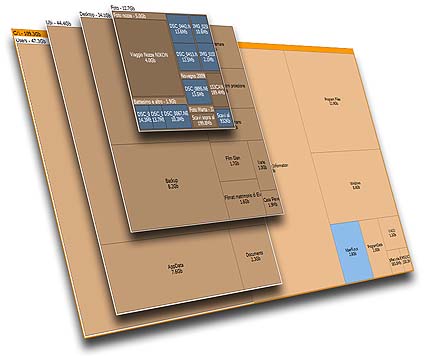
There are a lot of software out there that can show us the disk utilization and also how much disk space each folder consume, but either some of them cost a high fee or cannot meeting my requirement.
Treesize Professional and SpaceMonger are two famous software for this kind of function, however I don't think it should cost so much. Treesize Prefessional cost US$52.95 for single user license, and SpaceMonger cost US$24.95 for single user license. That is too expensive!

Thanks to Google, I found this free software that can do the same job like Treesize and SpaceMonger.

SpaceSniffer is using Treemap concept that invented by Prof. Ben Shneiderman.

Not only Space Sniffer will show the file size graphically, you can also apply filter and check for certain file type only (example: *.mp3). You can also exclude file type as well.

The filter will also works for time, type the condition (Example: >5years), the view will be updated accordingly. Combine filters is allow.

Other advantages that the author mentioned in the website:
Fast and easy to use
Supports drag and drop
Export module lets you produce customizable textual reports
Intuitive structure layout, multiple views for different media
Zoomable elements, navigate like a web browser
The Windows folders and file popup menu is accessible by right mouse click
It's possible to restrict the view content by typing simple yet powerful filtering criteria
Lets you temporary tag files with four different colors and perform filtering on them
Different views of the same media can show differently filtered elements
Customizable in geometry, colors, behaviors
You can navigate even during the scan
Smart cached scanning engine, multiple views, single scan
You can refine a zoomed area by a secondary scan process, even with main scan active
Reacts to file system events, keeps always in synch, warns you by blinking elements
Can scan NTFS Alternate Data Streams
It doesn't clutter your registry, only a plain XML configuration file
It's portable, no installation required, just put the executable somewhere and let's go

Best of all, it is free!
You can donate to the author to help the development of this software.

Why not install this software on your girl friend or wife or spouse's PC or laptop on this valentine? Not only they will appreciate your effort (this add points!), this will reduce the number of times of they call you for help because out of diskspace on their PC/laptop.

To download, go to this link:
http://www.uderzo.it/main_products/space_sniffer/download.html


Like this if you are FB user and you think this post is useful. The button is at top right of content of this post.
+1 this post if you are Google+ users and you think this post is useful.
Hope you will enjoy this post, subscribe to my RSS or mailing list or follow me on blogger or twitter. :)
source: I wrote this software review!

Wednesday, February 8, 2012

Made-in-China WinRar - HaoZip

90% (or more?) of goods in this world are Made-in-China. Even your iPhone 4S and iPad 2 are made in China. Therefore Made-in-China does not mean it is low quality, it can be high quality as well. When torrent and file server being shutdown world wide, China still have a lot of good quality servers. How about PPStream, Thunder and Qvod? Can't deny that China will be the center of the world as the name in Chinese say so (中国, direct translate is middle-country).

So here is a Made-in-China WinRar, HaoZip. In Chinese it means Good Zip. Well, the Chinese name is 好压, which mean Good Compression, but zip is more common name than compression right? Do you tell your friend to compress a file or zip a file?

HaoZip - Made-in-China WinRar on Oudated Penang Uncle blogspot dot com

HaoZip - Made-in-China WinRar on Oudated Penang Uncle blogspot dot com
Even the logo is somewhat similar to WinRar. Above picture is the icons showed in Chrome tab, left hand side is HaoZip, right hand side is WinRar.

Best of all it is free, contradict to the original WinRar, which cost $29 excluding VAT. I don't care it is Canadian dolar or Singapore dolar, don't think it is US dolar because of VAT, it still cost too much. Therefore I am using 7zip, which is free as well.

What the company claim on this HaoZip? [my opinion in square bracket and italic]
1. Better compression, 10% to 30% better [didn't mention which type of file]
2. Intelligently filter files to compress, increase throughput time [yes, there is no need to compress jpeg anymore]
3. Directly support zip, 7z and tar without external plugin [7z also have this]
4. Compatible on Win2k to Win7 [can you not support Win7?]
5. Compressed files guarantee can be unzip by other industry standard compression software [who does not?]
6. Repair damaged header on files download from Internet [can try this]
7. Skins [er... what for?]
8. Support Chinese characters encryption [good for Chinese Companies]
9. No ads, no plugin, free forever [yes, this is what a software should be, free forever]

To download setup files:
http://www.haozip.com/Eng/index_en.htm
To download other language:
http://www.haozip.com/Eng/download.htm
Download page in Chinese:
http://www.haozip.com/download.htm


Like this if you are FB user and you think this post is useful. The button is at top right of content of this post.
+1 this post if you are Google+ users and you think this post is useful.
Hope you will enjoy this post, subscribe to my RSS or mailing list or follow me on blogger or twitter. :)
source: I wrote this!

Monday, February 6, 2012

Download YouTube Video with JDownloader

JDownloader is a famous downloader for downloading files from file servers. Not only this, JDownloader can also works as normal download manager, meaning you can use it as replacement of FlashGet or other similar software.

JDownloader also can be use to download YouTube video. JDownloader by default will monitor clipboard for links of anything, including YouTube and file servers. Here I am trying to download a YouTube video regarding GDP.

JDownloader downloading youtube video on OutdatedPenangUncle.blogspot.com
JDownloader will analyse the link and show you all the available format. In this example, there are 360p and 720p for mp4 and Webm format. There are 240p, 360p and 480p for flv format. Flv format is the default format of YouTube, meaning usually flv is the format being downloaded by web browser if we directly watch the YouTube video on web browser. One of the advantages of JDownloader, it can tell us the file size of each file, we can pick which one is worth the time/bandwidth to download it.

Check to accept the terms of service if you are downloading YouTube video with JDownloader for first time and then click OK.
YouTube T&C on OutdatedPenangUncle.blogspot.com

Right click on any of the file (or press ctrl for multiple selection) and then click "Continue with selected link(s)". In this example I am downloading mp3, but the file listed there is not .mp3. Next picture will show you why.
download mp3 from YouTube with JDownloader on OutdatedPenangUncle.blogspot.com

After download .tmp, JDownloader convert it to mp3, automatically.
Direct convert to mp3 with JDownloader on Oudated Penang Uncle blogspot dot com

The mp4 and mp3 that downloaded from YouTube using JDownloader. Simple right?
The downloaded mp4 and mp3 with JDownloader on Oudated Penang Uncle blogspot dot com

Of source any software also has it's disadvantages. First one is it need Java to be working. There is no way to get around without installing Java. Or maybe you can look for portable Java. Because of it is in Java, it available for Windows, Linux, Mac, and any other OS that can support Java.
Another one is when we copy a YouTube link into it, it will take some time to finish the analysis. It took me about 30 seconds or more for the example showed in pictures above. This is something a lot of users find that quite annoying because it is too slow. The reason why it is slow is because it get all the information of the files,  not only the video encoding type, the audio type also being listed there.

Okay, the JDownloader links:
http://jdownloader.org/download/dld
Even though I like portable apps, don't bother to use portable version of JDownloader, because it update too often that using portable version is making no-sense.

To install Java:
http://www.java.com/en/download/installed.jsp?detect=jre&try=1

Happy downloading.


Like this if you are FB user and you think this post is useful. The button is at top right of content of this post.
+1 this post if you are Google+ users and you think this post is useful.
Hope you will enjoy this post, subscribe to my RSS or mailing list or follow me on blogger or twitter. :)
source: I wrote this!