Outdated Penang Uncle

Showing posts with label Windows 8. Show all posts

Sunday, March 18, 2012

Windows Explorer that Remembers

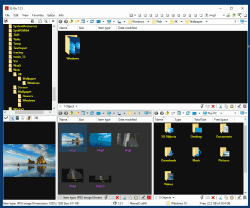
I did post about Explorer++ which become my favorite Windows Explorer. However, recently I have change my mind. Sorry Explorer++, not because you are not nice, but I have found other Windows Explorer that meet my needs. I like to open many windows, not only multiple of tabs in Chrome or FireFox, but Windows Explorer as well. There are a few Windows Explorer replacement that has multi tabs, but I don't think all of them can match Q-dir.

Q-dir not only allow up to 4 windows within the same windows, but I can open many more tabs in each windows. Best of all, I can save the state, so that after a Windows reboot, I can quickly recover my works, without need to look into the paths.

Usually after reboot, we have to open Windows Explorer, click on my documents and then search and search and search, which is very troublesome. With Q-dir, I just need to reload the previous state and it will open back all the windows and tabs and at the paths when I saved it.

Another advantage of the save state feature is I can upgrade Q-dir whenever I feel like to do it. Just save state and then upgrade, open the new version and load state again. I can quickly go back to business.

Why I like to open so many windows? Because I can quickly go back to my manga or music or movie or documents or anything, without need to navigate through the paths all over again. It will be there as long as I save the state.

Q-dir is freeware and now it also support Windows 8. Another thing I like about Q-dir is it available as portable from the official website.

There is one bug however. When I switch between "Restore down" or "Maximum", then windows does not refresh, sometime I don't see some of the files. But I can press Alt+F11 to restart it, it will remember the state before restart. So I don't need to worry too much of losing the paths/windows/tabs.

To download Q-dir, go to this link:
http://www.softwareok.com/?Download=Q-Dir
There is options on 32/64 bits and installer or portable. Personally I use 64bits portable version.


Like this if you are FB user and you think this post is useful. The button is at top right of content of this post.
+1 this post if you are Google+ users and you think this post is useful.
Hope you will enjoy this post, subscribe to my RSS or mailing list or follow me on blogger or twitter. :)
pix source: http://www.softwareok.com

Friday, March 2, 2012

Download Windows 8 Consumer Preview ISO for free

Yes, Windows 8 is still free for download and install. I am sure Microsoft going to charge it once they officially launch it. Windows 7 for example, now is cost about US$ 119.99 to US$219.99. So you can figure it out once Windows 8 is ready for retail.


Last year there was a release for Windows 8, it was beta if not mistaken. Now Windows 8 is at Consumer Preview version, so I think it should be quite stable with some bugs, which is expected. Hey, even iOS also have bugs.

To download it, go the links below for English and Chinese (Simplified Chinese only) versions:
English

64-bit (x64)                    Download (3.3 GB)                    Sha 1 hash — 1288519C5035BCAC83CBFA23A33038CCF5522749

32-bit (x86)                    Download (2.5 GB)                    Sha 1 hash — E91ED665B01A46F4344C36D9D88C8BF78E9A1B39

Product Key:   DNJXJ-7XBW8-2378T-X22TX-BKG7J
Chinese (Simplified)

64-bit (x64)                    Download (3.4 GB)                    Sha 1 hash — DF69B851F9A81DECBB16648CC452461894416EB0

32-bit (x86)                    Download (2.6 GB)                    Sha 1 hash — E29A2072745A48C14A1C2E5A61F5230841BEDB45

Product Key:   DNJXJ-7XBW8-2378T-X22TX-BKG7J

The product key will be needed for activation, make sure you copy it down at somewhere.

For other version, go to this link:
http://windows.microsoft.com/en-US/windows-8/iso

For the same page in Chinese, go to this link:
http://windows.microsoft.com/zh-CN/windows-8/iso

So far only English, Simplified Chinese, French, German and Japanese versions are available. Looks like Microsoft knows about potential of China, that's why Simplified Chinese version come out together with other versions.

Here are some basic requirement for Windows 8:
Processor: 1 gigahertz (GHz) or faster
RAM: 1 gigabyte (GB) (32-bit) or 2 GB (64-bit)
Hard disk space: 16 GB (32-bit) or 20 GB (64-bit)
Graphics card: Microsoft DirectX 9 graphics device or higher
To use touch, you need a tablet or monitor that supports multitouch
To access Windows Store and to download and run apps, you need an active Internet connection and a screen resolution of at least 1024 x 768
To snap apps, you need a screen resolution of at least 1366 x 768

I already downloaded the 64-bit English version, but I will not install it directly. I will install on VirtualBox, but before that, I need to clean up my SSD again, which is always has less than 10GB of free space. :P

Note: Do take note of the file size of each ISO, it will take a very long time for slow speed connection.


Update [June 9, 2012]: Windows 8 Release Preview ISO - this is the latest release
http://windows.microsoft.com/en-US/windows-8/iso


Like this if you are FB user and you think this post is useful. The button is at top right of content of this post.
+1 this post if you are Google+ users and you think this post is useful.
Hope you will enjoy this post, subscribe to my RSS or mailing list or follow me on blogger or twitter. :)
source: Research via google, you know what I mean. :)
pix source: from Microsoft

Wednesday, January 11, 2012

BlueStacks on Windows 8

These few days a lot of tech companies have been busy showing off their latest and concept gadgets at CES 2012 at Las Vegas. BlueStacks is one of them. They are showing off BlueStacks on Windows 8. The promo video below showed that after a new android apps being install on BlueStacks on Windows 8, an shortcut will appear automatically on the metro GUI.


BlueStacks for Windows8 will be available in Feb 2012. While waiting for that, why not install BlueStacks on your Windows 7 now and enjoy many Android apps on Windows 7, see see posts on how to do it:
How to install apk into BlueStacks
Rearrange apps list on BlueStacks
How to enable Android Market for BlueStacks


Like this if you are FB user and you think this post is useful. The button is at top right of content of this post.
+1 this post if you are Google+ users and you think this post is useful.
Hope you will enjoy this post, subscribe to my RSS or mailing list or follow me on blogger or twitter. :)
source: saw this video on youtube

Friday, September 23, 2011

My kind of Windows Explorer - Explorer++

If you are Windows user, regardless Windows XP, Windows Vista, Windows 7 or Windows 8 (anyone already on Windows 8???), you should have use Windows Explorer before. Even you always use "My Computer" to find the files, but it is actually Windows Explorer, just without the Folder view.

I use Windows Explorer a lot, both at work or at home. Copy files, move files, delete files, open files. And I use a few of Windows Explorer windows at any time, because I am too lazy to browse through the folder again every time I need to open it, so I just leave it. But that become very cluster, and messy with so many windows opened. So I start thinking if there is any multi-tab Windows Explorer? We have some many multi-tab web browsers, Firefox, Safari, Opera and IE also before multi-tab after some many years lack of this function after FF or Safari or Opera already have multi-tab.

Forget about web browsers, and there is a multi-tab Windows Explorer, but as always, it is not from Microsoft. But luckily this multi-tab Windows Explorer is a free software! Yeah!

Explorer++ (yes, it is Explorer with 2 plus symbols behind) can be come with installation version or portable version. This is another plus point, no installation! I have tried many file explorers, like Total Commander (need to pay), or some other which I forgot the names, because I simply switch back to use Windows Explorer after a few days of trying these file explorers. So you can know these file explorers are as bad as original Windows Explorer. :P

Because I am too lazy to take snapshot of Explorer++, so I just take the screenshots from it's website, hehe. And I will do some intro to the features of Explorer++.

Firstly, the view, it can be just like the original Windows Explorer, nothing much. Of course you can customize to add in more column in detail view, again, same like original Windows Explorer.


Second, it can show folder size at detail view. Don't this feature available

Third, you can change the attribute of files, again, same like Windows Explorer, but you can change the modification/creation/accessed date of each file. To do that, select the file(s) and then click "File" and then "Set File Attributes".

Forth, it can bookmark the folder that you want to open regularly.

And best of all, it is multi-tab, if you click on any of the picture above, you can already see the multi-tab. So no more messy with more than 10 Windows Explorer, because all of them can be open in muti-tab of Explorer++.

Okay, to get it, you can either get it from portableaps.com which will install the portable version for you.
http://portableapps.com/apps/utilities/explorerplusplus_portable

Or just download the zip version and unzip the files on your own. 64bits version available here. :)
http://www.explorerplusplus.com/download

The website:
http://www.explorerplusplus.com/home

Have a nice Sunday and a nice week ahead. :)

Hope you will enjoy this post, subscribe to my RSS or mailing list or follow me on blogger or twitter. :)
source: I wrote this, but pictures are from explorerplusplus website :P

p/s: submit your software/hardware/smartphone/tablet for review here, contact me at ahsiang888 at gmail.com. But be warned, I will write what ever is true if your stuffs really bad.

Monday, September 19, 2011

Windows 8 Developer Preview

oh... Tuesday again. What shall I should on Tuesday? Another waste time video? Well, depend on what you think, this might be another waste time video. :P
Microsoft hold Windows 8 Developer Preview recently, here is the official highlight from MS.


And recently I just did a survey, even though it didn't said it is from MS, but from the questions it asked, I can tell it most probably from MS.

Btw, you can download this Windows 8 for free:
http://msdn.microsoft.com/en-us/windows/home/
Warning: It will wipe out all older version of Windows. Make sure you backup your system first. And this is a one way ticket, meaning you have to reformat the whole system if you want to get back to Windows 7 or older.

Hope you will enjoy this post, subscribe to my RSS or mailing list or follow me on blogger or twitter. :)
source: I wrote most of this post, but video is always from youtube!

Sunday, June 5, 2011

Touch-optimized Windows 8

Microsoft has announced more detail of Windows 8 recently with many touch-optimized GUI. Looks like Steve Jobs always set a standard for everyone. Microsoft has to follow Steve again. More info after the jump......

Here are some of the stuffs listed by the press release:

•
Fast launching of apps from a tile-based Start screen, which replaces the Windows Start menu with a customizable, scalable full-screen view of apps.
•
Live tiles with notifications, showing always up-to-date information from your apps.
•
Fluid, natural switching between running apps.
•
Convenient ability to snap and resize an app to the side of the screen, so you can really multitask using the capabilities of Windows.
•
Web-connected and Web-powered apps built using HTML5 and JavaScript that have access to the full power of the PC.
•
Fully touch-optimized browsing, with all the power of hardware-accelerated Internet Explorer 10.

Looks more like Windows Phone style than typical desktop Windows. Sounds familiar? Yes, there are news on the WWW that next generation of Mac OS would be more iOS than the original Mac OS. Mobile computing is really shaping up the future, including the desktop computing.
See the video to find out more:


Hope you will enjoy this post, subscribe to my RSS or mailing list or follow me on blogger or twitter. :)
source: microsoft for the Win8 features, and me coz I wrote this!