Outdated Penang Uncle

Showing posts with label free stuffs. Show all posts

Monday, February 4, 2013

How To Download Torrent with Chrome

Not too long ago, I posted a post on how to download torrent without torrent client, just using put.IO:
How to download torrent without torrent client

put.IO however is limited to 1GB of disk space and 1GB of download per day, for free account:
Limitation of Put.IO

If we have some files that is bigger than 1GB, then we are unable to download them. Luckily now there is another alternative, which is download torrent with Chrome.

No, I am not talking about direct download, which the words "direct download" always appear in torrent sites, but it usually takes you to some malicious or dangerous or NSFW sites.


BitTorrent Surf is a Chrome extensions that acts as a torrent client.

To install BitTorrent Surf, you need to have Chrome installed on your system. I didn't try on Chrome of MacOS or Linux, but I think it should works as well.
https://chrome.google.com/webstore/detail/ibpbofogepkkeoockhkfcgngjkimndlp

After you install it, you should able to see BitTorrent Surf icon on right of address bar just like other extensions' icon.
BitTorrent Surf on Outdated Penang Uncle blogspot dot com

Click on the BitTorrent Surf icon, will bring up a small windows like this:
BitTorrent Surf on Outdated Penang Uncle blogspot dot com
Key in for files that you want to search for. Example here is Toy Story 2. By hovering the mouse over the icon, name, and bars, it will show you the address that actually has the torrent, how big is the file (in whole package, it didn't show if there is more than one file), and how many sharing.
Click on the arrow down icon will start the downloading, and it will change to a tick icon.

If you don't like the default search setting, you can add sites. The default search are using either google, yahoo, or bing. As you can see here, I added 3 more sites, eh-hem, eh-hem and eh-hem. And you can turn on or off each of them to fine tune the search.
BitTorrent Surf on Outdated Penang Uncle blogspot dot com

The icon in middle of icons are just notification.
BitTorrent Surf on Outdated Penang Uncle blogspot dot com

As for streaming function, I didn't try it. Somemore it says stream music library. Probably some new apps the developer trying to sell.
BitTorrent Surf on Outdated Penang Uncle blogspot dot com

During the installation of the Chrome extension, another program also will be install on your system, which is Torque. So I might have to say it might not works for MacOS and Linux. You will have to try first if you on these system/OS.
BitTorrent Surf on Outdated Penang Uncle blogspot dot com
Anyway, torque.exe is the one responsible do the P2P works. If you kill it, BitTorrent Surf will stop working.

After the download complete, it should have a button on the same line of the download that you can open the folder that contains the files.

Since BitTorrent Surf is still in alpha, do expected some flaw/bug/error. There was some moment that I cannot add more than one download, but the problem goes away after a while. I didn't reboot or anything.

Okay, it to install it, make sure you are on Chrome and click on this link:
https://chrome.google.com/webstore/detail/ibpbofogepkkeoockhkfcgngjkimndlp

Note1: It is might be completely illegal to P2P movie/songs/files in your country.

Note2: Do not enable this on your work computer/laptop. Your boss going to find out! You can disable the extension on Chrome (setting -> Tools -> Extensions) and then kill torque.exe manually. I wrote a batch file to kill torque.exe and others processes that I lazy to close individually.

Note3: I noticed that emule is slowed down (until zero) whenever I switch on BitTorrent Surf. It might be co-incident, but I suspect both processes are competing with the ports. I shall continue monitor and update this post if I find anything.


Like this if you are FB user and you think this post is useful. The button is at top right of content of this post.
+1 this post if you are Google+ users and you think this post is useful.
Hope you will enjoy this post, subscribe to my RSS or mailing list or follow me on blogger or twitter. :)
source: while at the wild wild web

Tuesday, December 25, 2012

iTunes 12 Days of Gifts

If you are using iTunes or iPhone or iPad or iPod, you probably already know this. For the rest, iTunes is giving out 12 Days of free gifts starting today (Dec 26).

You don't need to have an i-product to eligible for the free gift. What you need is iTunes. I already downloaded the first day of free gift, which is Maroon 5's songs.


Go to apple.com to download iTunes today.


Like this if you are FB user and you think this post is useful. The button is at top right of content of this post.
+1 this post if you are Google+ users and you think this post is useful.
Hope you will enjoy this post, subscribe to my RSS or mailing list or follow me on blogger or twitter. :)
source: wild wild web

Monday, November 19, 2012

How To Download Torrent without Torrent Client

Torrent, love it or hate it, from time to time we have to download some files that we need from it because the uploader only uploaded it to torrent only. So what if we are not allow to use Torrent Client, or even we installed it but the firewall blocked it.

If you google "How To Download Torrent without Torrent Client", there are a few options, however not all of them are as well. Example: BitLet.org. However you need to enable Java, which might be harmful.

How To Download Torrent without Torrent Client on Outdated Penang Uncle blogspot dot com


I found put.iO, a new cloud storage that allow us to download torrent without torrent client. I am trying out with Futurama Season 6 in this screenshot below. And since the downloading is by the server of put.iO, the downloading is so much faster then downloading over my super slow Streamyx broadband.

How To Download Torrent without Torrent Client on Outdated Penang Uncle blogspot dot com

The files will be downloaded into your put.iO, however only 1GB is given for free account. Another disadvantage is free account only allow one download at a time, and after the file being downloaded you have to wait until the file being shared at least the same size of the file. But at the same time you can download the file to your PC/laptop.

How To Download Torrent without Torrent Client on Outdated Penang Uncle blogspot dot com

More advantages of put.iO are you can use secure connections and choose the server nearest to your location. The nearest one is at Singapore for me.

How To Download Torrent without Torrent Client on Outdated Penang Uncle blogspot dot com

Since this a web-based torrent client, you can do it on all OS (Windows, Mac, Linux) as long have a internet connection and web browsers.

Another thing to note that, at time the website might not showing the right space being consumed. I had a few times that I already deleted the files, but it still don't allow me to add more torrent even though the main page is showing more than enough space. I found out that closing the tab (I am using Chrome) and reopen to the main page would help, but not always.

To give it a try, go this link:
http://put.io


Note: downloading movie or TV show might be illegal at your country, watch out!

Update (Nov20, 2012 6pm): another thing to note is put.iO will continue download and upload even though you logged out. So no need to worry about the PC/laptop being turn on whole day and night, save some electricity bill. :-)


Like this if you are FB user and you think this post is useful. The button is at top right of content of this post.
+1 this post if you are Google+ users and you think this post is useful.
Hope you will enjoy this post, subscribe to my RSS or mailing list or follow me on blogger or twitter. :)
source: I wrote this

Tuesday, August 28, 2012

(Give Away) 1AVCenter: complete audio video center

This blog has been running for 3 years and 1 months but I haven't really do any give away. In fact, none. Why? Because I am a stingy Outdated Penang Uncle. Haha.

I have been scouting for my next smartphone for months but I haven't found the right one, or because I still feel like those smartphone that I like is costing too much. So I will continue using my very very outdated HTC Touch Elfin.

Anyway, it is like someone can hear me, because I was planning to run a give away on Facebook page. But the gift would be limited to Malaysian only because the gift card is for using in Malaysia only. But luck strike, Alex from pcwinsoft.com contacted me though twitter if I want to run a give away on this blog. And this is also a good luck for everyone (not limited to Malaysian) because this give away is for everyone in this planet earth, and maybe Martian that already start contacting Curiosity.

So what is 1AVCenter?

Okay, it is not the AV that Japanese used to. AV stands for Audio Video in this case.

In short:
1AVCenter is for record, broadcast and remote surveillance of any audio and/or video source on your PC. You can also share files via secure web server that come with 1AVCenter.

Lengthy version:
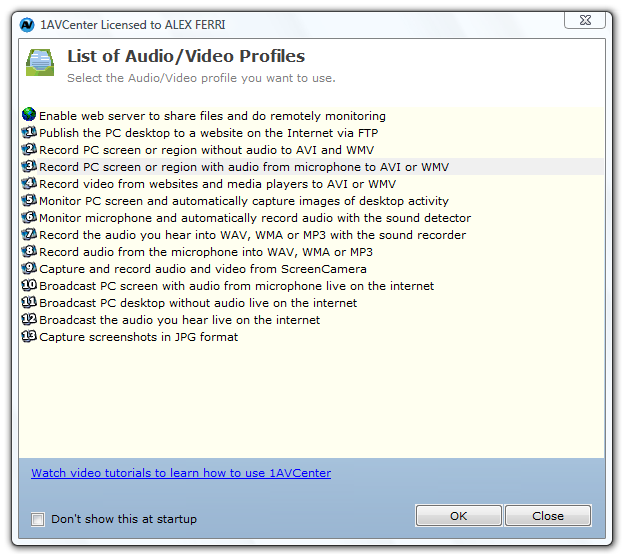
Here is what 1AVCenter does:

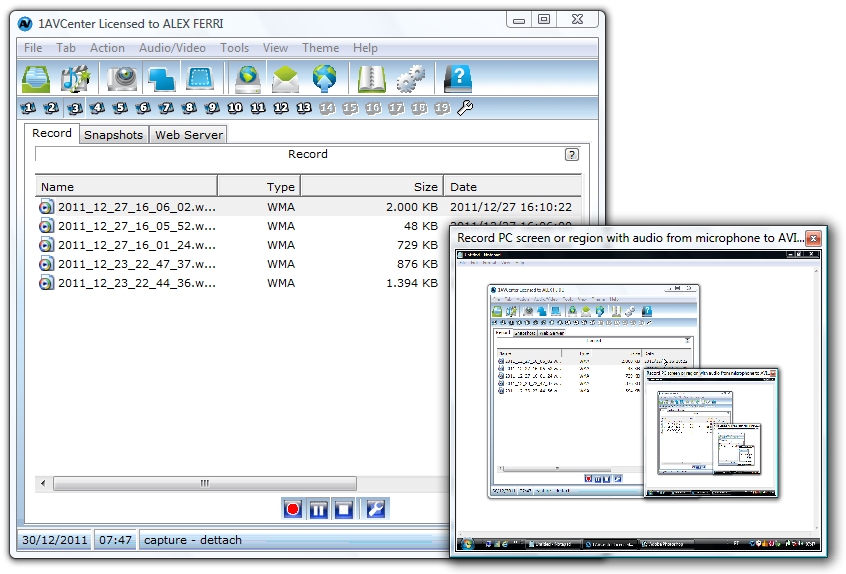
Here is 1AVCenter in action (recording screen):

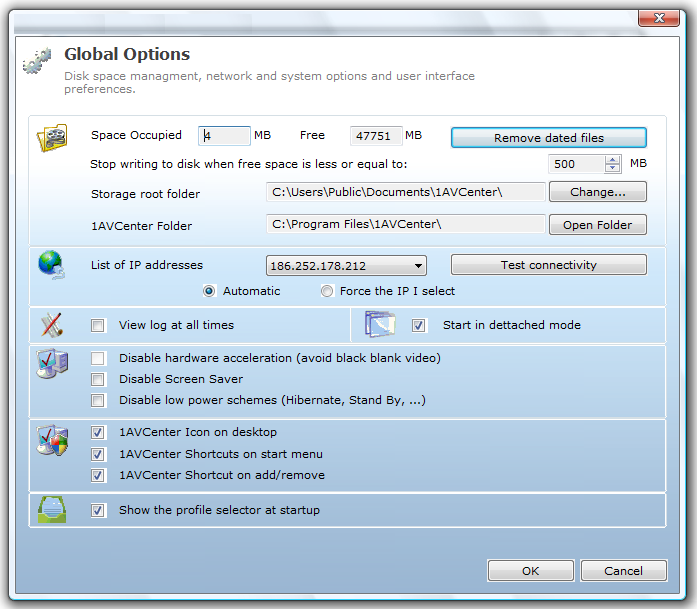
Here is 1AVCenter options:

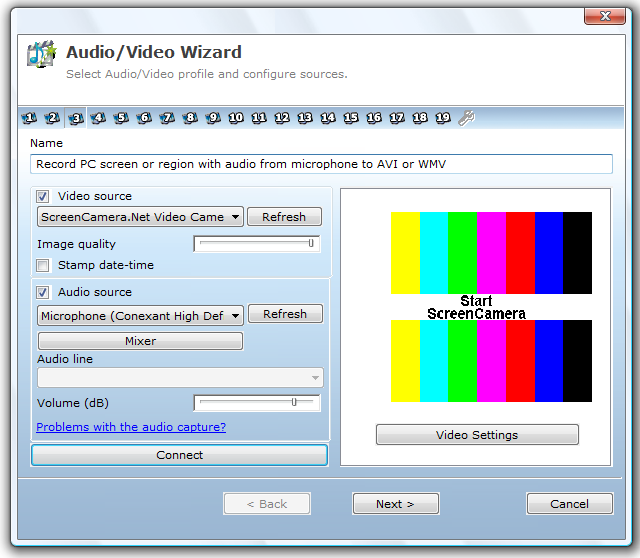
Here is how you can choose audio/video source for recording on 1AVCenter:

The screen capture is just normal, just like any other screen capture program.

So I try out the screen recording feature of 1AVCenter:


It gets 5 cows on Tucows and cost $99.95 (US dollar!) if you buy from pcwinsoft.com website. Now it is absolutely free. How?

1. Download the setup file and install it on your PC/laptop.
http://www.pcwinsoft.com/download/1AVShrInstAG.exe

2. During installation it will ask for "Buy", "Register" and "Try", leave it now without any button on the windows.

3. Go to this link to register with your info and email and wait for the registration key to arrive at your inbox.
http://www.pcwinsoft.com/promotion/OutdatedPenangUncle/registration.asp

4. After you get the registration key, copy the code and go back to the installation windows, click "Register" and enter the code there.

5. Now you just register a $99.95 worth of software for free!

Enjoy your screen capture and recording. :)

Before I forget, this is basic requirement:
  • Intel 1.3GHz
  • 120MB HD
  • 256MB RAM
  • Windows 2000/XP/2003/Media Center/Vista/Windows 7/Windows 8
  • Minimum screen resolution of 800x600

Note: I am too lazy to add audio in the above youtube video, you can screen capture video and audio at same time with 1AVCenter.

Note2: I am not sure how long the give away will be, most probably until pcwinsoft.com says stop. Why not just give it a try now. :)

Note3: I am not responsible if you break your Windows/PC/laptop/car/arms and legs/wallet because of this give away. :P


Like this if you are FB user and you think this post is useful. The button is at top right of content of this post.
+1 this post if you are Google+ users and you think this post is useful.
Hope you will enjoy this post, subscribe to my RSS or mailing list or follow me on blogger or twitter. :)
pix source: pcwinsoft.com

Sunday, July 29, 2012

Free Stock Image Worth over $5000

There is a problem for blogger or web writer that is picture. If you are posting your own pictures then should be no problem at all. But for most of us, we don't write stuffs about our-self only, we write topic for the benefit of others and pictures would be a big problem. I always go to look for pictures in google, you can use the advanced search to filter out those that need to be pay, and left with free for commercial use. However, usually there are very few quality pictures we can use. There are other free picture website but you still have to filter out those with copy right. It took some times to do it every time you write a post, and that is very troublesome.

I found a collection of 1000+ royalty-free photos. According to the website if each photo worth $5, it would be over $5000 worth of photos, free for everyone!

You can download the sample of the collection in low resolution to see if they are worth it to download all of them in full resolution. I am in progress of downloading the full resolution by the way.

The preview links:
http://www.filefactory.com/file/lwjqrdsynip/n/Carbon_full_preview_exe
http://depositfiles.com/files/twg41wwox

For the full resolution, go to this link for all of them:
http://www.datum-forensics.com/2012/06/free-stock-images/

 
Like this if you are FB user and you think this post is useful. The button is at top right of content of this post.
+1 this post if you are Google+ users and you think this post is useful.
Hope you will enjoy this post, subscribe to my RSS or mailing list or follow me on blogger or twitter. :)
source: http://www.datum-forensics.com/2012/06/free-stock-images/

Monday, July 16, 2012

Resize Windows with Sizer

GUI, ever since Steve Jobs invented Mac OS and Bill Gates make GUI to even greater height, all we know is Windows Windows Windows. Unless you are a full-screen guy (or girl), I am sure you will have various size of each windows. When I write blog, I need to refer to something, I will put them side by side. And after that, even un-snap from the edge of the screen, it don't really go back to original size. And I don't care, because I can resize it with a mouse.

However when I want to test my blog on a specific resolution, it because a headache. Luckily Sizer come to the picture.

credit: http://www.brianapps.net

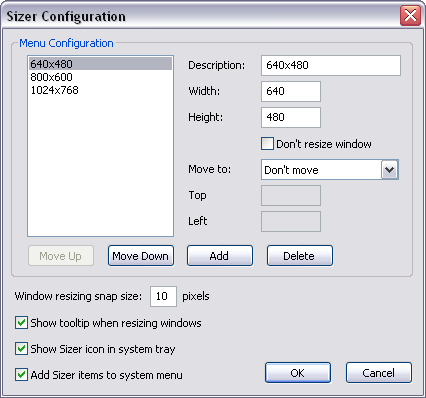
Sizer come with installation and portable version (Yeah!). The default setting are 640x480, 800x600, and 1024x768, these are the lower end of the screen resolution. But most of the time we need to make sure the website or blog we designing is fit into these resolution, so that even the people that using lowest spec can see read website or blog (netbook, ring a bell?).

credit: http://www.brianapps.net

You can also customized to any Windows size that you want in the setting.

To download, go to this link:
http://www.brianapps.net/sizer/


Like this if you are FB user and you think this post is useful. The button is at top right of content of this post.
+1 this post if you are Google+ users and you think this post is useful.
Hope you will enjoy this post, subscribe to my RSS or mailing list or follow me on blogger or twitter. :)
source: internet!

Thursday, July 12, 2012

SSH and SFTP for free [Geek]

Okay, it is not only for geek. If you want to transfer files between servers in different domain, or between your friends or family, in secure way, SFTP is a must. The first "S" on SSH and SFTP means secure.

I used to use putty. Someone told me to try SilverSHielD.

pix credit: http://www.k2sxs.com/silvershield/

I don't care what kind of feature it has, what I want are SSH and SFTP only.

There are Pro and free version (as always), free version only allow 3 simultaneous connections from a single client and not for commercial purpose. If you want use for commercial, you should buy Pro version, which cost US$39.95.

Anyway, SilverSHielD is free forever and k2sxs going to give you free upgrade forever! (or until the company close down or take over by some other company :P)

SFTP in progress:
pix credit: http://www.k2sxs.com/silvershield/

For more detail/download, go to:
http://www.k2sxs.com/silvershield/


Like this if you are FB user and you think this post is useful. The button is at top right of content of this post.
+1 this post if you are Google+ users and you think this post is useful.
Hope you will enjoy this post, subscribe to my RSS or mailing list or follow me on blogger or twitter. :)
source: internet

Tuesday, July 10, 2012

Bandizip: just another zip or power house?

Zip zip zip. Sometime if you tell a co-worker to compress a file, he/she would look at you and show you a face of "that the **** you are talking about". However if you say zip it, then everyone know what to do.

WinZip probably the most popular compression software on Windows. But I don't like it. It was because at that time:
  • it tried too hard to change the interface to be too fancy
  • it doesn't support Chinese or Asian characters
  • it doesn't support rar and gz (common zip format in unix/linux)
Even though it already improved, but ever since I switch to 7-Zip, I never look back. Every time I change a new computer or laptop or install a new Windows, one of the first software to install is 7-Zip. 7-Zip don't have any fancy interface, but I don't care, what I care is the features and easy to use.

Recently I found Bandizip. It claimed that it can be better than WinZip and 7-Zip. Here is why (taken from Bandizip website):
 BandizipWinZipWinRAR7-Zip
  FreewareOXXO
  Extracting .z01OOOX
  Extracting .part1.rarOOOO
  Extracting 7zip.001OXXO
  Extracting zip.001OOXO
  Changing Code PageOXXX
  Fast Drag&DropOXXX
  High Speed ArchivingOXXX
  Multi-core CompressionOOOO

pix credit: bandicam.com

There are installation and portable version for Windows (yeah) as well as Mac OS X. And yes, it is free.

Go to Bandizip official website for more detail:
http://www.bandicam.com/bandizip/


Like this if you are FB user and you think this post is useful. The button is at top right of content of this post.
+1 this post if you are Google+ users and you think this post is useful.
Hope you will enjoy this post, subscribe to my RSS or mailing list or follow me on blogger or twitter. :)
source: Internet la.

Monday, June 25, 2012

Remove Empty Directories

The longer we use our PC/laptop, the more files and folders being created and accumulated on the hard disk(s). I always tell myself to do some housekeeping, but where is the time left for that after I use the time for work, family and writing blogs as well as reading 100+ of RSS everyday?

Then I found this. RED is Remove Empty Directories and it is a free apps.

pix source: http://www.jonasjohn.de/red.htm

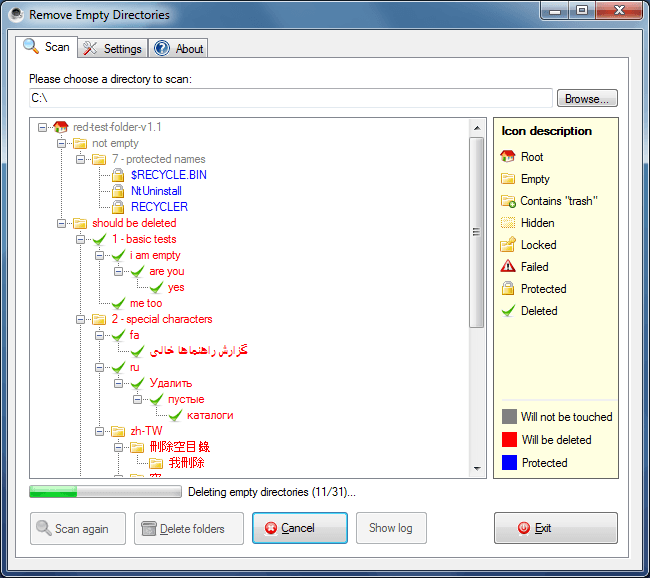
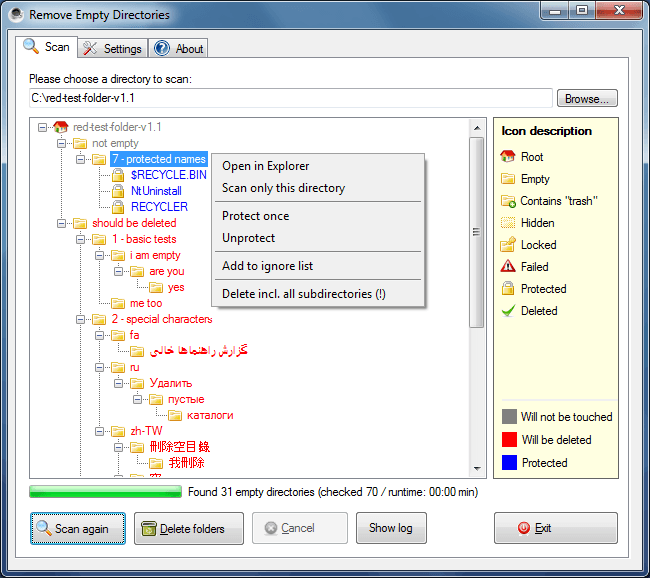
I downloaded that portable version. After unzip, I execute it directly but some directories cannot be access. So I restart it as administrator, in slightly more than 1min, there are 2241 empty directories has been listed by it. Wow, I can't imagine how I am going to find all of them, unless I do a disk format. :P

Remove Empty Directories also use different icons to describe each of these kinds of dirs:
  • Root
  • the really empty
  • dirs with trash (you have to define what is trash)
  • hidden dirs
  • locked dirs
  • protected dirs
  • Failed (meaning no reading access, I fixed it by run it with administrator permission)
After it listed out the dirs, it is time to review and exclude or protect the dirs you want to keep.
pix source: http://www.jonasjohn.de/red.htm


Remove Empty Directories available as installer or portable version. The author of this apps also very kind to post his coding at internet, so that if you want to use it for other OS(s), you can compile on your own.

To download Remove Empty Directories, go to:
http://www.jonasjohn.de/red.htm


Like this if you are FB user and you think this post is useful. The button is at top right of content of this post.
+1 this post if you are Google+ users and you think this post is useful.
Hope you will enjoy this post, subscribe to my RSS or mailing list or follow me on blogger or twitter. :)
source: internet!

Friday, June 22, 2012

How to reduce FireFox Memory Usage

FireFox is always my favourite since I start to use it a few years back. But the problem with FireFox is it is hogging too much memory. FireFox also is known for the memory leak issue even though on FireFox 13 and even FireFox 14 beta (they said they fixed it but the truth is the truth). Even though I do nothing on FireFox, I can see the memory usage of FireFox keep on growing.

Personally I am not sure how FireFox will crash every now and then on my laptop, it could be Windows7 trying to kill it because it hogging too much memory. I am sure this could be the truth because if I close FireFox and leave Chrome on only, now it is time for Chrome to crash every now and then.

I searched through FireFox add-ons and found a few add-on that claimed to be able to reduce the memory usage of FireFox. I picked Memory Fox, which works as expected. The memory reduced, but not a lot (reduced 20MB, sigh). But I can feel that the FireFox sometimes will lag a bit, even with just typing on blogger.

pic credit: http://www.datum-forensics.com

Then it is like someone can read my mind. Raymond.cc posted Firemin on one of their post and I give it a try and seriously it works. FireFox on my laptop now will always not more than 20M of memory with 10 tabs opened. It might blow up to more than 50M, but FireMin will lower it down.


To download and understand more about this software, go to this link below:
http://www.datum-forensics.com/2012/05/firemin/

So how to use it?
  1. Download it from the link showed above
  2. Run Firemin.exe to extract it to the same dir where firemin.exe at
  3. Look for Firemin folder, and execute (double click) Firemin.exe
  4. Now you have to close FireFox before you can optimize it
  5. After FireFox is closed, look for the Firemin icon at notification area
  6. Right click on the Firemin icon and select Optimize FireFox
  7. Wait for it to complete.
  8. Now open FireFox and load up your 10 or 20 tabs and enjoy surfing. 
You can check the memory usage by open Windows Task Manager and look for firefox.exe under Processes tab.

Bear in mind that Firemin is not 100% working all the time. The FireFox eventually will need to be restart, but not as often compare to without Firemin.

Happy FireFox-ing. :)


Like this if you are FB user and you think this post is useful. The button is at top right of content of this post.
+1 this post if you are Google+ users and you think this post is useful.
Hope you will enjoy this post, subscribe to my RSS or mailing list or follow me on blogger or twitter. :)
source: saw it first at http://www.raymond.cc/blog/reduce-firefox-memory-leaks-and-usage-with-firemin -> thanks HAL9000

Saturday, June 16, 2012

The Ultimate Boss Key or Boss Mode

Many of us works in office or factory or lab or whatever place, except at home. Some of the time we like to check FB status of friends, wish friends happy birthday, or do some online banking such as transfer money and pay credit card and bills. Or maybe just watching a funny youtube video that your friend sent you the link a moment ago.
And we wish that no one would appear suddenly at our back and see whatever we are doing on the laptop or desktop or workstation.

Boss Mode on Outdated Penang Uncle blogspot dot com

Usually we will try to minimize the windows by clicking the minimize icon on top right of the windows using mouse, but that might be too late to hide whatever you are doing. Some web browser such as Maxthon has boss key or boss mode that you can immediately hide the Maxthon from the taskbar. But how about other web browser or windows? Sure you can use Windows+m to minimize everything, but what if your boss need you to show him some result on some windows or excel or VNC, the Windows' Aero Peek would exposed whatever you were doing because Windows+m does not hide windows from taskbar.

Clicky Gone can help in this situation. After you download it and install/unzip it, you can either use the default shortcut key or customized your own combination. Practice the shortcut key for a few times and you are good to go.

Another good thing about Clicky Gone is you can mute the computer sound for Boss Mode. Therefore your boss will not able to notice if you were on youtube. :P

Actually Clicky Gone is not written for the intention of hiding stuffs from boss, but it helps to hide windows that you are not sure at the moment, make your windows cleaner and easier to work.

Another thing I can think of is during presentation. You can hide most of the windows and leave the powerpoint and a few windows that are needed during the presentation. After you finish the presentation and go back at home, you can bring back others windows back, without need to reopen everything all over again. :)

To download Clicky Gone, go to this link:
http://clickygone.sourceforge.net/

Clicky Gone also available in portable version


Like this if you are FB user and you think this post is useful. The button is at top right of content of this post.
+1 this post if you are Google+ users and you think this post is useful.
Hope you will enjoy this post, subscribe to my RSS or mailing list or follow me on blogger or twitter. :)
source: saw it somewhere.....

Monday, June 4, 2012

Make Your Own Portable Software

Portable software or portable apps is always my favorite. At anytime I have more than 100 portable apps on my PC. The best thing about portable apps are there is no installation needed, just download, unzip and you are ready to use it. Portable apps also will not mess with your file system, unless you allow it to do it. Unlike installed software for example real player is the most stubborn software that likes to take over system setting without user's consensus.

Since USB thumb drive is relatively cheap nowadays, it is very convenient to put all the apps into a thumb drive and run on any PC or laptop that you wanted to.

With so much of the advantages of portable apps, why not make some of your own? For those paid software, I would think as long you don't distributed it, use it on your own, it should not be fine because you already pay for it.

Cameyo is the software that I am talking about.

pix credit: http://www.cameyo.com/

They even made a step-by-step instruction, therefore I am just going to skip this part.
http://www.cameyo.com/doc/index.html

Do download cameyo, go to this link:
http://www.cameyo.com/


Like this if you are FB user and you think this post is useful. The button is at top right of content of this post.
+1 this post if you are Google+ users and you think this post is useful.
Hope you will enjoy this post, subscribe to my RSS or mailing list or follow me on blogger or twitter. :)
source: wild wild web!

Saturday, June 2, 2012

Unlock locked files

Have you bump into a problem when trying to do some house keeping on your PC/laptop harddisk, but there is a warning message said that there is a process is using the file, or the file is locked because blah blah blah? For advanced users, you might able to figure it out how to fix this. But how about the rest of 90% of us?

Fear not, LockHunter can help us.
pix credit: http://lockhunter.com/

LockHunter has to be install, not suitable to be portable because it need to integrate with the system. There should be a way to do this with portable version, but that is beyond the scope for this post.

When you want to move or delete a file and the system flag an error, then just right-click on the file and click on "What is locking this file?". LockHunter will then report the problem.

There are a few options with the locked file:
  1. Unlock the file only
  2. Close the Locking Processes (a.k.a kill) that locked the file
  3. Delete the Locking Processes

By default, LockHunter will delete any file into recycle bins, therefore it is much safer so that you can retrieve it from recycle bins in case you mistakenly deleted a file/apps/exe.

Supports Windows only (Win2k to Win7), available for 32 and 64 bits. Still in beta stage, so it might be buggy. And it is free!

To download this useful apps, go to here:
http://lockhunter.com/


Like this if you are FB user and you think this post is useful. The button is at top right of content of this post.
+1 this post if you are Google+ users and you think this post is useful.
Hope you will enjoy this post, subscribe to my RSS or mailing list or follow me on blogger or twitter. :)
source: wild wild web!

Friday, May 25, 2012

Facebook Free Money?

Facebook is giving me free money. No bluffing, Facebook is really giving me free money.

I got this email from Facebook last night:
Facebook is giving me free money on Outdated Penang Uncle blogspot dot com

Apparently it is because this blog's Facebook Page has reached 300 Likes last week. Facebook is offering me US$50, wow, that is about RM150. Not bad at all.

US$50 for Facebook is much much smaller than a peanut. With market capital at 70.62B (May 24, 2012), the money Facebook gave me is about 0.0000000007% from it's market capital.
Anyway, how often someone that is not working for Facebook getting money from Facebook? :P

Alright, I am going to use the free money to run ads on Facebook!

This blog's Facebook Page:
http://www.facebook.com/PenangUncle


Like this if you are FB user and you think this post is useful. The button is at top right of content of this post.
+1 this post if you are Google+ users and you think this post is useful.
Hope you will enjoy this post, subscribe to my RSS or mailing list or follow me on blogger or twitter. :)
source: my rant

Wednesday, May 23, 2012

Extracting Flash or SWF with HugFlash

Even though HTML5 is gaining popularity, Flash is still exist in too many websites. In fact, some famous online game website still based on flash games. Some of the time, you wish you can get the pictures or sounds from the flash or swf, since you like them very much, but print screen or record the sounds while running the flash or swf is troublesome. Why not try out HugFlash?

HugFlash is a free utility from a Japanese [http://www.paw.hi-ho.ne.jp/milbesos/] that you can download, unzip and use it.

Here is the picture HugFlash is extracting files from zoo.exe [ZooKeeper]. Yes, not only *.swf, but *.exe HugFlash also can handle it.
HugFlash on Outdated Penang Uncle blogspot dot com

The cute animals from the ZooKeeper that extracted by HugFlash.
HugFlash on Outdated Penang Uncle blogspot dot com

All the mp3 and wav files from ZooKeeper:
HugFlash on Outdated Penang Uncle blogspot dot com

One thing to note is that HugFlash is default to Japanese language. Once you launch it, right click on any place of the small HugFlash windows and choose to change to English.
HugFlash on Outdated Penang Uncle blogspot dot com

Download HugFlash Ver.2.8.4:
http://www.paw.hi-ho.ne.jp/milbesos/download/hugflash2_8_4.zip
You can also visit the website, but it all in Japanese. [I tried google translate, but it turn out to be non-sense sentences].
http://www.paw.hi-ho.ne.jp/milbesos/


Btw, the file explorer I am using is Q-Dir.


Like this if you are FB user and you think this post is useful. The button is at top right of content of this post.
+1 this post if you are Google+ users and you think this post is useful.
Hope you will enjoy this post, subscribe to my RSS or mailing list or follow me on blogger or twitter. :)
source: wild wild web!

Monday, May 21, 2012

Finding Free WiFi in Penang

Even though quite a lot of people subscribe to data plan or 3G/4G plan with their telco, there are even more people trying to stay out of it to reduce the phone bill cost. One of them is me, Penang Uncle. In my opinion, there is no need to always 'online' with data plan or 3G/4G plan, unless I am a VVIP and I need to check facebook/twitter/viper/whatsapp every minute. If I need to be on internet, I can easily find free wifi hotspot in many places.

Penang Government did a good job in recent years to work with private companies to enable as many as wifi hotspot all over Penang. But where are these wifi hotspots?

Check out this webpage to find the free wifi hotspots in Penang:
http://www.redtone.com/services/penang_wifi.php

You might need to register before use the free wifi service with a valid email account. And speed is not guarantee. Even the free wifi I use at Japan (I went to Japan on Apr 2012) also don't have guarantee speed.

Enjoy your free wifi in Penang!


Like this if you are FB user and you think this post is useful. The button is at top right of content of this post.
+1 this post if you are Google+ users and you think this post is useful.
Hope you will enjoy this post, subscribe to my RSS or mailing list or follow me on blogger or twitter. :)
source: https://twitter.com/#!/cmlimguaneng

Sunday, May 13, 2012

Free Online Courses from MIT and Harvard

Few years back, MIT already offered free online courses through MIT OpenCourseWare. The material that being published in OpenCourseWare is same as the one being used in MIT campus. Now MIT and Harvard joint partnership to further enhance the online learning experience, EdX.

EdX not only offers courses from MIT, but from Harvard as well. With this, for those who looking for other scope that MIT didn't covers, they can find Harvard's courses in EdX, and it is free!


Video streaming by Ustream

I did registered for OpenCourseWare few years ago and benefit from it. I will register for EdX to interesting topics from Harvard as well. :)


Like this if you are FB user and you think this post is useful. The button is at top right of content of this post.
+1 this post if you are Google+ users and you think this post is useful.
Hope you will enjoy this post, subscribe to my RSS or mailing list or follow me on blogger or twitter. :)
source: wild wild web

Saturday, May 5, 2012

WakeupOnStandBy to wakeup computer (again?)

Okay, maybe you feel like KM Wakeup is too simple and would like a more complete (complex) solution, why not give it a try on WakeupOnStandBy?


As you can see in the picture above, the interface is much more complicated than KM Wakeup.

The author of this software put up an online manual of it since it is too complicated:
http://www.dennisbabkin.com/php/docs.php?what=wosb
The online manual also indirectly show how many things it can does. 

FAQ:
http://www.dennisbabkin.com/php/faq.php?what=wosb#1

The download link is different for Window 98/ME and other Windows:
Windows 98/ME: http://www.dennisbabkin.com/php/download.php?go=WOSB1714
Windows 2k/XP/Vista/7: http://www.dennisbabkin.com/php/download.php?go=WOSB

I would think only try this if you geek enough. :)


Like this if you are FB user and you think this post is useful. The button is at top right of content of this post.
+1 this post if you are Google+ users and you think this post is useful.
Hope you will enjoy this post, subscribe to my RSS or mailing list or follow me on blogger or twitter. :)
pix source: http://www.dennisbabkin.com/php/images/wosb_top_logo.png

Thursday, May 3, 2012

KM Wakeup that wake up computer

KM Wakeup. No, it is not related to KMPlayer, not at all. It is actually a software acts as an alarm and control when to turn on/off computer, play chosen sounds (alarm clock??) and run applications.


Actually it will not shutdown the computer completely, it will be standby mode. There is no way to get a software to wake up a computer from complete shutdown because the software depend on the OS and as long as the OS not booted yet, the software will not work. However if the computer in standby mode, the software should be able to wake up the computer.

KM Wakeup will works only with hardware and software that are ACPI/APM compatible, which mean Windows OS from Windows 98 onward (until Windows 7) should be able to handle it.Sorry Apple fanboys, no luck for you, again. :P

You can make the computer to wake up or put it to standby in all sort of frequency, including once, daily, which day, weekly, monthly and yearly. About yearly, who would want to wake up a computer once a year? :P

What I can think of the usage is if you have a personal computer at home which primary job is to download stuffs but you don't want it to be switch on all day long (to save some electricity and money), you can set it to turn on at specific time and launch the software (torrent, thunder, qvod, ppstream, pptv, whatever) and then put it to standby at another specific time.

To download KM Wakeup, go to http://kmtools.win-os.pl/download.php?lang=ang

Opps... Forgot to mention, it is FREE! :D


Like this if you are FB user and you think this post is useful. The button is at top right of content of this post.
+1 this post if you are Google+ users and you think this post is useful.
Hope you will enjoy this post, subscribe to my RSS or mailing list or follow me on blogger or twitter. :)
pix source: http://kmtools.win-os.pl/img/kmwakeup.gif

Thursday, April 19, 2012

BleachBit: the real HDD cleaning agent

I am happy with the lightning speed of SSD however suffer at the same time with the tiny space on SSD. SSD is still super expensive compare to the conventional (magnetic) harddisk. I have the quick check on Amazon just now and found out Cricial 128GB SSD (US$146.34) is much more expensive than Seagate 750GB (US$105.65), with both are 2.5 inch.

Due to the tiny diskspace on SSD, I have always watch out the stuffs I store on this SSD, and disk cleaning is become household chores (hate it but have to do it!). However "Disk Cleanup" which come with all Windows is one heck of useless software. It can clean up some of the junk, but most of the junk still remain as it is, hiding somewhere in the harddisk.

Today I bump into BleachBit, this guy really do what it is called, bleach!

BleachBit on Outdated Penang Uncle blogspot dot com

Not only Windows OS's junks, it can also clean up junks from:
  • Adobe Reader
  • FireFox
  • Google Chrome
  • IE
  • Java
  • MS Office
  • Paint
  • Silverlight
  • VLC media player
  • Windows explorer
  • Winzip
  • Wordpad
  • etc, whichever it can find in your HD. (The author claimed that the list is 780+ apps for Windows)
It can also shred files, directory and free space. Shred free space is a really important things to do before sending your computer to repair shop. Because delete file and flush it in recycle bins does not really get rid of it. I have posted methods to retrieved deleted files:
http://outdatedpenanguncle.blogspot.com/2010/04/pclaptop-life-saver-series-file.html
http://outdatedpenanguncle.blogspot.com/2010/04/pclaptop-life-saver-series-file_05.html
http://outdatedpenanguncle.blogspot.com/2010/04/pclaptop-life-saver-series-file_06.html
http://outdatedpenanguncle.blogspot.com/2012/01/recuva-another-file-recovery-freeware.html

BleachBit is available for Linux and Windows.And it is portable, in 56 languages.
Best of all, it is free!


Like this if you are FB user and you think this post is useful. The button is at top right of content of this post.
+1 this post if you are Google+ users and you think this post is useful.
Hope you will enjoy this post, subscribe to my RSS or mailing list or follow me on blogger or twitter. :)
source: bump to this in wild wild web.