Outdated Penang Uncle

Showing posts with label portable. Show all posts

Sunday, December 9, 2012

Jar of Beans - latest Android emulator

Jar of Beans is the latest Android emulator. Unlike BlueStacks and Pokki, this emulator is developed by XDA member, unrealmanu.

One important thing to note is Jar of Beans is portable. Yeah, I always like portable software, because no installation needed as well as you will not mess up with the Windows.

Jar of Beans is emulator based on Jelly Bean (Android 4.1.1). And it is rooted, therefore you can mess with the emulator as much as possible.

You can choose the resolution which are being made into phone/tablet/phablet, such as:
->WVGA800
->WVGA854
->WXGA720
->HVGA
->QVGA
->WQVGA400
->WQVGA432
->WSVGA
->WXGA800

Or choose the resolution that suitable for your desktop or laptop:
800x480
1024x600
1280x768
1400x900
1920x1080

Full screen also supported.

Jar of Beans can access Google Play:

Jar of Beans running AnTuTu benchmarks:

Read more more detail at XDA:
http://forum.xda-developers.com/showthread.php?t=1975675

You can also directly go to download it at code.google.com:
http://code.google.com/p/jar-of-beans/downloads/list

Enjoy!

Like this if you are FB user and you think this post is useful. The button is at top right of content of this post.
+1 this post if you are Google+ users and you think this post is useful.
Hope you will enjoy this post, subscribe to my RSS or mailing list or follow me on blogger or twitter. :)
source: XDA
pix source: XDA

Saturday, August 11, 2012

Find Windows CD Key and others

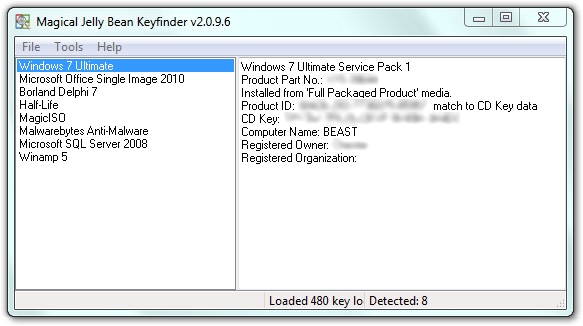
Saw this software / apps at a website. Magical Jelly Bean Keyfinder (no, not Android 4.1) is a free apps that helps to retrieve your Windows, MS Office, Winzip and many more CD Key. Sometime we might misplace the original DVD of the Windows, MS Office or other apps after we copy all the installers into another HD or partitions. So when we want to format and reinstall the Windows and etc, we can't find the CD key. Some might have to spend times and money to get it from Microsoft or other software company, or buy another one?

pix credit: http://www.magicaljellybean.com/keyfinder/


Anyway, with Keyfinder (I don't want to say the full name again), you can retrieve the CD key and save it down on a USB drive or papers.

Where is the catch you might ask. Yes, this apps only support 300+ software (as it claimed), if you want more coverage like 3600+ programs, then you have to buy the full version, which is called Recover Keys, which cost US$24.95 for single license.

Okay to the apps/software:
http://www.magicaljellybean.com/keyfinder/
Official portable version available, woohoo!


Like this if you are FB user and you think this post is useful. The button is at top right of content of this post.
+1 this post if you are Google+ users and you think this post is useful.
Hope you will enjoy this post, subscribe to my RSS or mailing list or follow me on blogger or twitter. :)
source: internet!

Saturday, June 16, 2012

The Ultimate Boss Key or Boss Mode

Many of us works in office or factory or lab or whatever place, except at home. Some of the time we like to check FB status of friends, wish friends happy birthday, or do some online banking such as transfer money and pay credit card and bills. Or maybe just watching a funny youtube video that your friend sent you the link a moment ago.
And we wish that no one would appear suddenly at our back and see whatever we are doing on the laptop or desktop or workstation.

Boss Mode on Outdated Penang Uncle blogspot dot com

Usually we will try to minimize the windows by clicking the minimize icon on top right of the windows using mouse, but that might be too late to hide whatever you are doing. Some web browser such as Maxthon has boss key or boss mode that you can immediately hide the Maxthon from the taskbar. But how about other web browser or windows? Sure you can use Windows+m to minimize everything, but what if your boss need you to show him some result on some windows or excel or VNC, the Windows' Aero Peek would exposed whatever you were doing because Windows+m does not hide windows from taskbar.

Clicky Gone can help in this situation. After you download it and install/unzip it, you can either use the default shortcut key or customized your own combination. Practice the shortcut key for a few times and you are good to go.

Another good thing about Clicky Gone is you can mute the computer sound for Boss Mode. Therefore your boss will not able to notice if you were on youtube. :P

Actually Clicky Gone is not written for the intention of hiding stuffs from boss, but it helps to hide windows that you are not sure at the moment, make your windows cleaner and easier to work.

Another thing I can think of is during presentation. You can hide most of the windows and leave the powerpoint and a few windows that are needed during the presentation. After you finish the presentation and go back at home, you can bring back others windows back, without need to reopen everything all over again. :)

To download Clicky Gone, go to this link:
http://clickygone.sourceforge.net/

Clicky Gone also available in portable version


Like this if you are FB user and you think this post is useful. The button is at top right of content of this post.
+1 this post if you are Google+ users and you think this post is useful.
Hope you will enjoy this post, subscribe to my RSS or mailing list or follow me on blogger or twitter. :)
source: saw it somewhere.....

Monday, June 4, 2012

Make Your Own Portable Software

Portable software or portable apps is always my favorite. At anytime I have more than 100 portable apps on my PC. The best thing about portable apps are there is no installation needed, just download, unzip and you are ready to use it. Portable apps also will not mess with your file system, unless you allow it to do it. Unlike installed software for example real player is the most stubborn software that likes to take over system setting without user's consensus.

Since USB thumb drive is relatively cheap nowadays, it is very convenient to put all the apps into a thumb drive and run on any PC or laptop that you wanted to.

With so much of the advantages of portable apps, why not make some of your own? For those paid software, I would think as long you don't distributed it, use it on your own, it should not be fine because you already pay for it.

Cameyo is the software that I am talking about.

pix credit: http://www.cameyo.com/

They even made a step-by-step instruction, therefore I am just going to skip this part.
http://www.cameyo.com/doc/index.html

Do download cameyo, go to this link:
http://www.cameyo.com/


Like this if you are FB user and you think this post is useful. The button is at top right of content of this post.
+1 this post if you are Google+ users and you think this post is useful.
Hope you will enjoy this post, subscribe to my RSS or mailing list or follow me on blogger or twitter. :)
source: wild wild web!

Tuesday, November 17, 2009

DO NOT INSTALL la!

Nowadays thumb drive (or some call it USB drive/flash drive/some drive la) just very cheap these day. Well although it is not as cheap as hard disk per GB, the price is damn cheap compare to the day I bought my 128M thumb drive (it is M, not G).

Anyway, the main topic today is not thumb drive, but portable software. We no longer need to install the software that we want use every time we go to another computer/laptop/etc. Some nice people out there just too kind to create the portable version of the software (some might piss off the original author though :P). What you can do is to download and unzip them into your thumb drive (and some need to tweak a little bit maybe, depend on how portable it is), and you can bring it anywhere with you.
So when you see your friends don't have a software on his/her laptop/computer that you want to use, you can just plug your thumb drive into the USB and you are good to go!

So here are some of the web sites that provide the portable software:
1. http://portableapps.com/
This web is super fast with the updated version of the software they have it there. I got most of the software I wanted at here. All of them are legal to be portable (I think).

2. http://www.portablefreeware.com/
More choices here, but update is slower. But it still a good source of portable software, in fact this is the most portable software I could find so far. Not all are legal to be portable (I think), just be careful.

3. http://devrexster.googlepages.com/mmk
Only Microsoft Movie Maker. I just found out this one after I was frustrated the way you have to go through to download this Movie Make from Microsoft website.

4. http://www.opera-usb.com
Only Opera (web brower). The people at Opera are kind enough to give out free version of portable Opera. So this one is legal one lo.

5. Torrent
You can find all sort of pirated and portable at the same time software at some torrent site. I wouldn't tell you, but you know how to find them la...... heheheheh.

"Install" this word going to be disappear some day, I hope the sooner the better. YEAH!