Jar of Beans is the latest Android emulator. Unlike BlueStacks and Pokki, this emulator is developed by XDA member, unrealmanu.
One important thing to note is Jar of Beans is portable. Yeah, I always like portable software, because no installation needed as well as you will not mess up with the Windows.
Jar of Beans is emulator based on Jelly Bean (Android 4.1.1). And it is rooted, therefore you can mess with the emulator as much as possible.
You can choose the resolution which are being made into phone/tablet/phablet, such as:
->WVGA800
->WVGA854
->WXGA720
->HVGA
->QVGA
->WQVGA400
->WQVGA432
->WSVGA
->WXGA800
Or choose the resolution that suitable for your desktop or laptop:
800x480
1024x600
1280x768
1400x900
1920x1080
Full screen also supported.
Jar of Beans can access Google Play:
Jar of Beans running AnTuTu benchmarks:
Read more more detail at XDA:
http://forum.xda-developers.com/showthread.php?t=1975675
You can also directly go to download it at code.google.com:
http://code.google.com/p/jar-of-beans/downloads/list
Enjoy!
Like this if you are FB user and you think this post is useful. The button is at top right of content of this post.
+1 this post if you are Google+ users and you think this post is useful.
Hope you will enjoy this post, subscribe to my RSS or mailing list or follow me on blogger or twitter. :)
source: XDA
pix source: XDA
Update every month from http://outdatedpenanguncle.blogspot.com/
Outdated Penang Uncle
Showing posts with label portable software. Show all posts
Sunday, December 9, 2012
Monday, June 4, 2012
Make Your Own Portable Software
Portable software or portable apps is always my favorite. At anytime I have more than 100 portable apps on my PC. The best thing about portable apps are there is no installation needed, just download, unzip and you are ready to use it. Portable apps also will not mess with your file system, unless you allow it to do it. Unlike installed software for example real player is the most stubborn software that likes to take over system setting without user's consensus.
Since USB thumb drive is relatively cheap nowadays, it is very convenient to put all the apps into a thumb drive and run on any PC or laptop that you wanted to.
With so much of the advantages of portable apps, why not make some of your own? For those paid software, I would think as long you don't distributed it, use it on your own, it should not be fine because you already pay for it.
Cameyo is the software that I am talking about.

pix credit: http://www.cameyo.com/
They even made a step-by-step instruction, therefore I am just going to skip this part.
http://www.cameyo.com/doc/index.html
Do download cameyo, go to this link:
http://www.cameyo.com/
Like this if you are FB user and you think this post is useful. The button is at top right of content of this post.
+1 this post if you are Google+ users and you think this post is useful.
Hope you will enjoy this post, subscribe to my RSS or mailing list or follow me on blogger or twitter. :)
source: wild wild web!
Since USB thumb drive is relatively cheap nowadays, it is very convenient to put all the apps into a thumb drive and run on any PC or laptop that you wanted to.
With so much of the advantages of portable apps, why not make some of your own? For those paid software, I would think as long you don't distributed it, use it on your own, it should not be fine because you already pay for it.
Cameyo is the software that I am talking about.
pix credit: http://www.cameyo.com/
They even made a step-by-step instruction, therefore I am just going to skip this part.
http://www.cameyo.com/doc/index.html
Do download cameyo, go to this link:
http://www.cameyo.com/
Like this if you are FB user and you think this post is useful. The button is at top right of content of this post.
+1 this post if you are Google+ users and you think this post is useful.
Hope you will enjoy this post, subscribe to my RSS or mailing list or follow me on blogger or twitter. :)
source: wild wild web!
Friday, March 9, 2012
Get To Know Your Computer Better
No, it is not a date. You will not go out to movie and restaurant or jogging or hiking with your computer to know your computer better.
All you need is Speccy free version.
What went well?
1. While CPUz only give you the hardware information, Speccy give you even more detail of the hardware
2. While "System Information" on Windows give you the geeky information, Speccy can give you even more. (I really don't give the damn about Conflicts or DMA or IRQs information anyway)
3. It is free.
4. Portable version available from the official website (Portable version from unknown source could be dangerous!)
5. Made by the same company that created CCleaner.
6. Save the result into XML or text file.
I downloaded the portable version (link at end of post) and give it a try. It take a while to grab all the data, probably 1/2 minutes or more.

The summary is quite simple, just showing the type of OS, CPU, RAM, Motherboards, etc. The CPU temperature is being update on the fly.

Click on the items on left column or the blue color link on right column will give you more detail, I mean the really in-depth details.
One thing that catch my attention, is the Uptime and Downtime. The longest Uptime I ever have on my laptop is more than 20days, meaning I never ever reboot the laptop for more than 20 days! That is what I like about Sandy Bridge with Windows 7, I don't need to reboot so often compare to older version of Windows. All I need to do is either put it to sleep or hibernate mode.

Of course you can buy the Home or Business edition, which will cost US$19.95 and US$34.95, but I don't think it is necessary for normal usage since the information from free version is way too much already.
Download installation version:
http://www.piriform.com/speccy/download/standard
Download portable version:
http://www.piriform.com/speccy/download/portable
Like this if you are FB user and you think this post is useful. The button is at top right of content of this post.
+1 this post if you are Google+ users and you think this post is useful.
Hope you will enjoy this post, subscribe to my RSS or mailing list or follow me on blogger or twitter. :)
source: I wrote this!
All you need is Speccy free version.
What went well?
1. While CPUz only give you the hardware information, Speccy give you even more detail of the hardware
2. While "System Information" on Windows give you the geeky information, Speccy can give you even more. (I really don't give the damn about Conflicts or DMA or IRQs information anyway)
3. It is free.
4. Portable version available from the official website (Portable version from unknown source could be dangerous!)
5. Made by the same company that created CCleaner.
6. Save the result into XML or text file.
I downloaded the portable version (link at end of post) and give it a try. It take a while to grab all the data, probably 1/2 minutes or more.
The summary is quite simple, just showing the type of OS, CPU, RAM, Motherboards, etc. The CPU temperature is being update on the fly.
Click on the items on left column or the blue color link on right column will give you more detail, I mean the really in-depth details.
One thing that catch my attention, is the Uptime and Downtime. The longest Uptime I ever have on my laptop is more than 20days, meaning I never ever reboot the laptop for more than 20 days! That is what I like about Sandy Bridge with Windows 7, I don't need to reboot so often compare to older version of Windows. All I need to do is either put it to sleep or hibernate mode.
Of course you can buy the Home or Business edition, which will cost US$19.95 and US$34.95, but I don't think it is necessary for normal usage since the information from free version is way too much already.
Download installation version:
http://www.piriform.com/speccy/download/standard
Download portable version:
http://www.piriform.com/speccy/download/portable
Like this if you are FB user and you think this post is useful. The button is at top right of content of this post.
+1 this post if you are Google+ users and you think this post is useful.
Hope you will enjoy this post, subscribe to my RSS or mailing list or follow me on blogger or twitter. :)
source: I wrote this!
Thursday, February 23, 2012
How to Measure Disk Drive Speed
Do you know how fast is your disk read and write speed? Usually we really no need to know about this, but disk read and write speed is crucial to determine the overall performance of your system. even though you have a Intel Core i3, i5 or i7, but you use only the normal (magnetic) hard disk, the performance is defenately slow down by the hard disk. Same as solid state hard disk, some solid state drive might not be as fast as the manufacturer claimed. Thumb drive (or known USB drive) is usually slow, I will show you in later part of this post.
There are a lot of free software out there to do disk read write speed accessment, but I found DiskMark is very simple and direct, or sometime I call it "no-nonsense".


As you can see in picture above, DiskMark interface is very simple, just a few buttons only. Buttons on left are the type of read and write test. Usually I just execute all of them (click "All" button).
As for the pull down options, you can choose to run how many times to run each test on first pull down option from left.
The second pull down option is to choose the file size of the test, 50MB to 4000MB, long bigger the file the longer the test time.
The pull down option on right is the choose which disk to run the test. It will not update automatically if I add in a new drive (on USB) after DiskMark is opened. I have close DiskMark and open it again.
There is skin option which I think is the only nonsense thing on DiskMark. Why need skin when what is needed is the test result.
The help is very simple and direct as well. Disk Mark is available in 32 and 64 bits, if you have 64bits Windows 7, you should use 64bits version.
There are the result of some of my SSD, thumb drive and external HDD:
Intel Solid State Drive on my sandy bridge laptop:

Samsung Solid State Drive on Dell ST tablet (which I will post of review of it soon!)
If you compare it with Intel Solid State above, the Seq write and 512k read/write on this drive is faster than Intel SSD.

Kingston DT101 G2 8GB thumb drive
Not only limited by the USB2 port speed, but also the common problem on USB thumb drive, which that write speed is super slow. The Seq write speed at ~4MB is about the same when I use it to copy HD movies to this drive. Therefore this DiskMark is ready giving me the result as close as possible to the real usage.

Normal HD (magnetic) on external casing, connected over USB2 port
The read and write speed are limited by the USB2 port if not mistaken. These non-solid state HD will have higher read and write speed if it is install inside PC/USB and connected though P-ATA or S-ATA.

To download DiskMark, go to this link:
http://crystalmark.info/software/CrystalDiskMark/index-e.html
The latest version is CrystalDiskMark 3.0.1c. Portable version also available, therefore you can put it in thumb drive and run it on any PC/laptop you wish to test the HD/SDD/flash/memory card.
Like this if you are FB user and you think this post is useful. The button is at top right of content of this post.
+1 this post if you are Google+ users and you think this post is useful.
Hope you will enjoy this post, subscribe to my RSS or mailing list or follow me on blogger or twitter. :)
source: I wrote this!
There are a lot of free software out there to do disk read write speed accessment, but I found DiskMark is very simple and direct, or sometime I call it "no-nonsense".
As you can see in picture above, DiskMark interface is very simple, just a few buttons only. Buttons on left are the type of read and write test. Usually I just execute all of them (click "All" button).
As for the pull down options, you can choose to run how many times to run each test on first pull down option from left.
The second pull down option is to choose the file size of the test, 50MB to 4000MB, long bigger the file the longer the test time.
The pull down option on right is the choose which disk to run the test. It will not update automatically if I add in a new drive (on USB) after DiskMark is opened. I have close DiskMark and open it again.
There is skin option which I think is the only nonsense thing on DiskMark. Why need skin when what is needed is the test result.
The help is very simple and direct as well. Disk Mark is available in 32 and 64 bits, if you have 64bits Windows 7, you should use 64bits version.
There are the result of some of my SSD, thumb drive and external HDD:
Intel Solid State Drive on my sandy bridge laptop:
Samsung Solid State Drive on Dell ST tablet (which I will post of review of it soon!)
If you compare it with Intel Solid State above, the Seq write and 512k read/write on this drive is faster than Intel SSD.
Kingston DT101 G2 8GB thumb drive
Not only limited by the USB2 port speed, but also the common problem on USB thumb drive, which that write speed is super slow. The Seq write speed at ~4MB is about the same when I use it to copy HD movies to this drive. Therefore this DiskMark is ready giving me the result as close as possible to the real usage.
Normal HD (magnetic) on external casing, connected over USB2 port
The read and write speed are limited by the USB2 port if not mistaken. These non-solid state HD will have higher read and write speed if it is install inside PC/USB and connected though P-ATA or S-ATA.
To download DiskMark, go to this link:
http://crystalmark.info/software/CrystalDiskMark/index-e.html
The latest version is CrystalDiskMark 3.0.1c. Portable version also available, therefore you can put it in thumb drive and run it on any PC/laptop you wish to test the HD/SDD/flash/memory card.
Like this if you are FB user and you think this post is useful. The button is at top right of content of this post.
+1 this post if you are Google+ users and you think this post is useful.
Hope you will enjoy this post, subscribe to my RSS or mailing list or follow me on blogger or twitter. :)
source: I wrote this!
Monday, February 13, 2012
Free software: Space Sniffer
Happy Valentine Day!
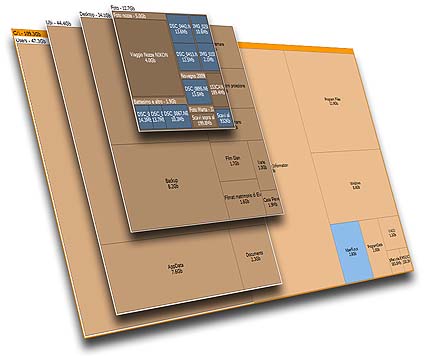
There are a lot of software out there that can show us the disk utilization and also how much disk space each folder consume, but either some of them cost a high fee or cannot meeting my requirement.
Treesize Professional and SpaceMonger are two famous software for this kind of function, however I don't think it should cost so much. Treesize Prefessional cost US$52.95 for single user license, and SpaceMonger cost US$24.95 for single user license. That is too expensive!
Thanks to Google, I found this free software that can do the same job like Treesize and SpaceMonger.
SpaceSniffer is using Treemap concept that invented by Prof. Ben Shneiderman.
Not only Space Sniffer will show the file size graphically, you can also apply filter and check for certain file type only (example: *.mp3). You can also exclude file type as well.
The filter will also works for time, type the condition (Example: >5years), the view will be updated accordingly. Combine filters is allow.
Other advantages that the author mentioned in the website:
Fast and easy to use
Supports drag and drop
Export module lets you produce customizable textual reports
Intuitive structure layout, multiple views for different media
Zoomable elements, navigate like a web browser
The Windows folders and file popup menu is accessible by right mouse click
It's possible to restrict the view content by typing simple yet powerful filtering criteria
Lets you temporary tag files with four different colors and perform filtering on them
Different views of the same media can show differently filtered elements
Customizable in geometry, colors, behaviors
You can navigate even during the scan
Smart cached scanning engine, multiple views, single scan
You can refine a zoomed area by a secondary scan process, even with main scan active
Reacts to file system events, keeps always in synch, warns you by blinking elements
Can scan NTFS Alternate Data Streams
It doesn't clutter your registry, only a plain XML configuration file
It's portable, no installation required, just put the executable somewhere and let's go
Best of all, it is free!
You can donate to the author to help the development of this software.
Why not install this software on your girl friend or wife or spouse's PC or laptop on this valentine? Not only they will appreciate your effort (this add points!), this will reduce the number of times of they call you for help because out of diskspace on their PC/laptop.
To download, go to this link:
http://www.uderzo.it/main_products/space_sniffer/download.html
Like this if you are FB user and you think this post is useful. The button is at top right of content of this post.
+1 this post if you are Google+ users and you think this post is useful.
Hope you will enjoy this post, subscribe to my RSS or mailing list or follow me on blogger or twitter. :)
source: I wrote this software review!
There are a lot of software out there that can show us the disk utilization and also how much disk space each folder consume, but either some of them cost a high fee or cannot meeting my requirement.
Treesize Professional and SpaceMonger are two famous software for this kind of function, however I don't think it should cost so much. Treesize Prefessional cost US$52.95 for single user license, and SpaceMonger cost US$24.95 for single user license. That is too expensive!
Thanks to Google, I found this free software that can do the same job like Treesize and SpaceMonger.
SpaceSniffer is using Treemap concept that invented by Prof. Ben Shneiderman.
Not only Space Sniffer will show the file size graphically, you can also apply filter and check for certain file type only (example: *.mp3). You can also exclude file type as well.
The filter will also works for time, type the condition (Example: >5years), the view will be updated accordingly. Combine filters is allow.
Other advantages that the author mentioned in the website:
Fast and easy to use
Supports drag and drop
Export module lets you produce customizable textual reports
Intuitive structure layout, multiple views for different media
Zoomable elements, navigate like a web browser
The Windows folders and file popup menu is accessible by right mouse click
It's possible to restrict the view content by typing simple yet powerful filtering criteria
Lets you temporary tag files with four different colors and perform filtering on them
Different views of the same media can show differently filtered elements
Customizable in geometry, colors, behaviors
You can navigate even during the scan
Smart cached scanning engine, multiple views, single scan
You can refine a zoomed area by a secondary scan process, even with main scan active
Reacts to file system events, keeps always in synch, warns you by blinking elements
Can scan NTFS Alternate Data Streams
It doesn't clutter your registry, only a plain XML configuration file
It's portable, no installation required, just put the executable somewhere and let's go
Best of all, it is free!
You can donate to the author to help the development of this software.
Why not install this software on your girl friend or wife or spouse's PC or laptop on this valentine? Not only they will appreciate your effort (this add points!), this will reduce the number of times of they call you for help because out of diskspace on their PC/laptop.
To download, go to this link:
http://www.uderzo.it/main_products/space_sniffer/download.html
Like this if you are FB user and you think this post is useful. The button is at top right of content of this post.
+1 this post if you are Google+ users and you think this post is useful.
Hope you will enjoy this post, subscribe to my RSS or mailing list or follow me on blogger or twitter. :)
source: I wrote this software review!
Monday, January 30, 2012
My new love: PotPlayer
My new love, oh no, I mean have felt in love with a new media player. PotPlayer is not new, but being outdated uncle, I was too lazy to change the media player once I found it is very stable for daily usage. I have been using KMPlayer for many years, with Media Player Classic as backup for daily usage.
PotPlayer is created by the same author (Mr Kang) that wrote KMPlayer. However KMPlayer has been sold to a commercial company, Pandora TV in 2007. After that, Mr Kang shifted his focus to create another player, hence PotPlayer is created.
Why I switch from KMPlayer to PotPlayer?
1. PotPlayer has the same functionality like KMPLayer. Therefore no problem at all from the time I switched.
2. KMPlayer is becoming bulky after being takeover by Pandora TV. It is not as light as I think anymore. From the setup file grow from ~14M at Sep 2010, to ~17M at Oct 2011, to ~22M for latest version of KMP 3.1. This is a very bad sign, the code should be optimized from time to time, but becoming another MS Windows. PotPlayer at softpedia right now is about ~8M only.
3. KMPlayer become slow in sync up the video and audio during play back of RMVB format. The problem appear when I try to skip to a certain time, or fast-forward or backward, especially I use the left and right arrow keys to fast-forward or backward. PotPlayer don't have this problem at all. Media Player Classic don't have this problem as well.
4. Portable version of PotPlayer is easily available compare to KMPlayer.
5. No additional codec is require to enable PotPlayer to play all major format. I don't need to install any codec to play RMVB, mkv, divx, xvid, etc etc.
PotPlayer also have it's disadvantages as well:
1. Original website is in Korean only, no other language. We also cannot feedback in it's forum if we found any bug if we don't know Korean language. However you can find the English version from softpedia.
2. I downloaded portable version from a Chinese website, that PotPlayer is completely in Chinese only. Not as friendly as KMPlayer that I can switch language on the fly.
Summary, more advantage than disadvantage using PotPlayer. I am going to remove KMPlayer from my computer in very near future. Lifehacker even has feature this player.
To download PotPlayer:
English version [don't download from softonic, it has very outdated version]
English version from videohelp.com
English version from portableapps.com
Official website (in Korean)
Portable version (in Chinese)
Like this if you are FB user and you think this post is useful. The button is at top right of content of this post.
+1 this post if you are Google+ users and you think this post is useful.
Hope you will enjoy this post, subscribe to my RSS or mailing list or follow me on blogger or twitter. :)
source: I wrote this!
p/s: contact me at ahsiang888 at google mail for software review.
PotPlayer is created by the same author (Mr Kang) that wrote KMPlayer. However KMPlayer has been sold to a commercial company, Pandora TV in 2007. After that, Mr Kang shifted his focus to create another player, hence PotPlayer is created.
Why I switch from KMPlayer to PotPlayer?
1. PotPlayer has the same functionality like KMPLayer. Therefore no problem at all from the time I switched.
2. KMPlayer is becoming bulky after being takeover by Pandora TV. It is not as light as I think anymore. From the setup file grow from ~14M at Sep 2010, to ~17M at Oct 2011, to ~22M for latest version of KMP 3.1. This is a very bad sign, the code should be optimized from time to time, but becoming another MS Windows. PotPlayer at softpedia right now is about ~8M only.
3. KMPlayer become slow in sync up the video and audio during play back of RMVB format. The problem appear when I try to skip to a certain time, or fast-forward or backward, especially I use the left and right arrow keys to fast-forward or backward. PotPlayer don't have this problem at all. Media Player Classic don't have this problem as well.
4. Portable version of PotPlayer is easily available compare to KMPlayer.
5. No additional codec is require to enable PotPlayer to play all major format. I don't need to install any codec to play RMVB, mkv, divx, xvid, etc etc.
PotPlayer also have it's disadvantages as well:
1. Original website is in Korean only, no other language. We also cannot feedback in it's forum if we found any bug if we don't know Korean language. However you can find the English version from softpedia.
2. I downloaded portable version from a Chinese website, that PotPlayer is completely in Chinese only. Not as friendly as KMPlayer that I can switch language on the fly.
Summary, more advantage than disadvantage using PotPlayer. I am going to remove KMPlayer from my computer in very near future. Lifehacker even has feature this player.
To download PotPlayer:
English version [don't download from softonic, it has very outdated version]
English version from videohelp.com
English version from portableapps.com
Official website (in Korean)
Portable version (in Chinese)
Like this if you are FB user and you think this post is useful. The button is at top right of content of this post.
+1 this post if you are Google+ users and you think this post is useful.
Hope you will enjoy this post, subscribe to my RSS or mailing list or follow me on blogger or twitter. :)
source: I wrote this!
p/s: contact me at ahsiang888 at google mail for software review.
Tuesday, December 13, 2011
Extend Windows desktop to 4 desktops
Why would someone extend a Windows desktop to 4 desktop? For those that used to Linux would know that that help to organize the Windows, you can put some jobs in one desktop and another jobs in another. By doing that you don't always have to look into every Windows just find the MS office or MathLab or Chrome.
I could put all personal web browsing in one desktop and work related Windows into another desktop. So when your boss drop by your cubicle, he/she would see your clean desktop with just work related stuffs. ;-)
There are a few similar software that have this kind of function. Today I would want to introduce Dexpot. It is free of charge for personal use.
It supports older version of Windows such as Windows 95, Windows 98, Windows ME and Windows NT4, but upto version 1.4 only.
It also have portable version, which I like it very much!
You can configure different wallpapers and screen saver for each desktop. However I didn't try the password. One Windows login password is enough, why want to have so many password? I would think this is very useful if you are sharing one computer with another person, there is no need to login and logout every time want to change user. Just use Dexpot to assign each Desktop to each user. By doing this it can be share with 4 persons!
There is a powerful component in Dexpot that automatically distribute the Windows into different Desktop. By configure it correctly, you can always make sure your facebook page is not same desktop with simulation windows.
There are many more features, but it would be super long post. So I leave it to you to explorer. :)
Dexpot download page
Hope you will enjoy this post, subscribe to my RSS or mailing list or follow me on blogger or twitter. :)
pix source: http://dexpot.de
Source: I wrote this!
I could put all personal web browsing in one desktop and work related Windows into another desktop. So when your boss drop by your cubicle, he/she would see your clean desktop with just work related stuffs. ;-)
There are a few similar software that have this kind of function. Today I would want to introduce Dexpot. It is free of charge for personal use.
It supports older version of Windows such as Windows 95, Windows 98, Windows ME and Windows NT4, but upto version 1.4 only.
It also have portable version, which I like it very much!
You can configure different wallpapers and screen saver for each desktop. However I didn't try the password. One Windows login password is enough, why want to have so many password? I would think this is very useful if you are sharing one computer with another person, there is no need to login and logout every time want to change user. Just use Dexpot to assign each Desktop to each user. By doing this it can be share with 4 persons!
There is a powerful component in Dexpot that automatically distribute the Windows into different Desktop. By configure it correctly, you can always make sure your facebook page is not same desktop with simulation windows.
There are many more features, but it would be super long post. So I leave it to you to explorer. :)
Dexpot download page
Hope you will enjoy this post, subscribe to my RSS or mailing list or follow me on blogger or twitter. :)
pix source: http://dexpot.de
Source: I wrote this!
Sunday, December 11, 2011
Decorate Windows with Snow Flakes
Usually at this time of year, a lot of people would start changing their wallpapers or Windows theme to something very Christmas. Here is something to impress your family or colleagues or customers.
DesktopSnowOK is just small ~57k zip file (~79k after unzip). You can put it any place you want and execute the .exe file. DesktopSnowOK.ini will be generated to keep the setting. DesktopSnowOK is a portable software, so please copy both files (exe and ini) when you want to transfer the program and its setting to thumbdrive or another computer.

As you can see in the picture above, DesktopSnowOK (below BlueStacks) will generate the snowflakes all over your desktop.
There is a few settings to change:
1. Number of flakes
2. Transparency of flakes
3. Speed - how fast the flakes fall
4. How big is the flakes. Or you can choose soccer/glass/red/blue/tennis/baseball balls.
5. Let the snow continue to fall or disable snow flakes with mouse/keyboard movement.
DesktopSnowOK is written by Nenad Hrg from Germany. He is very good software writer who wrote a lot of freeware for Windows. I will try to intro other good stuffs he has in his website.
However I do notice that the snowflakes only appear in primary screen. If you have extended screen like me, the snowflakes will not appear in extended screen. Even if I place the program at extended screen before activate it, the snowflakes still appear at primary screen. Probably this is a bug. I will try to feedback to him about this.
To download this freeware, go to this link:
http://softwareok.com/?seite=Freeware/DesktopSnowOK
Look for "... Download (57 KB)"
Or direct download link:
http://softwareok.com/?Download=DesktopSnowOK&goto=../Download/DesktopSnowOK.zip
Hope you will enjoy this post, subscribe to my RSS or mailing list or follow me on blogger or twitter. :)
software source: http://softwareok.com/?seite=Freeware/DesktopSnowOK
I wrote this review! And also the screen capture by myself!
p/s: contact me for software/smartphone/tablet/anything you can send to me for review
DesktopSnowOK is just small ~57k zip file (~79k after unzip). You can put it any place you want and execute the .exe file. DesktopSnowOK.ini will be generated to keep the setting. DesktopSnowOK is a portable software, so please copy both files (exe and ini) when you want to transfer the program and its setting to thumbdrive or another computer.
As you can see in the picture above, DesktopSnowOK (below BlueStacks) will generate the snowflakes all over your desktop.
There is a few settings to change:
1. Number of flakes
2. Transparency of flakes
3. Speed - how fast the flakes fall
4. How big is the flakes. Or you can choose soccer/glass/red/blue/tennis/baseball balls.
5. Let the snow continue to fall or disable snow flakes with mouse/keyboard movement.
DesktopSnowOK is written by Nenad Hrg from Germany. He is very good software writer who wrote a lot of freeware for Windows. I will try to intro other good stuffs he has in his website.
However I do notice that the snowflakes only appear in primary screen. If you have extended screen like me, the snowflakes will not appear in extended screen. Even if I place the program at extended screen before activate it, the snowflakes still appear at primary screen. Probably this is a bug. I will try to feedback to him about this.
To download this freeware, go to this link:
http://softwareok.com/?seite=Freeware/DesktopSnowOK
Look for "... Download (57 KB)"
Or direct download link:
http://softwareok.com/?Download=DesktopSnowOK&goto=../Download/DesktopSnowOK.zip
Hope you will enjoy this post, subscribe to my RSS or mailing list or follow me on blogger or twitter. :)
software source: http://softwareok.com/?seite=Freeware/DesktopSnowOK
I wrote this review! And also the screen capture by myself!
p/s: contact me for software/smartphone/tablet/anything you can send to me for review
Monday, January 10, 2011
AngryBird for Windows is here!
I have been waiting for Angry Bird to come to Windows or Windows Mobile. Windows Mobile should have no luck at all, but finally Angry Bird is on Windows! Nice.
In case you don't know or not sure what is Angry Bird, watch this:
You can get free version of Angry Bird on Apple Apps store (for iPhone/iPad/iPod touch/iWhatever), or Nokia phone or on Android marketplace. Windows Phone 7 users also can get Angry Bird in very near future. And where to get Angry Bird for Windows? here:
http://appdeveloper.intel.com/en-us/blog/2011/01/03/angry-birds
Intel AppUp is selling for $4.99 (that's US$).
Anyway, I found someone posting Angry Bird portable, no installation require, but do take note of the warning below.
http://www.n8fanclub.com/2011/01/angry-birds-pc-version-windows-seven-7.html
Warning, download from this link and playing this software might violate your country's law or regulation.
Buy original, support original if you think you like to keep this game.
Hope you will enjoy this post, subscribe to my RSS or mailing list or follow me on blogger or twitter. :)
Source: n8fanclub.com, appup.com
In case you don't know or not sure what is Angry Bird, watch this:
You can get free version of Angry Bird on Apple Apps store (for iPhone/iPad/iPod touch/iWhatever), or Nokia phone or on Android marketplace. Windows Phone 7 users also can get Angry Bird in very near future. And where to get Angry Bird for Windows? here:
http://appdeveloper.intel.com/en-us/blog/2011/01/03/angry-birds
Intel AppUp is selling for $4.99 (that's US$).
Anyway, I found someone posting Angry Bird portable, no installation require, but do take note of the warning below.
http://www.n8fanclub.com/2011/01/angry-birds-pc-version-windows-seven-7.html
Warning, download from this link and playing this software might violate your country's law or regulation.
Buy original, support original if you think you like to keep this game.
Hope you will enjoy this post, subscribe to my RSS or mailing list or follow me on blogger or twitter. :)
Source: n8fanclub.com, appup.com
Saturday, January 1, 2011
Freeware: Typing Tutor Portable 0.4.2
What is your resolution for 2011? If one of the resolution is to learn touch-type or to type faster and better, then you should download this portable freeware.
Here is some feature of TypeFaster Typing Tutor Portable:
* Supports multiple keyboard layouts and more can be added easily (see the developers section). Includes support for non-rectangular keys. The following keyboard layouts are currently supported: Danish, Finnish, French, French-Belgian, German, Hebrew (no lesson files), Italian, Norwegian, Numeric Keypad, Portuguese, Spanish, UK-English, US-Dvorak, US-English
* A clear indication of which fingers to use. This is the essence of touchtyping.
* A 3D typing game.
* Typing statistics and the option of practising the least accurate/slowest/custom keys.
* Keyboard is not a fixed size (resolution independent).
* Multi-user support.
* Teacher support (view student statistics).
* Interface for editing lesson files and game settings.
* Backspace support
* Right to left text support.
* Variable text size.
* Lesson files can be prose or poems.
* Lesson progress indicator.
To download, go to this link:
http://portableapps.com/apps/education/typefaster_portable
Hope you will enjoy this post, subscribe to my RSS or mailing list or follow me on blogger or twitter. :) source:
Here is some feature of TypeFaster Typing Tutor Portable:
* Supports multiple keyboard layouts and more can be added easily (see the developers section). Includes support for non-rectangular keys. The following keyboard layouts are currently supported: Danish, Finnish, French, French-Belgian, German, Hebrew (no lesson files), Italian, Norwegian, Numeric Keypad, Portuguese, Spanish, UK-English, US-Dvorak, US-English
* A clear indication of which fingers to use. This is the essence of touchtyping.
* A 3D typing game.
* Typing statistics and the option of practising the least accurate/slowest/custom keys.
* Keyboard is not a fixed size (resolution independent).
* Multi-user support.
* Teacher support (view student statistics).
* Interface for editing lesson files and game settings.
* Backspace support
* Right to left text support.
* Variable text size.
* Lesson files can be prose or poems.
* Lesson progress indicator.
To download, go to this link:
http://portableapps.com/apps/education/typefaster_portable
Hope you will enjoy this post, subscribe to my RSS or mailing list or follow me on blogger or twitter. :) source:
Monday, October 11, 2010
GIMP Portable
GIMP is always my choice of software to edit photos or pictures, because it is free! Although not 100% comparable to Photoshop, it wins because it is free. Adobe Photoshop CS5 is now selling at US$699 at Adobe website. That is very ka-ching!!!
Today GIMP Portable 2.6.11 Rev 3 is released.
Why portable? Because it will be much more cleaner to the Windows, no clustering the Windows system directory. Usually portable apps need you to create the shortcut to the program itself, but the guys at portableapps.com did a really good job to make a exe to unzip the files and create a shortcut for you.
Here is a tutorial that creating animated gif using GIMP:
http://outdatedpenanguncle.blogspot.com/2009/07/create-animated-gif.html
To download, click here:
http://portableapps.com/apps/graphics_pictures/gimp_portable
Today GIMP Portable 2.6.11 Rev 3 is released.
Why portable? Because it will be much more cleaner to the Windows, no clustering the Windows system directory. Usually portable apps need you to create the shortcut to the program itself, but the guys at portableapps.com did a really good job to make a exe to unzip the files and create a shortcut for you.
Here is a tutorial that creating animated gif using GIMP:
http://outdatedpenanguncle.blogspot.com/2009/07/create-animated-gif.html
To download, click here:
http://portableapps.com/apps/graphics_pictures/gimp_portable
Tuesday, November 17, 2009
DO NOT INSTALL la!
Nowadays thumb drive (or some call it USB drive/flash drive/some drive la) just very cheap these day. Well although it is not as cheap as hard disk per GB, the price is damn cheap compare to the day I bought my 128M thumb drive (it is M, not G).
Anyway, the main topic today is not thumb drive, but portable software. We no longer need to install the software that we want use every time we go to another computer/laptop/etc. Some nice people out there just too kind to create the portable version of the software (some might piss off the original author though :P). What you can do is to download and unzip them into your thumb drive (and some need to tweak a little bit maybe, depend on how portable it is), and you can bring it anywhere with you.
So when you see your friends don't have a software on his/her laptop/computer that you want to use, you can just plug your thumb drive into the USB and you are good to go!
So here are some of the web sites that provide the portable software:
1. http://portableapps.com/
This web is super fast with the updated version of the software they have it there. I got most of the software I wanted at here. All of them are legal to be portable (I think).
2. http://www.portablefreeware.com/
More choices here, but update is slower. But it still a good source of portable software, in fact this is the most portable software I could find so far. Not all are legal to be portable (I think), just be careful.
3. http://devrexster.googlepages.com/mmk
Only Microsoft Movie Maker. I just found out this one after I was frustrated the way you have to go through to download this Movie Make from Microsoft website.
4. http://www.opera-usb.com
Only Opera (web brower). The people at Opera are kind enough to give out free version of portable Opera. So this one is legal one lo.
5. Torrent
You can find all sort of pirated and portable at the same time software at some torrent site. I wouldn't tell you, but you know how to find them la...... heheheheh.
"Install" this word going to be disappear some day, I hope the sooner the better. YEAH!
Anyway, the main topic today is not thumb drive, but portable software. We no longer need to install the software that we want use every time we go to another computer/laptop/etc. Some nice people out there just too kind to create the portable version of the software (some might piss off the original author though :P). What you can do is to download and unzip them into your thumb drive (and some need to tweak a little bit maybe, depend on how portable it is), and you can bring it anywhere with you.
So when you see your friends don't have a software on his/her laptop/computer that you want to use, you can just plug your thumb drive into the USB and you are good to go!
So here are some of the web sites that provide the portable software:
1. http://portableapps.com/
This web is super fast with the updated version of the software they have it there. I got most of the software I wanted at here. All of them are legal to be portable (I think).
2. http://www.portablefreeware.com/
More choices here, but update is slower. But it still a good source of portable software, in fact this is the most portable software I could find so far. Not all are legal to be portable (I think), just be careful.
3. http://devrexster.googlepages.com/mmk
Only Microsoft Movie Maker. I just found out this one after I was frustrated the way you have to go through to download this Movie Make from Microsoft website.
4. http://www.opera-usb.com
Only Opera (web brower). The people at Opera are kind enough to give out free version of portable Opera. So this one is legal one lo.
5. Torrent
You can find all sort of pirated and portable at the same time software at some torrent site. I wouldn't tell you, but you know how to find them la...... heheheheh.
"Install" this word going to be disappear some day, I hope the sooner the better. YEAH!
Subscribe to:
Comments (Atom)