What are the password that mostly people would use?
Here is a infographic to show you:
http://outdatedpenanguncle.blogspot.com/2012/10/infographic-password.html
Anyway, how do we check for the password that we use is safe enough?
I used this website:
http://howsecureismypassword.net/
In my opinion, as long as the password need 1 years plus to crack, it should be good enough. To be more safe, just make sure you always change the password every few months.
But since changing password every few months need a lot of effort especially everyone has more than 10 accounts like emails, banking, works, blogs, etc etc, I use keepass to keep all my password.
Keepass is available on Android, iOS, PC, Windows, Linux, and many more platform.
Like this if you are FB user and you think this post is useful. The button is at top right of content of this post.
+1 this post if you are Google+ users and you think this post is useful.
Hope you will enjoy this post, subscribe to my RSS or mailing list or follow me on blogger or twitter. :)
source: wild wild web
Showing posts with label utilities. Show all posts
Showing posts with label utilities. Show all posts
Friday, April 19, 2013

Wednesday, January 23, 2013
[Free] Audacity - the real free audio editor
If you google (or bing or yahoo) for audio editor, you will find thousands of "free" audio editors, but how many of them are really free? I found out usually those free software are not really free. Some are time limited trial, some are feature limited and trying to sell you the full feature of the software for 9.90, 19.90, 29.90 or 39.90. However we shouldn't paying for just some simple software. Software usually should be free, except for business use.
I have been using Audacity for editing audio for many occasions, ringtones, audio for video, etc. When I checked the posts that I posted in the past, I noticed that I haven't share this software with you. So here you go:
Audacity Advantages:


Audacity is as good as professional, paid software. Therefore, go download it now:
http://audacity.sourceforge.net/download/
Like this if you are FB user and you think this post is useful. The button is at top right of content of this post.
+1 this post if you are Google+ users and you think this post is useful.
Hope you will enjoy this post, subscribe to my RSS or mailing list or follow me on blogger or twitter. :)
pix source:http://audacity.sourceforge.net
I have been using Audacity for editing audio for many occasions, ringtones, audio for video, etc. When I checked the posts that I posted in the past, I noticed that I haven't share this software with you. So here you go:
Audacity Advantages:
- It is completely free
- It runs on Windows, Mac OS, and Linux
- Live recording from microphone, line input, USB/Firewire, etc
- Timer record, and sound activated recording
- Multi-track recordings
- Import and export many types of file (WAV, AIFF, AU, FLAC, OGG, MP2, MP3, AC3, M4A, AAC, WMA) - might need to install additional library
- Supports 16, 24, 32-bits
- Easy editing
- Unlimited undo and redo
- Automatic crash recovery
- Lots of effects
- Tons of plug-ins


Audacity is as good as professional, paid software. Therefore, go download it now:
http://audacity.sourceforge.net/download/
Like this if you are FB user and you think this post is useful. The button is at top right of content of this post.
+1 this post if you are Google+ users and you think this post is useful.
Hope you will enjoy this post, subscribe to my RSS or mailing list or follow me on blogger or twitter. :)
pix source:http://audacity.sourceforge.net
Friday, July 27, 2012
Stickies: replacement for Sticky Note
I believe a lot of Windows 7 (and Windows Vista) users have used Sticky Note gadget at least once. For those that like to use it or depend on it very often, the sad news is the later version of Windows 7 does not include Sticky Note. This happen to me as well. My first Win7 OS does has Sticky Note, and it did save some tree from some forest on this Earth. However when I got my new laptop, it is a more matured Win7, but Sticky Note disappear from the gadgets. Did Microsoft want to destroy more tree? I don't know.
Anyway, I found this freeware, or free apps which more people call it that way on every single software (except OS). This apps is Stickies.
 pix credit:http://www.zhornsoftware.co.uk/stickies/
Not only this Stickies does the same thing that the Sticky Note does, but better [my comment in square bracket]:
1. Stickies appearance can be customized for fonts, colors. Buttons may be changed, and styles can be saved [reduce boredom]
 pix credit:http://www.zhornsoftware.co.uk/stickies/
2. Stickies can store text or images [yea, don't think original Sticky Note can store picture]
3. Stickies can snap to each other and to the sides of the screen to keep them neatly lined up [tidiness?]
4. Stickies can be attached to a web site, document or folder so they only show when it's on screen [I like this feature very much and it make sense!]

5. Stickies can be transferred from one machine to another either over a TCP/IP network connection, or by using an SMTP mail server or MAPI client. [okay, you have to do this for 1001 stick notes? otherwise who would need to do this]
6. Stickies can be hidden for a certain period, until a specified date and time, or to wake every day, week or month, to act as reminders [stick note the can remind me at the right time, nice!]
7. Stickies can have alarms set to ensure you notice them at a point you choose [nice!]
8. Free [yes!!!!!!]
To download Stickies:
http://www.zhornsoftware.co.uk/stickies/download.html
To download more skins for Stickies, go to:
http://www.zhornsoftware.co.uk/stickies/skins/search.pl
If you prefer portable version, here you go:
http://portableapps.com/apps/office/stickies_portable
Like this if you are FB user and you think this post is useful. The button is at top right of content of this post.
+1 this post if you are Google+ users and you think this post is useful.
Hope you will enjoy this post, subscribe to my RSS or mailing list or follow me on blogger or twitter. :)
source: Internet!
Anyway, I found this freeware, or free apps which more people call it that way on every single software (except OS). This apps is Stickies.

Not only this Stickies does the same thing that the Sticky Note does, but better [my comment in square bracket]:
1. Stickies appearance can be customized for fonts, colors. Buttons may be changed, and styles can be saved [reduce boredom]
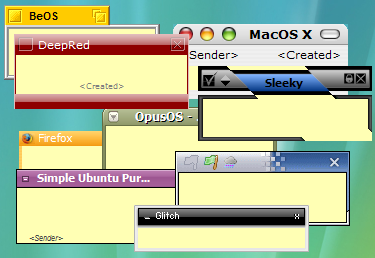
2. Stickies can store text or images [yea, don't think original Sticky Note can store picture]
3. Stickies can snap to each other and to the sides of the screen to keep them neatly lined up [tidiness?]
4. Stickies can be attached to a web site, document or folder so they only show when it's on screen [I like this feature very much and it make sense!]

5. Stickies can be transferred from one machine to another either over a TCP/IP network connection, or by using an SMTP mail server or MAPI client. [okay, you have to do this for 1001 stick notes? otherwise who would need to do this]
6. Stickies can be hidden for a certain period, until a specified date and time, or to wake every day, week or month, to act as reminders [stick note the can remind me at the right time, nice!]
7. Stickies can have alarms set to ensure you notice them at a point you choose [nice!]
8. Free [yes!!!!!!]
To download Stickies:
http://www.zhornsoftware.co.uk/stickies/download.html
To download more skins for Stickies, go to:
http://www.zhornsoftware.co.uk/stickies/skins/search.pl
If you prefer portable version, here you go:
http://portableapps.com/apps/office/stickies_portable
Like this if you are FB user and you think this post is useful. The button is at top right of content of this post.
+1 this post if you are Google+ users and you think this post is useful.
Hope you will enjoy this post, subscribe to my RSS or mailing list or follow me on blogger or twitter. :)
source: Internet!
Monday, July 16, 2012
Resize Windows with Sizer
GUI, ever since Steve Jobs invented Mac OS and Bill Gates make GUI to even greater height, all we know is Windows Windows Windows. Unless you are a full-screen guy (or girl), I am sure you will have various size of each windows. When I write blog, I need to refer to something, I will put them side by side. And after that, even un-snap from the edge of the screen, it don't really go back to original size. And I don't care, because I can resize it with a mouse.
However when I want to test my blog on a specific resolution, it because a headache. Luckily Sizer come to the picture.
 credit: http://www.brianapps.net
Sizer come with installation and portable version (Yeah!). The default setting are 640x480, 800x600, and 1024x768, these are the lower end of the screen resolution. But most of the time we need to make sure the website or blog we designing is fit into these resolution, so that even the people that using lowest spec can see read website or blog (netbook, ring a bell?).
 credit: http://www.brianapps.net
You can also customized to any Windows size that you want in the setting.
To download, go to this link:
http://www.brianapps.net/sizer/
Like this if you are FB user and you think this post is useful. The button is at top right of content of this post.
+1 this post if you are Google+ users and you think this post is useful.
Hope you will enjoy this post, subscribe to my RSS or mailing list or follow me on blogger or twitter. :)
source: internet!
However when I want to test my blog on a specific resolution, it because a headache. Luckily Sizer come to the picture.
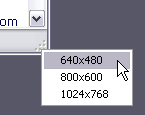
Sizer come with installation and portable version (Yeah!). The default setting are 640x480, 800x600, and 1024x768, these are the lower end of the screen resolution. But most of the time we need to make sure the website or blog we designing is fit into these resolution, so that even the people that using lowest spec can see read website or blog (netbook, ring a bell?).
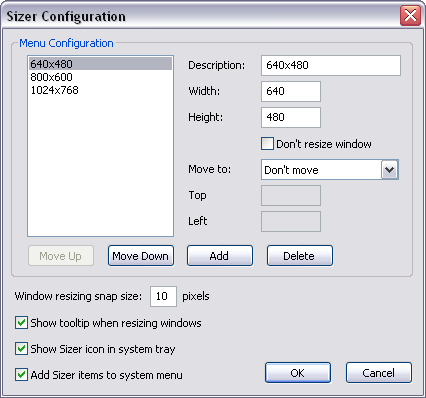
You can also customized to any Windows size that you want in the setting.
To download, go to this link:
http://www.brianapps.net/sizer/
Like this if you are FB user and you think this post is useful. The button is at top right of content of this post.
+1 this post if you are Google+ users and you think this post is useful.
Hope you will enjoy this post, subscribe to my RSS or mailing list or follow me on blogger or twitter. :)
source: internet!
Monday, June 25, 2012
Remove Empty Directories
The longer we use our PC/laptop, the more files and folders being created and accumulated on the hard disk(s). I always tell myself to do some housekeeping, but where is the time left for that after I use the time for work, family and writing blogs as well as reading 100+ of RSS everyday?
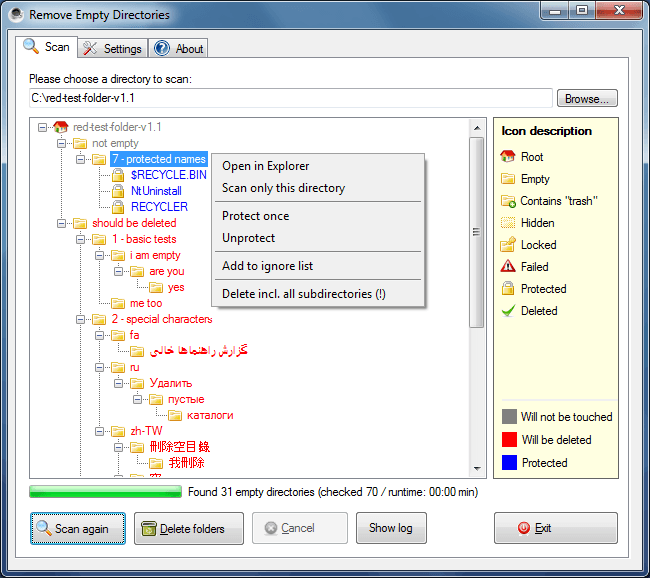
Then I found this. RED is Remove Empty Directories and it is a free apps.

pix source: http://www.jonasjohn.de/red.htm
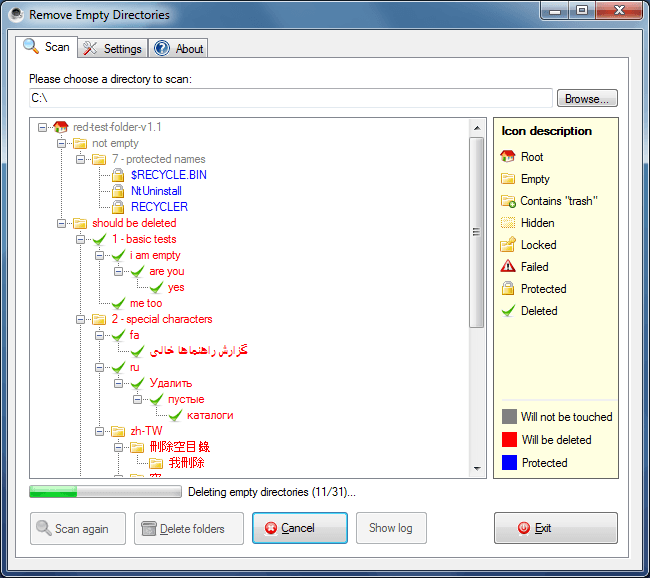
I downloaded that portable version. After unzip, I execute it directly but some directories cannot be access. So I restart it as administrator, in slightly more than 1min, there are 2241 empty directories has been listed by it. Wow, I can't imagine how I am going to find all of them, unless I do a disk format. :P
Remove Empty Directories also use different icons to describe each of these kinds of dirs:
 pix source: http://www.jonasjohn.de/red.htm
Remove Empty Directories available as installer or portable version. The author of this apps also very kind to post his coding at internet, so that if you want to use it for other OS(s), you can compile on your own.
To download Remove Empty Directories, go to:
http://www.jonasjohn.de/red.htm
Like this if you are FB user and you think this post is useful. The button is at top right of content of this post.
+1 this post if you are Google+ users and you think this post is useful.
Hope you will enjoy this post, subscribe to my RSS or mailing list or follow me on blogger or twitter. :)
source: internet!
Then I found this. RED is Remove Empty Directories and it is a free apps.
pix source: http://www.jonasjohn.de/red.htm
I downloaded that portable version. After unzip, I execute it directly but some directories cannot be access. So I restart it as administrator, in slightly more than 1min, there are 2241 empty directories has been listed by it. Wow, I can't imagine how I am going to find all of them, unless I do a disk format. :P
Remove Empty Directories also use different icons to describe each of these kinds of dirs:
- Root
- the really empty
- dirs with trash (you have to define what is trash)
- hidden dirs
- locked dirs
- protected dirs
- Failed (meaning no reading access, I fixed it by run it with administrator permission)
Remove Empty Directories available as installer or portable version. The author of this apps also very kind to post his coding at internet, so that if you want to use it for other OS(s), you can compile on your own.
To download Remove Empty Directories, go to:
http://www.jonasjohn.de/red.htm
Like this if you are FB user and you think this post is useful. The button is at top right of content of this post.
+1 this post if you are Google+ users and you think this post is useful.
Hope you will enjoy this post, subscribe to my RSS or mailing list or follow me on blogger or twitter. :)
source: internet!
Friday, March 9, 2012
Get To Know Your Computer Better
No, it is not a date. You will not go out to movie and restaurant or jogging or hiking with your computer to know your computer better.
All you need is Speccy free version.

What went well?
1. While CPUz only give you the hardware information, Speccy give you even more detail of the hardware
2. While "System Information" on Windows give you the geeky information, Speccy can give you even more. (I really don't give the damn about Conflicts or DMA or IRQs information anyway)
3. It is free.
4. Portable version available from the official website (Portable version from unknown source could be dangerous!)
5. Made by the same company that created CCleaner.
6. Save the result into XML or text file.
I downloaded the portable version (link at end of post) and give it a try. It take a while to grab all the data, probably 1/2 minutes or more.

The summary is quite simple, just showing the type of OS, CPU, RAM, Motherboards, etc. The CPU temperature is being update on the fly.

Click on the items on left column or the blue color link on right column will give you more detail, I mean the really in-depth details.
One thing that catch my attention, is the Uptime and Downtime. The longest Uptime I ever have on my laptop is more than 20days, meaning I never ever reboot the laptop for more than 20 days! That is what I like about Sandy Bridge with Windows 7, I don't need to reboot so often compare to older version of Windows. All I need to do is either put it to sleep or hibernate mode.

Of course you can buy the Home or Business edition, which will cost US$19.95 and US$34.95, but I don't think it is necessary for normal usage since the information from free version is way too much already.
Download installation version:
http://www.piriform.com/speccy/download/standard
Download portable version:
http://www.piriform.com/speccy/download/portable
Like this if you are FB user and you think this post is useful. The button is at top right of content of this post.
+1 this post if you are Google+ users and you think this post is useful.
Hope you will enjoy this post, subscribe to my RSS or mailing list or follow me on blogger or twitter. :)
source: I wrote this!
All you need is Speccy free version.

What went well?
1. While CPUz only give you the hardware information, Speccy give you even more detail of the hardware
2. While "System Information" on Windows give you the geeky information, Speccy can give you even more. (I really don't give the damn about Conflicts or DMA or IRQs information anyway)
3. It is free.
4. Portable version available from the official website (Portable version from unknown source could be dangerous!)
5. Made by the same company that created CCleaner.
6. Save the result into XML or text file.
I downloaded the portable version (link at end of post) and give it a try. It take a while to grab all the data, probably 1/2 minutes or more.
The summary is quite simple, just showing the type of OS, CPU, RAM, Motherboards, etc. The CPU temperature is being update on the fly.
Click on the items on left column or the blue color link on right column will give you more detail, I mean the really in-depth details.
One thing that catch my attention, is the Uptime and Downtime. The longest Uptime I ever have on my laptop is more than 20days, meaning I never ever reboot the laptop for more than 20 days! That is what I like about Sandy Bridge with Windows 7, I don't need to reboot so often compare to older version of Windows. All I need to do is either put it to sleep or hibernate mode.
Of course you can buy the Home or Business edition, which will cost US$19.95 and US$34.95, but I don't think it is necessary for normal usage since the information from free version is way too much already.
Download installation version:
http://www.piriform.com/speccy/download/standard
Download portable version:
http://www.piriform.com/speccy/download/portable
Like this if you are FB user and you think this post is useful. The button is at top right of content of this post.
+1 this post if you are Google+ users and you think this post is useful.
Hope you will enjoy this post, subscribe to my RSS or mailing list or follow me on blogger or twitter. :)
source: I wrote this!
Saturday, March 3, 2012
Reset Windows 7 without re-install Windows 7
Usually for home users, the best way to fix the problematic Windows is to format the hard disk and re-install everything, all over again. Good that you will get the brand new PC/laptop feel after all steps are down. Bad is too much time wasted.
As for corporate users, the IT usually tell you to re-build the system, which is a nicer term for format and re-install. Well, they might use same imaging software to duplicate the hard image since corporate PCs are always standard build. But it take times to recover all your emails and other stuffs.
How to avoid all these? Use RefreshPC to recover everything back to default setting, safely, claimed by the author of the software, not me. heheh.

Here is what it is written on the website:
RefreshPC is a very easy to use and safe utility for fixing misconfigurations in your services and in the registry itself.
RefreshPC will do the following:
Reduce errors in the Event Viewer
Fix service misconfigurations that may be causing problems including slow boots.
Clean your temporary folders.
Reset key registry entries back to their default values.
The best part is it is Freeware.
RefreshPC works on Windows XP, Windows Vista and Windows 7. 64bit and 32bit versions.
Yes, I read that, FREE. Anyway, I don't have a problem on my Windows 7, yet, so I have not try it. However, if you decided to for the format and re-install thing, why not give this a try before doing the format and re-install. If it still bad, just go ahead with format; but if it is fixed, you save a lot of time!
Like this if you are FB user and you think this post is useful. The button is at top right of content of this post.
+1 this post if you are Google+ users and you think this post is useful.
Hope you will enjoy this post, subscribe to my RSS or mailing list or follow me on blogger or twitter. :)
source: originally saw at http://www.portablesoft.org/refreshpc-portable/
pix source: http://www.xp-smoker.com
As for corporate users, the IT usually tell you to re-build the system, which is a nicer term for format and re-install. Well, they might use same imaging software to duplicate the hard image since corporate PCs are always standard build. But it take times to recover all your emails and other stuffs.
How to avoid all these? Use RefreshPC to recover everything back to default setting, safely, claimed by the author of the software, not me. heheh.

Here is what it is written on the website:
RefreshPC is a very easy to use and safe utility for fixing misconfigurations in your services and in the registry itself.
RefreshPC will do the following:
Reduce errors in the Event Viewer
Fix service misconfigurations that may be causing problems including slow boots.
Clean your temporary folders.
Reset key registry entries back to their default values.
The best part is it is Freeware.
RefreshPC works on Windows XP, Windows Vista and Windows 7. 64bit and 32bit versions.
Yes, I read that, FREE. Anyway, I don't have a problem on my Windows 7, yet, so I have not try it. However, if you decided to for the format and re-install thing, why not give this a try before doing the format and re-install. If it still bad, just go ahead with format; but if it is fixed, you save a lot of time!
Like this if you are FB user and you think this post is useful. The button is at top right of content of this post.
+1 this post if you are Google+ users and you think this post is useful.
Hope you will enjoy this post, subscribe to my RSS or mailing list or follow me on blogger or twitter. :)
source: originally saw at http://www.portablesoft.org/refreshpc-portable/
pix source: http://www.xp-smoker.com
Wednesday, May 25, 2011
Listary - list out anything
Okay, some of you might like to have everything very fast, in fact super fast on your PC. Not more than 5 sec is allow to search a file or dir. This might be your heavenly software. Read more after the jump......
A picture worth a thousand words, so a video worth a million words? HAHA, just watch the video first then you decide if you need this software or not. So that I can skip writing the full thing, hehehehe.
So how? Nice or not? And best of all it is absolutely free (that's what software should be). Yes, free!
Okay, how to get it?
Download from here
Or if you like the portable version (legally portable), go here.
Hope you will enjoy this post, subscribe to my RSS or mailing list or follow me on blogger or twitter. :)
source: http://www.listary.com
Note for software writer/provider, contact me for software review or give away, just leave the contact info on any of the comment.
A picture worth a thousand words, so a video worth a million words? HAHA, just watch the video first then you decide if you need this software or not. So that I can skip writing the full thing, hehehehe.
So how? Nice or not? And best of all it is absolutely free (that's what software should be). Yes, free!
Okay, how to get it?
Download from here
Or if you like the portable version (legally portable), go here.
Hope you will enjoy this post, subscribe to my RSS or mailing list or follow me on blogger or twitter. :)
source: http://www.listary.com
Note for software writer/provider, contact me for software review or give away, just leave the contact info on any of the comment.
Monday, March 14, 2011
Task Manager using MS Excel
MS Excel can do lots of amazing things beside drawing beautiful charts. Didier Stevens wrote a macro script to make excel become a Task Manager.
After download the zip file, unzip the file and open it with MS Excel. Depend on your excel setting, but usually it will have a security warning saying "Macros have been disabled". You have to turn the macro on, otherwise nothing will happen when you press any of the button on this excel file. To enable this macro, click the "Options" button next to the "Macros have been disabled" msg, another windows pop-up and give two options, select "Enable this content" and click OK.

Click "List processes" button, and you can start to see the macro listed out the processes running on your laptop/computer.
I like the suspend and resume function, because I use suspend and resume processes a lot on UNIX/LINUX. It is good when you want to debug something and/or just the the process to stop for a while but you don't want to kill it. Of course we can change the priority using the default task manager that come with windows, but sometime it if not effective.
To suspend a process, put a "s" on Command column next to the process and then click "Execute commands". To resume back a suspended process, put a "r" on the same box and then click "Execute commands" again.
Download version 0.3 here:
http://blog.didierstevens.com/2011/03/01/update-taskmanager-xls-version-0-0-3/
Hope you will enjoy this post, subscribe to my RSS or mailing list or follow me on blogger or twitter. :)
Source and picture source: didierstevens.com
After download the zip file, unzip the file and open it with MS Excel. Depend on your excel setting, but usually it will have a security warning saying "Macros have been disabled". You have to turn the macro on, otherwise nothing will happen when you press any of the button on this excel file. To enable this macro, click the "Options" button next to the "Macros have been disabled" msg, another windows pop-up and give two options, select "Enable this content" and click OK.

Click "List processes" button, and you can start to see the macro listed out the processes running on your laptop/computer.
I like the suspend and resume function, because I use suspend and resume processes a lot on UNIX/LINUX. It is good when you want to debug something and/or just the the process to stop for a while but you don't want to kill it. Of course we can change the priority using the default task manager that come with windows, but sometime it if not effective.
To suspend a process, put a "s" on Command column next to the process and then click "Execute commands". To resume back a suspended process, put a "r" on the same box and then click "Execute commands" again.
Download version 0.3 here:
http://blog.didierstevens.com/2011/03/01/update-taskmanager-xls-version-0-0-3/
Hope you will enjoy this post, subscribe to my RSS or mailing list or follow me on blogger or twitter. :)
Source and picture source: didierstevens.com
Wednesday, January 12, 2011
Speed up Windows 7 booting time
You will be surprise on the items loaded during boot up of your Windows 7 (or any other Windows). Using this autoruns apps from live.sysinternal.com
http://technet.microsoft.com/en-us/sysinternals/bb963902.aspx
You can run it directly from the web or download it and run it from your local hard drive.
Please note this: clean up the Logon, Sidebar Gadgets and Scheduled Tasks tabs only, do not change/delete other items in other tabs unless you know what you doing. The reason is your might break Windows and end up re-installation the Windows.
Also run it as administrator, use with cautions, I do not responsible if anything happen to your Windows and you! :)
Hope you will enjoy this post, subscribe to my RSS or mailing list or follow me on blogger or twitter. :)
Source:
http://technet.microsoft.com/en-us/sysinternals/bb963902.aspx
You can run it directly from the web or download it and run it from your local hard drive.
Please note this: clean up the Logon, Sidebar Gadgets and Scheduled Tasks tabs only, do not change/delete other items in other tabs unless you know what you doing. The reason is your might break Windows and end up re-installation the Windows.
Also run it as administrator, use with cautions, I do not responsible if anything happen to your Windows and you! :)
Hope you will enjoy this post, subscribe to my RSS or mailing list or follow me on blogger or twitter. :)
Source:
Wednesday, September 2, 2009
Use your phone as ruler?
Ever thought of your phone can use as a ruler? Well, by attaching a laser transmitter and laser sensor and also a measurement software, you should able to get very accurate ruler. Just joking, but this kind of software does exist, not as accurate as laser ruler la.
Introducing dwRuler. It is a freeware, so don't need to be worry about the money. Haha.


After install it and before start to use you need to calibrated it with a real ruler. IMHO, the software will based on the length you key in and make some simple calculations to determine the ruler that going to show on your phone screen. You can also set the unit in cm or inch. As for the dm/m/ft, I am not sure why it is there at first place, haha.
I did compare the ruler this software rendered with the real ruler, quite accurate. What can I expect more when the real ruler I have also not very accurate one la. Haha.
Introducing dwRuler. It is a freeware, so don't need to be worry about the money. Haha.


After install it and before start to use you need to calibrated it with a real ruler. IMHO, the software will based on the length you key in and make some simple calculations to determine the ruler that going to show on your phone screen. You can also set the unit in cm or inch. As for the dm/m/ft, I am not sure why it is there at first place, haha.
I did compare the ruler this software rendered with the real ruler, quite accurate. What can I expect more when the real ruler I have also not very accurate one la. Haha.
Subscribe to:
Posts (Atom)