What are the password that mostly people would use?
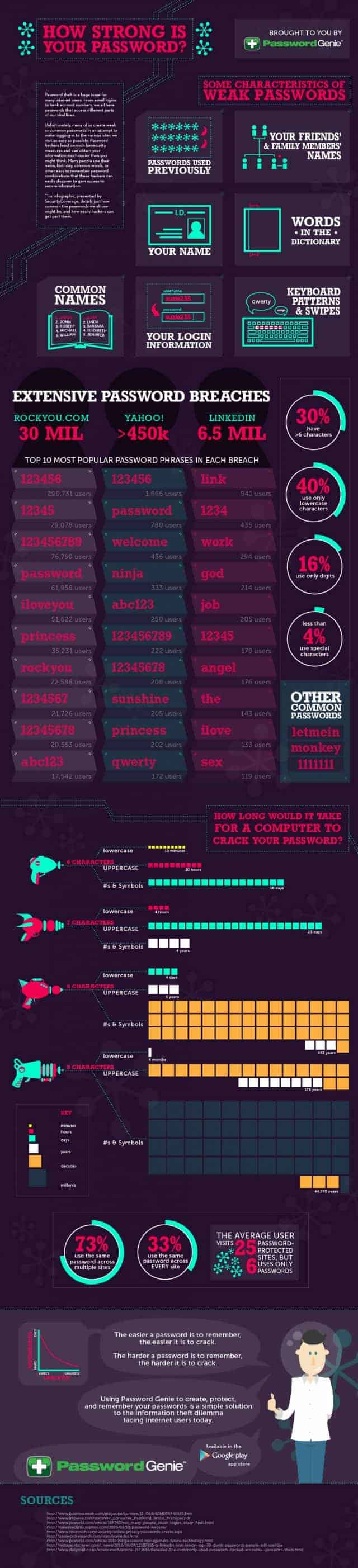
Here is a infographic to show you:
http://outdatedpenanguncle.blogspot.com/2012/10/infographic-password.html
Anyway, how do we check for the password that we use is safe enough?
I used this website:
http://howsecureismypassword.net/
In my opinion, as long as the password need 1 years plus to crack, it should be good enough. To be more safe, just make sure you always change the password every few months.
But since changing password every few months need a lot of effort especially everyone has more than 10 accounts like emails, banking, works, blogs, etc etc, I use keepass to keep all my password.
Keepass is available on Android, iOS, PC, Windows, Linux, and many more platform.
Like this if you are FB user and you think this post is useful. The button is at top right of content of this post.
+1 this post if you are Google+ users and you think this post is useful.
Hope you will enjoy this post, subscribe to my RSS or mailing list or follow me on blogger or twitter. :)
source: wild wild web
Showing posts with label password. Show all posts
Showing posts with label password. Show all posts
Friday, April 19, 2013

Wednesday, October 24, 2012
Infographic: Password
I have been receiving 2 emails from Twitter within a month, stating that my password might have been compromised and asked me to change it. I have already changed it to very difficult to crack, good quality password. But seems like Twitter got problem nowadays.
Anyway, just to share with you an infographic regarding password.
Here are a few tips:
1. don't use words that can be find in dictionary
2. mix capital and small letters, number and special characters
If you have at least 9 characters, and with 2 rules mentioned above, it will takes more than 44 years to crack your password, meaning it will be very very safe.

Time to change your password eh?
Like this if you are FB user and you think this post is useful. The button is at top right of content of this post.
+1 this post if you are Google+ users and you think this post is useful.
Hope you will enjoy this post, subscribe to my RSS or mailing list or follow me on blogger or twitter. :)
source: http://dailyinfographic.com/how-strong-is-your-password-infographic
Anyway, just to share with you an infographic regarding password.
Here are a few tips:
1. don't use words that can be find in dictionary
2. mix capital and small letters, number and special characters
If you have at least 9 characters, and with 2 rules mentioned above, it will takes more than 44 years to crack your password, meaning it will be very very safe.
Time to change your password eh?
Like this if you are FB user and you think this post is useful. The button is at top right of content of this post.
+1 this post if you are Google+ users and you think this post is useful.
Hope you will enjoy this post, subscribe to my RSS or mailing list or follow me on blogger or twitter. :)
source: http://dailyinfographic.com/how-strong-is-your-password-infographic
Monday, March 21, 2011
Keep safe your password
How many password do you keep? ATM? Email? Blogging account? Online banking account? Online share/forex trading account? Many more...... I have been using KeePass not too long after I bought my HTC Touch Elfin 2 years ago and have been using it until today. I got all my password in there, well almost all......

The good thing about KeePass is I can transfer the same file from my WinMo to PC and vice versa. So I can update the password using my PC or Winmo.
I do believe you can do it for any other OS and smartphones because it supports many platforms:
1. Windows Mobile (still supporting it! Thank you!)
2. Windows Phone 7
3. iPhone (and iPad, if you don't mind the weird UI that don't fix iPad)
4. Android
5. JAVA (meaning even your phone is not smartphone, as long as it support J2ME, you can use it!)
6. BlackBerry
7. PalmOS
8. Linux
9. Mac OS X
10. last but not least, Windows
You can choose to have a installed version for Windows or portable, meaning you can carry it on your USB thumb drive!
It supports AES and TwoFish, so you don't need to worry it will easily crack by hackers. Well, unless you are very special person who hold super secret password to super secret facility that your enemy country want to very badly. :P
Go to see the full feature:
http://keepass.info/features.html
Best of all, it is FREE!
To download, go to here for download link or download instruction:
http://keepass.info/download.html
Hope you will enjoy this post, subscribe to my RSS or mailing list or follow me on blogger or twitter. :)
Source: wrote by me
Picture source: Keepass

The good thing about KeePass is I can transfer the same file from my WinMo to PC and vice versa. So I can update the password using my PC or Winmo.
I do believe you can do it for any other OS and smartphones because it supports many platforms:
1. Windows Mobile (still supporting it! Thank you!)
2. Windows Phone 7
3. iPhone (and iPad, if you don't mind the weird UI that don't fix iPad)
4. Android
5. JAVA (meaning even your phone is not smartphone, as long as it support J2ME, you can use it!)
6. BlackBerry
7. PalmOS
8. Linux
9. Mac OS X
10. last but not least, Windows
You can choose to have a installed version for Windows or portable, meaning you can carry it on your USB thumb drive!
It supports AES and TwoFish, so you don't need to worry it will easily crack by hackers. Well, unless you are very special person who hold super secret password to super secret facility that your enemy country want to very badly. :P
Go to see the full feature:
http://keepass.info/features.html
Best of all, it is FREE!
To download, go to here for download link or download instruction:
http://keepass.info/download.html
Hope you will enjoy this post, subscribe to my RSS or mailing list or follow me on blogger or twitter. :)
Source: wrote by me
Picture source: Keepass
Subscribe to:
Comments (Atom)