Outdated Penang Uncle

Showing posts with label software. Show all posts

Sunday, May 20, 2012

RarmaRadio: Listen to the World

Since early 20th century (a.k.a 19xx) when the first Radio station started broadcasting as a source of information and entertainment, it never looks back. Radio stations nowadays not only have to compete with the TV stations (local/cable/satellite/etc), but also the internet. Even though radio is lack of a screen to see, but it is still a great source of entertainment and information whenever I drive or traveling on public transport. It is dangerous to watch a show on LCD screen when we are driving, so radio still the best choice. :P

Most of the radio stations nowadays have put up their websites and allow us to listen to them through the internet. The problem with that is some of the website required us to register with your email first before you can listen to the radio stream. Before you know it, you have tons of ads or spam mails in your inbox. Not to say the radio station spam you, but having too many emails in inbox is certainly not a good thing. There are a few software out there that can locate the radio stations easily and let us listen to the radio online without the need to register for each station. RarmaRadio is one of my favourite.

There are a few ways to navigate for the radio station, such as genres, network, region(a.k.a. country).

Picture below showing I am listening to JP Hip from Japan. RarmaRadio will show the logo of the radio station if it can find it. RarmaRadio will also shows the type of audio stream, which usually either mp3 or wma or aac. The Bitrate column is a good reference because if you are on slower network, the best to avoid those high Bitrate station. I tried some radio stations with Bitrate of 128k on TM Streamyx 1Mbps, and the result is very bad, the sounds keep on breaking up.
RarmaRadio on Outdated Penang Uncle blogspot dot com

Picture below showing I am listening to EKR from UK. If the station support the song name/artist name, it will show in the box below.
RarmaRadio on Outdated Penang Uncle blogspot dot com

One is the great feature of RarmaRadio is I can record the station with few options:
1. continuously with auto split song or no split (into one big music file)
2. record with timer
3. record current song only
RarmaRadio on Outdated Penang Uncle blogspot dot com

RarmaRadio did a good work to update the list as often as possible, if you find out a station you like to listen but it could not stream correctly, you can feedback to RarmaRadio.

The only disadvantage that I found on RarmaRadio is it will keep on streaming the station you listening to before you switch to another station, if you are on slow network, it will chock both station because RarmaRadio will continue stream the previous station. This feature is good only if you like to switch station very often. I would recommend to stop streaming first before switch to another station.

To download RarmaRadio, go to this link:
http://www.raimersoft.com/rarmaradio.aspx


Like this if you are FB user and you think this post is useful. The button is at top right of content of this post.
+1 this post if you are Google+ users and you think this post is useful.
Hope you will enjoy this post, subscribe to my RSS or mailing list or follow me on blogger or twitter. :)
source: wild wild web

Monday, February 13, 2012

Free software: Space Sniffer

Happy Valentine Day!

There are a lot of software out there that can show us the disk utilization and also how much disk space each folder consume, but either some of them cost a high fee or cannot meeting my requirement.
Treesize Professional and SpaceMonger are two famous software for this kind of function, however I don't think it should cost so much. Treesize Prefessional cost US$52.95 for single user license, and SpaceMonger cost US$24.95 for single user license. That is too expensive!

Thanks to Google, I found this free software that can do the same job like Treesize and SpaceMonger.

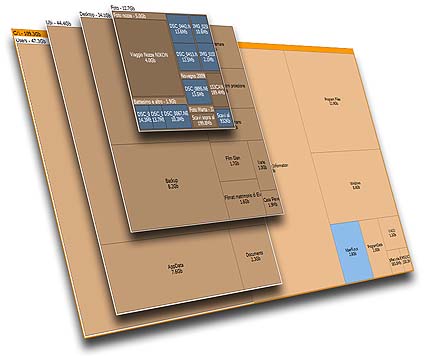
SpaceSniffer is using Treemap concept that invented by Prof. Ben Shneiderman.

Not only Space Sniffer will show the file size graphically, you can also apply filter and check for certain file type only (example: *.mp3). You can also exclude file type as well.

The filter will also works for time, type the condition (Example: >5years), the view will be updated accordingly. Combine filters is allow.

Other advantages that the author mentioned in the website:
Fast and easy to use
Supports drag and drop
Export module lets you produce customizable textual reports
Intuitive structure layout, multiple views for different media
Zoomable elements, navigate like a web browser
The Windows folders and file popup menu is accessible by right mouse click
It's possible to restrict the view content by typing simple yet powerful filtering criteria
Lets you temporary tag files with four different colors and perform filtering on them
Different views of the same media can show differently filtered elements
Customizable in geometry, colors, behaviors
You can navigate even during the scan
Smart cached scanning engine, multiple views, single scan
You can refine a zoomed area by a secondary scan process, even with main scan active
Reacts to file system events, keeps always in synch, warns you by blinking elements
Can scan NTFS Alternate Data Streams
It doesn't clutter your registry, only a plain XML configuration file
It's portable, no installation required, just put the executable somewhere and let's go

Best of all, it is free!
You can donate to the author to help the development of this software.

Why not install this software on your girl friend or wife or spouse's PC or laptop on this valentine? Not only they will appreciate your effort (this add points!), this will reduce the number of times of they call you for help because out of diskspace on their PC/laptop.

To download, go to this link:
http://www.uderzo.it/main_products/space_sniffer/download.html


Like this if you are FB user and you think this post is useful. The button is at top right of content of this post.
+1 this post if you are Google+ users and you think this post is useful.
Hope you will enjoy this post, subscribe to my RSS or mailing list or follow me on blogger or twitter. :)
source: I wrote this software review!

Monday, January 30, 2012

My new love: PotPlayer

My new love, oh no, I mean have felt in love with a new media player. PotPlayer is not new, but being outdated uncle, I was too lazy to change the media player once I found it is very stable for daily usage. I have been using KMPlayer for many years, with Media Player Classic as backup for daily usage.

PotPlayer is created by the same author (Mr Kang) that wrote KMPlayer. However KMPlayer has been sold to a commercial company, Pandora TV in 2007. After that, Mr Kang shifted his focus to create another player, hence PotPlayer is created.

Why I switch from KMPlayer to PotPlayer?

1. PotPlayer has the same functionality like KMPLayer. Therefore no problem at all from the time I switched.

2. KMPlayer is becoming bulky after being takeover by Pandora TV. It is not as light as I think anymore. From the setup file grow from ~14M at Sep 2010, to ~17M at Oct 2011, to ~22M for latest version of KMP 3.1. This is a very bad sign, the code should be optimized from time to time, but becoming another MS Windows. PotPlayer at softpedia right now is about ~8M only.

3. KMPlayer become slow in sync up the video and audio during play back of RMVB format. The problem appear when I try to skip to a certain time, or fast-forward or backward, especially I use the left and right arrow keys to fast-forward or backward. PotPlayer don't have this problem at all. Media Player Classic don't have this problem as well.

4. Portable version of PotPlayer is easily available compare to KMPlayer.

5. No additional codec is require to enable PotPlayer to play all major format. I don't need to install any codec to play RMVB, mkv, divx, xvid, etc etc.


PotPlayer also have it's disadvantages as well:
1. Original website is in Korean only, no other language. We also cannot feedback in it's forum if we found any bug if we don't know Korean language. However you can find the English version from softpedia.

2. I downloaded portable version from a Chinese website, that PotPlayer is completely in Chinese only. Not as friendly as KMPlayer that I can switch language on the fly.

Summary, more advantage than disadvantage using PotPlayer. I am going to remove KMPlayer from my computer in very near future. Lifehacker even has feature this player.

To download PotPlayer:
English version [don't download from softonic, it has very outdated version]
English version from videohelp.com
English version from portableapps.com
Official website (in Korean)
Portable version (in Chinese)


Like this if you are FB user and you think this post is useful. The button is at top right of content of this post.
+1 this post if you are Google+ users and you think this post is useful.
Hope you will enjoy this post, subscribe to my RSS or mailing list or follow me on blogger or twitter. :)
source: I wrote this!

p/s: contact me at ahsiang888 at google mail for software review.

Tuesday, January 3, 2012

Captcha.Trader for JDownloader and MiPony

File-server services always being linked to piracy. A lot of songs, video, apk (Android setup file), software, PDF that supposedly need to be pay first before download legally from the original or authorized websites, but they are being cracked and put in to file-server and share publicly and the link being distribute worldwide. File-server actually being serve as temporary storage to send huge files for research and development in many area, from universities to private sectors.

Some of us need to download homework or huge result files from file-server that being upload by a friend at another side of the planet. Of course it is convenient to download directly using web browser, it is good for small file, but for huge file like a few GB, there is no way we can wait for days for the download to complete. Furthermore, some web browsers will time out, so we have to start the download all over again.

So some nice people out there wrote some nice softwares for us to manage these download, example MiPony and JDownloader. We can put all the links to the files we want to download and let the software manage them. However the captcha still has to be key-in manually by human (a.k.a. us). If your counterpart at Brazil uploaded 100 files, then you have to key-in 100 times the captcha and not once, but every time before the download begin on each file. We should be focusing on our the real work, not on downloading. So Captcha.Trader come to the picture.

I can download the Captcha.Trader plugins and then add into JDownloader and MiPony, so that Captcha.Trader will solve the captcha for me. You can either buy some credits or start resolve some captcha and earn credits before you want to use it for download purpose.

Captcha.Trader also works for Android (CaptchaDroid), WP7 (CaptchaToGo), and iOS (MobiCaptcha).

Like this if you are FB user and you think this post is useful. The button is at top right of content of this post.
+1 this post if you are Google+ users and you think this post is useful.
Hope you will enjoy this post, subscribe to my RSS or mailing list or follow me on blogger or twitter. :)
source: I wrote this

Thursday, December 29, 2011

Play LEGO without buying LEGO

Excuse me? How to play LEGO without buying LEGO?
Imagination in my brain?
Not really, we are really able to play or design LEGO with need to buy the LEGO first.

Introducing LEGO Digital Designer.

The downloaded setup file size is about 140MB and installation need about 200MB only.

Here is the interface (from Lego website, I don't need to explain it again here, haha):


It will calculate how many of each type blocks that you need to build a Lego project, which is very convenient when you going to buy the real physical Lego to build the real Lego project.
It also include the Lego with micro computer, Lego Power Function, which make it a is a very good planning tool to plan for a Lego project, either huge or big or small.

Talking about Lego, I posted a few video showing Lego projects that people built using Lego:
How to waste 8mins on Tuesday
Build film projector with LEGO
Predict eclipses with LEGO
ARM that solves Rubik's Cube

To download this software, go this this link, choose either Windows or Mac OSX. Supported Windows version are Windows XP, Windows Vista and Windows 7.
http://ldd.lego.com/download/default.aspx

And yes, it is absolutely free!


Hope you will enjoy this post, subscribe to my RSS or mailing list or follow me on blogger or twitter. :)
pix source: LEGO website
video source: http://ldd.lego.com/getstarted/default.aspx

Monday, November 14, 2011

Super fast find file for Windows

For most of the Windows users, they use the default "search" function on Windows to find their file. There are a few problems with it.

For older Windows, the search function just not doing the job right, meaning it cannot find the file I want, even though I gave the right keyword. This happen a lot during Windows XP time. So I use cygwin to search file.

For Windows 7, the search function become better and faster. Why it can become faster? It is because it keep on indexing all the files (including emails). The problem with this is that it create a huge index file on hard-disk  Although hard-disk (non-solid-state type) are very cheap nowadays, no problem with Windows creating a Gig or two on a 500G or 1T hard-disk. But this will be a problem for solid-state type hard-disk, because solid-state hard-disk still very expensive. So in order to save the disk space on my laptop (I use solid-state hard-disk, hehe), I disable the indexing but search function become super slow.

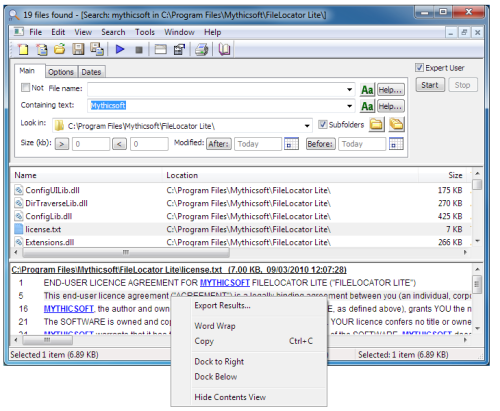
Luckily I found a software that search files as fast as Windows 7 search (with indexing turn on), but without the huge indexing file! Introducing FileLocator Lite. The same company also selling the pro version, named "FileLocator Pro", but this cost US$39!

Anyway, you can download the setup file for lite version here:
http://mythicsoft.com/Page.aspx?type=filelocatorlite&page=download


I found out the lite version is good enough for me for daily usage. Search with asterisk (*something*) always give me the right file. You can also search by modified, created, or last accessed date of a particular file(s).

Actually this software also called "Agent Ransack" but the name seems like not really suitable for work (NSFW), so the company compile the same code with different product name.


Hope you will enjoy this post, subscribe to my RSS or mailing list or follow me on blogger or twitter. :)
pix source: http://mythicsoft.com
source: I wrote this review!

Contact me for software review at: ahsiang888 at gmail dot com

Friday, September 23, 2011

My kind of Windows Explorer - Explorer++

If you are Windows user, regardless Windows XP, Windows Vista, Windows 7 or Windows 8 (anyone already on Windows 8???), you should have use Windows Explorer before. Even you always use "My Computer" to find the files, but it is actually Windows Explorer, just without the Folder view.

I use Windows Explorer a lot, both at work or at home. Copy files, move files, delete files, open files. And I use a few of Windows Explorer windows at any time, because I am too lazy to browse through the folder again every time I need to open it, so I just leave it. But that become very cluster, and messy with so many windows opened. So I start thinking if there is any multi-tab Windows Explorer? We have some many multi-tab web browsers, Firefox, Safari, Opera and IE also before multi-tab after some many years lack of this function after FF or Safari or Opera already have multi-tab.

Forget about web browsers, and there is a multi-tab Windows Explorer, but as always, it is not from Microsoft. But luckily this multi-tab Windows Explorer is a free software! Yeah!

Explorer++ (yes, it is Explorer with 2 plus symbols behind) can be come with installation version or portable version. This is another plus point, no installation! I have tried many file explorers, like Total Commander (need to pay), or some other which I forgot the names, because I simply switch back to use Windows Explorer after a few days of trying these file explorers. So you can know these file explorers are as bad as original Windows Explorer. :P

Because I am too lazy to take snapshot of Explorer++, so I just take the screenshots from it's website, hehe. And I will do some intro to the features of Explorer++.

Firstly, the view, it can be just like the original Windows Explorer, nothing much. Of course you can customize to add in more column in detail view, again, same like original Windows Explorer.


Second, it can show folder size at detail view. Don't this feature available

Third, you can change the attribute of files, again, same like Windows Explorer, but you can change the modification/creation/accessed date of each file. To do that, select the file(s) and then click "File" and then "Set File Attributes".

Forth, it can bookmark the folder that you want to open regularly.

And best of all, it is multi-tab, if you click on any of the picture above, you can already see the multi-tab. So no more messy with more than 10 Windows Explorer, because all of them can be open in muti-tab of Explorer++.

Okay, to get it, you can either get it from portableaps.com which will install the portable version for you.
http://portableapps.com/apps/utilities/explorerplusplus_portable

Or just download the zip version and unzip the files on your own. 64bits version available here. :)
http://www.explorerplusplus.com/download

The website:
http://www.explorerplusplus.com/home

Have a nice Sunday and a nice week ahead. :)

Hope you will enjoy this post, subscribe to my RSS or mailing list or follow me on blogger or twitter. :)
source: I wrote this, but pictures are from explorerplusplus website :P

p/s: submit your software/hardware/smartphone/tablet for review here, contact me at ahsiang888 at gmail.com. But be warned, I will write what ever is true if your stuffs really bad.

Sunday, August 21, 2011

Take control of Gmail inbox

Monday again. If you don't check email on weekend, usually you will get lots (tons for some people) of emails inside your inbox, update emails from Facebook, Groupons and some other websites/blogs that you subscribe to. But how do you organize them?
Usually we heard of 4D (sorry, not 4D numbers gambling in Malaysia, Singapore and some other countries :P)
1. Delete it
2. Delicate it
3. Do it
4. Defer it

But how do we sure this is really working? To help with that, TaskForce can help you to do more with this 4D, for Gmail specifically. Not sure has it is working for other web-based email like yahoo mail, or hotmail though.

Basically TaskForce help us to convert emails into tasks, so that we can save time and stay organized.

Here is how:
1. Install the add-on on FireFox or Safari or Chrome (and RockMelt).
2. Restart the browser.
3. Log-in to Gmail.
4. TaskForce converts emails to tasks and clear the inbox.
5. And then you can delay tasks that you can deal with them later.

For more detail, go to this RSS or mailing list or follow me on blogger or twitter. :)
source: I wrote this!

Monday, June 27, 2011

Irfanview is my favourite photo viewer

Irfanview is always my favorite photo viewer. Why? Because it is fast and very light weight. While some photo viewer software claim that they can view so and so format, I don't like most of them trying to take over my Windows settings and boy I hate that. Also you need to pay a fee to use some of them legally.
With less than 10Meg (including additional plug-ins), I can view 99% of the photos and video and flash video using Irfanview. And I always like to see the EXIF data of photo that I view. With just typing "e" while viewing photo with Irfanview, I can see the EXIF instantly!

I am too lazy to print screen, so just go ahead to the Irfanview website to download the latest version 4.3 and install it. Remember to download and install the plug-ins as well.

If you like portable version, download from PortableApps.com.


Hope you will enjoy this post, subscribe to my RSS or mailing list or follow me on blogger or twitter. :)
source: I wrote this, amazing!

Monday, May 23, 2011

Download Google Map with Google Map Saver

Why do you need to save the map when you can view it whenever you are online? Simple, because some of us not always able to be online. Or it could be very costly to be always-on. So a nice guy wrote this software for those that need to look at Google Map regularly without being punish with high data cost. Read more after the jump......


You will see water mark if the software not being activated. Luckily activation is free, you just need to agree upon a few things, which I think it is fair.

Is it legal to download? Yes, because it is not bulk download according to the author.

When you start the software, it will show you the steps to download google map.

To download, go to here:
http://www.codres.de/google-map-saver

Buy the author coffee if you think the software did helped you.

Hope you will enjoy this post, subscribe to my RSS or mailing list or follow me on blogger or twitter. :)
picture source:

Monday, February 1, 2010

Sketch2Photo: Real or not? Byebye photoshop

According to the website link below, they claim they can let user to sketch a picture and the software(?) will search the internet for related images and put them into one single nice photos.

http://cg.cs.tsinghua.edu.cn/montage/home.htm

Does this mean good bye photoshop? Go to the link and see the video for yourself.

Monday, July 20, 2009

Sprite backup

This is the first software that I installed on my HTC touch by myself.

The shop that I purchased this phone already helped me to installed a few useful and un-useful (:P) software. I will go thru them one by one, hopefully I have time to do that. :)

I know I am going to do lots of funny stuffs on the phone, so backup is the first one I need to install.

Luckily this backup software came with the software CD, so I don't need to pay for it.
You need to install it on your PC/desktop/laptop first then it will ask for connection to your phone and it will install it on the phone. After a few times of rebooting your phone, it will eventually backup important files from \Windows and some others dir (I didn't check, don't ask).

I haven't went to the situation that need to restore from backup, so don't ask the restore. Actually it is very simple only, hook up your phone with PC, select ActiveSync (file access only wouldn't work), start the software on PC, select backup or restore, thats all.

Sunday, July 12, 2009

terracrosser - Better than "Google Maps for mobile"

As promised in previous post, terracrosser offer a much better map viewer than google map for mobile. Actually this terracrosser used another program called mapper.exe (which come with the downloaded package) to download the maps from google map and yahoo map on your laptop/desktop. It then compiled the maps into a file that can be read by the terracrosser. The only trick is to copy the map file into your ppc.

This is much much much x12 better than google map for mobile la. why? coz google map for mobile required GPRS data connection. GPRS is very costly in my country (Malaysia). So why bother to make it only works with GPRS only? why not wifi? Why the smart engineers at Google make it such a way? That might be some marketing gimmick. Mobile providers: "You make the program become blood sucker and we share share the profit la"
Goooooogle: "sure, anything you say taukeh"

Anyway, back to terracrosser, you can download maps from google map and yahoo map, and choose the level of zoom. The more zoom-in, the bigger the file size lo. So if you have a few more Gigs to spare on your ppc's external memory card, why not? heheheh.

I have downloaded Penang island, Penang mainland, Taiping, Ipoh and Cameron Highland's maps from google and view them on my HTC Touch after copy the map files into it. If your ppc have GPS then even better, you can use it as a navigator. Syok!

Anyway, remember to read the disclaimer at below of the page before you try out ya, heheh.

Thursday, July 9, 2009

Trying out this software......Stay tune......

http://terracrosser.com/
It is a map viewer + navigator. Too bad my HTC Touch don't have GPS, so will be trying for the viewer, downloading map now...... Stay tune for the review.