Outdated Penang Uncle

Showing posts with label facebook. Show all posts

Tuesday, December 11, 2012

Which Friends Concerns You Most on Facebook - part2

If you don't like to do the coding stuffs like in this post (part 1), you might want to this method in part 2 of "Which Friends Concerns You Most on Facebook".
http://outdatedpenanguncle.blogspot.com/2012/12/which-friends-concerns-you-most-on.html

Which Friends Concerns You Most on Facebook - part2

  1. Login to your Facebook account as usual
  2. Right click on any blank space on your timeline (or first page, if you still not change to timeline), and view page source. Example in picture below, from left FireFox, IE, Chrome.
  3. Instead of looking for a string like in part1, copy the whole code by pressing Ctrl-A and then Ctrl-C.
  4. Paste the code into step3 of this link below:
    http://www.piliapp.com/event/facebook-ordered-friends/
  5. Wait for a few seconds for it to render the result, and it will show you the top 150 friends that concern you the most.


If your spouse or boyfriend/girl friend not in the top 3 list, please do not punish or angry with him/her. It is because some people is always looks at everyone else timeline every 5 mins on his/her laptop/ipad/smartphone. :P

Happy checking. :)


Update: I was unable to upload picture to imgur when I wrote this post. Here is the picture that the result looks like:
Which Friends Concerns You Most on Facebook on Outdated Penang Uncle blogspot dot com


Like this if you are FB user and you think this post is useful. The button is at top right of content of this post.
+1 this post if you are Google+ users and you think this post is useful.
Hope you will enjoy this post, subscribe to my RSS or mailing list or follow me on blogger or twitter. :)
source: I google it!

Friday, December 7, 2012

Which Friends Concerns You Most on Facebook - part1

How many of your friends actually looked at your post on Facebook timeline? There is no way to tell how many looked except if you are posted to a group, or it is a Facebook page (not personal timeline). Is there really friends that concern about you on Facebook? Well, I try to keep positive when I post on Facebook.

How do we know that which friends concerns about you most on Facebook? There are a few methods, but I would like to share the first method and this should the the most safe method. But this will involved some geek stuffs, but not too geek because I am going to walk you through the process.

Which Friends Concerns You Most on Facebook - part1


  1. Login to your Facebook account as usual
  2. Right click on any blank space on your timeline (or first page, if you still not change to timeline), and view page source. Example in picture below, from left FireFox, IE, Chrome.
  3. Press "Ctrl+F" and search for "OrderedFriends" (without double quote). I have to blur out the numbers to protect my friends identity. :)
  4. Copy the first number (without double quote) after the "list".
  5. Paste the number after the "facebook.com/" in the address bar. Example below, replace PenangUncle?ref=hl with the number that you copied in step4.
  6. Press enter and it should bring you to your friend's timeline/page. That is the friend which always check your status. If you want to see No.2, No.3 and onwards, please copy the second, third and so on number from the page source you see in Step3.

If your spouse or boyfriend/girl friend not in the top 3 list, please do not punish or angry with him/her. It is because some people is always looks at everyone else timeline every 5 mins on his/her laptop/ipad/smartphone. :P

Happy checking. :)


Like this if you are FB user and you think this post is useful. The button is at top right of content of this post.
+1 this post if you are Google+ users and you think this post is useful.
Hope you will enjoy this post, subscribe to my RSS or mailing list or follow me on blogger or twitter. :)
source: I google it!

Sunday, July 15, 2012

Latest Instagram Update (after FB bought over)

You probably already know that Facebook bought over Instagram few months ago. But do you know that how Instagram doing after being bought over? Well, lamebook.com have some idea, here is what they think FB Instagram will roll out new filters.

pix credit: lamebook.com

Personally I don't know why Instagram is so popular and why (some) people like it. It is just a bunch of badly photoshopped photos. Oh wait, that make sense that Facebook bought it over.
:P


Like this if you are FB user and you think this post is useful. The button is at top right of content of this post.
+1 this post if you are Google+ users and you think this post is useful.
Hope you will enjoy this post, subscribe to my RSS or mailing list or follow me on blogger or twitter. :)
pix source: lamebook.com

Tuesday, July 3, 2012

How to Get More Likes on Facebook Page

Yesterday my ex-cubemate suddenly ping me on WLM (Windows Live Messenger). So I start to reply her out of courtesy. After a few rounds of Q&A, she asked me to like her FB page. Actually I have already received email from Facebook that asked me to view or like the page. I know what path she is going through and I have been there. So I start to offer some methods however since she was on smartphone, not computer, so it was very inconvenient to switch between apps. Okay, on a side note, why not consider a better smartphone my friend? :)

I have been going through some difficult paths to get more likes on my Facebook page. I will list out all of them and the good and bad of each of them. Here we go:

  1. The very first method that Facebook suggest us to get more likes on our Facebook page is send out notification to friends in our personal Facebook account. 
    • $: free
    • Good: Some of your friends would support you and liked the Facebook page for you
    • Bad: Most of the your friends will ignore the notification
    • My thought: this is the worst method! Unless you are the marketing director and you ask all of your 100 over people that work for you to like the Facebook page.
  2. Email/Skype/MSN/WLM/YM/Whatsapp/etc (whatever communication method) your friends and family, and ask (beg) them to like your Facebook page.
    • $: free
    • Good: Some nice friends would like your Facebook page. Family members could or could not like your Facebook page.
    • Bad: You have to beg and beg with each of them. Time Consuming.
    • My thought: Asking favor from other, in return you have to spend more time to response to the favor asked by them.
  3. Buy Facebook Page Likes
    • Yes, if you google "buy Facebook likes", you will find more than hundreds of website/organization are offering this kind of service.
    • $: expensive
    • Good: Number of Facebook page Likes increase very fast!
    • Bad: again, it is expensive to use this method
    • Another Bad: is the Likes are by true users? Will the Like disappear over night after a while (assuming the Likes are from fake users).
    • My thought: this is the most expensive method. Why not give out some freebies or organize a lucky draw for those that liked your Facebook page. Majority of the internet users always like some freebies. 
  4. Reciprocity
    • According to Wiki: Reciprocity in social psychology refers to responding to a positive action with another positive action, rewarding kind actions.
    • According to me: I help you, you help me in return. :)
    •  $: free
    • Good: the Facebook page Likes that you get is real
    • Bad: some Liked Facebook page to get points, they will unlike after a while. This method also very time consuming.
    • My thought: some of the website that offering this system usually use point system. You pay out points for others to like your Facebook page or visit website or G+ or view YouTube video. You will earn points by liking others Facebook page, visit websites and etc. If you feel frustrated with slow pace, you can always buy points with money, which become similar to 3rd method.
  5. Advertisement in Facebook
    • Spend some money to expose your Facebook page to targeted audience.
    • $: very low investment
    • Good: Very easy to target your desired audience, and performance of each ads can be monitor.
    • Bad: Need to learn how to write Facebook ads.
    • My thought: Very cost effective and the controlability of the ads. We can manage the cost of it as well.
The most important thing with Facebook page is engagement with audience, as well as the content of the page. There will be little Likes if there is no content or no engagement with the Facebook users.

In summary, it is up to you to choose which method that suite you well. Below are some of the links for method no.4:
Add Me Fast http://addm.co/W2U86IM
You Like Hits http://youlikehits.com/?x=160287
Get By Hit http://www.getbyhit.com/ref-209.html

Good luck!

Like this if you are FB user and you think this post is useful. The button is at top right of content of this post.
+1 this post if you are Google+ users and you think this post is useful.
Hope you will enjoy this post, subscribe to my RSS or mailing list or follow me on blogger or twitter. :)
source:  I wrote this!

Friday, June 15, 2012

(Almost) Shopping with Lazada (Social Media Failed)

If you are surfing internet from Malaysia, you probably have noticed lately that almost all the Google Ads you seen on all websites, including international websites, are Lazada ads (ladies might seen Zalora, the online fashion site, under same company with Lazada). Lazada and Zalora are new Amazon clone that started by Samwer Brothers from German. Samwer Brothers operating model (I heard only ya) has always been clone famous online business from US and implement on other countries that don't have the similar online business. So they has been very successful.

With the all-in effort (seems like) in Malaysia by Lazada, I think a lot of Malaysian knows about it by now. And the price are very competitive, well, at least for the smartphones that I am looking for recently. I was almost wanted to order for Samsung Galaxy S 2 because after discount and voucher, it is selling at RM1169 (~US$368) only! My friend has bought the very same phone at shop for RM1550 (~US$488) few weeks ago. That is RM381 or more than US$100 cheaper at Lazada.

However after some research (Google, what else?), there is a little bad comment on the internet or forum (including Cari and Lowyat which are the mostly use forum in Malaysia), except Lazada Philippines which was being complained about the bad services. So I was getting a bit worry.

Then I found FB page of Lazada Malaysia. There are mixed comments with bad ones appear more than the good ones. Just now I found the best (worst) comments. I think that person is very frustrated, therefore he posted about 6 or 7 of same comment on the FB page. However when I want to take a snapshot of it, it left one only, the rest probably being deleted by the page admin.

Lazada FB page comment on Outdated Penang Uncle blogspot dot com

Checking other comment, some are left without any response for days. And I (almost) decided not to buy from this website, because I don't want to get too much trouble just to save a few hundreds. If there is any problem, the money should be able to return to me, but the troubles and worries is not worth of the money that I might be saved.

In the summary, if you want to have a FB page of your business, make sure there is one person who properly manage it. FB page can be your biggest helper or bigger loser for your business. Well, Lazada is not making profit out of me, for now. :)


Update: Jul 2, 2012 - looks like there are more and more frustrated customers on Lazada's facebook page.
Lazada failed on Outdated Penang Uncle blogspot dot com


Like this if you are FB user and you think this post is useful. The button is at top right of content of this post.
+1 this post if you are Google+ users and you think this post is useful.
Hope you will enjoy this post, subscribe to my RSS or mailing list or follow me on blogger or twitter. :)
source: I wrote this!

Wednesday, May 30, 2012

Facebook Timeline Remover

Facebook Timeline, like it or hate it, it is here no matter what you think. While most of the Facebook users has been forced to change to Timeline, some still at older Facebook interface. I am lucky that my personal Facebook page still using old Facebook interface, while this blog's Facebook Page has been forced to change to Timeline not too soon after it was being setup.

TimeLineRemove is something you can try if you want to get rid of the TimeLine for now. What actually happen in background is timeline still being loaded, but TimeLineRemove change the look of the TimeLine to become old and good Facebook interface. So you can look at your friend's Facebook profile on old Facebook interface.

TimeLineRemove is available for FireFox, Chrome, Safari and Internet Explorer. All you need to do is go to it's website and install the add-on or extension (allow permission if needed), reload the Facebook and then you are on old and good Facebook interface.

picture source: http://www.timelineremove.com/

To disable Facebook TimeLine, visit this link and download the add-on/extension:
http://www.timelineremove.com/


Like this if you are FB user and you think this post is useful. The button is at top right of content of this post.
+1 this post if you are Google+ users and you think this post is useful.
Hope you will enjoy this post, subscribe to my RSS or mailing list or follow me on blogger or twitter. :)
source: http://www.timelineremove.com/

Friday, May 25, 2012

Facebook Free Money?

Facebook is giving me free money. No bluffing, Facebook is really giving me free money.

I got this email from Facebook last night:
Facebook is giving me free money on Outdated Penang Uncle blogspot dot com

Apparently it is because this blog's Facebook Page has reached 300 Likes last week. Facebook is offering me US$50, wow, that is about RM150. Not bad at all.

US$50 for Facebook is much much smaller than a peanut. With market capital at 70.62B (May 24, 2012), the money Facebook gave me is about 0.0000000007% from it's market capital.
Anyway, how often someone that is not working for Facebook getting money from Facebook? :P

Alright, I am going to use the free money to run ads on Facebook!

This blog's Facebook Page:
http://www.facebook.com/PenangUncle


Like this if you are FB user and you think this post is useful. The button is at top right of content of this post.
+1 this post if you are Google+ users and you think this post is useful.
Hope you will enjoy this post, subscribe to my RSS or mailing list or follow me on blogger or twitter. :)
source: my rant

Wednesday, March 14, 2012

Something Wrong with Facebook?

The other day I have problem login into Facebook on Chrome, the the page just could not refresh even though other websites just refresh nicely on Chrome. So I changes to FireFox, was able to login to Facebook, but see something like below picture, the date and time just NaNNaNNaN.
FB problem on Outdated Penang Uncle blogspot dot com

It might be just the "Notifications" only, so I go to a group that I created, and see this:
FB problem on Outdated Penang Uncle blogspot dot com

Okay, might be my account, so I go to check out some Singapore local artist facebook page, and still get NaNNaNNaN.
FB problem on Outdated Penang Uncle blogspot dot com

Okay, probably my network problem. I just leave it and try it tomorrow. Then I login in again in next day and still get the same thing.

Oh well, probably Nyan Cat has slip into my laptop? :P


Like this if you are FB user and you think this post is useful. The button is at top right of content of this post.
+1 this post if you are Google+ users and you think this post is useful.
Hope you will enjoy this post, subscribe to my RSS or mailing list or follow me on blogger or twitter. :)
source: I saw it, I write it

Thursday, February 9, 2012

Fun facts about Facebook Timeline

Do you use Facebook? If yes, do you use Facebook Timeline? Well, as an Outdated Penang Uncle, I haven't use Facebook Timeline yet. Because I have too few photos and video to put in there, hence make no-sense to enable the Timeline. However if you are celebrity or famous people with lots of fans and likes, it might be a good choice to enable Timeline.

Here is a video taking about fun facts about Facebook Timeline. The narration supposed dubbed by someone sounds like Mark Zuckerberg.

Your future has been determined and own by Facebook, hahah.


Like this if you are FB user and you think this post is useful. The button is at top right of content of this post.
+1 this post if you are Google+ users and you think this post is useful.
Hope you will enjoy this post, subscribe to my RSS or mailing list or follow me on blogger or twitter. :)
source: video source cracked.com

Wednesday, January 4, 2012

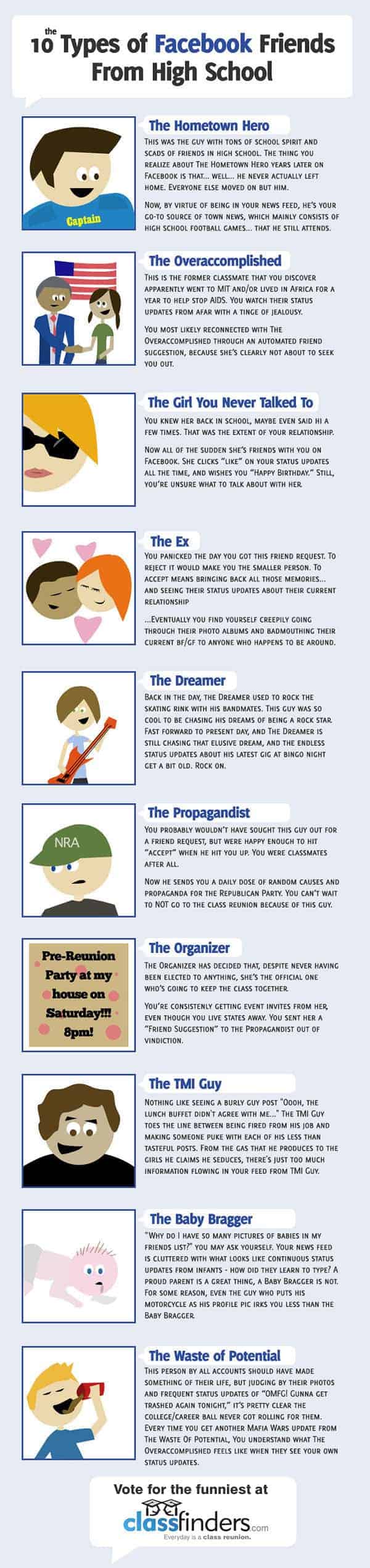
What kind of Facebook Friends you have?

Friends on Facebook. There are really good friends, there are annoying friends who you wish you never accepted. See what kind of Facebook Friends you would have. I have 9 out of 10 listed here, sigh.


Like this if you are FB user and you think this post is useful/funny. The button is at top right of content of this post.
+1 this post if you are Google+ users and you think this post is useful.
Hope you will enjoy this post, subscribe to my RSS or mailing list or follow me on blogger or twitter. :)
source: http://dailyinfographic.com

Monday, October 31, 2011

Facebook wall of shame

Facebook Facebook, how many of you out there are NOT using Facebook? I am still using Facebook because 99% of my friends use Facebook. So in order to get update of a friend, Facebook. In order to see the photo that my friend took with me, Facebook. How about you? Do you still use Facebook?

Here are some fact about Facebook (click image to enlarge):

Also see why you should quit Facebook :D
What you should quit Facebook
Video: why you should quit Facebook
More reason why you should quit Facebook
More Fact on Facebook

Hope you will enjoy this post, subscribe to my RSS or mailing list or follow me on blogger or twitter. :)
source: http://dailyinfographic.com

Thursday, September 29, 2011

How to disable Facebook News Ticker

Don't like the Facebook News Ticker? Here is a simple video to teach you how to do it. A picture worth a thousand words, a video worth a million words? Never mind, just click play on the video below.


Note: for FireFox and Chrome only.

Hope you will enjoy this post, subscribe to my RSS or mailing list or follow me on blogger or twitter. :)
source: See the original author of the video(?) http://googleplus.wonderhowto.com/corkboard/hide-facebook-news-ticker-firefox-and-google-chrome-0130089/

Tuesday, August 9, 2011

Attacking Facebook by Anonymous

Anonymous, the famous hacker group is planning an attack on Facebook on Nov 5, 2011. They called it "Operation Facebook". I hope they don't steal the Facebook users' password, otherwise everyone just have to change their password right after the attack. That is what I plan to do after that day. Even though I don't have anything critical to hide on Facebook, but Facebook account nowadays serve as an identity of myself on the world wide web. I would suggest everyone to change your password after the attack.


Btw, if you have not change your Facebook login to be always using https, please do so. It have more protection. And always logout if you are sharing your computer/laptop with your family/friend/etc.

Hope you will enjoy this post, subscribe to my RSS or mailing list or follow me on blogger or twitter. :)
source: video from youtube and I wrote the rest la.

Sunday, August 7, 2011

Facebook vs Google+

Facebook vs Google+, who is better? Find out the detail in the infographic below. How many of you already using Google+?

Click the picture to see in full size:

If you still don't get Google+ account, leave a comment so that I can invite you. :)

Hope you will enjoy this post, subscribe to my RSS or mailing list or follow me on blogger or twitter. :)
source: http://dailyinfographic.com/

Monday, July 18, 2011

Angry Birds with Super Mario

Found this in Facebook video yesterday. Angry Birds leverage on Super Mario Bro technique. :) Enjoy!


Hope you will enjoy this post, subscribe to my RSS or mailing list or follow me on blogger or twitter. :)
source: Originally saw this at http://www.facebook.com/video/video.php?v=163894497015080&oid=121766611168619&comments

Friday, March 25, 2011

Facebook saved life!

Okay, I have posted a few posts that why you should quit facebook:
Why you should quit Facebook
Top 10 reasons why you should quit facebook
More reason Why You Should Quit Facebook
But see the video how facebook saved life after the jump:


So facebook does have its value, okay, I am going to keep the facebook account.
How about you? Did facebook help you or screwed you? :P


Hope you will enjoy this post, subscribe to my RSS or mailing list or follow me on blogger or twitter. :)
Source: http://thedailywh.at/2011/03/18/last-night-the-internet-saved-my-life-of-the-day/

Monday, February 28, 2011

More fact on Facebook

Just how many people using Facebook now? See the video to find out after the jump:


Also some posts regarding facebook that I wrote:
Why you should quit Facebook
Why you should quit Facebook again!
More reason you should quit Facebook :D

Hope you will enjoy this post, subscribe to my RSS or mailing list or follow me on blogger or twitter. :)
Source: http://alextrimpe.com/

Wednesday, November 24, 2010

Facebook wants to be GOD

Yes, don't make GOD angry, else HE will punish you, like remove you from facebook, and banned you forever from facebook.


lamebook is one of the case, see their posting http://www.lamebook.com/lamebk/. It was banned from facebook, but facebook then said it was some technical issue. http://techcrunch.com/2010/11/22/facebook-censorship/
Don't think it is technical issue, but was a bad moved that they regretted that and said it was technical issue.

Facebook is filtering whatever you post and said on facebook, so they can watch what you write in facebook email maybe?

So should be you continue posting all your privacy in facebook? What is your thought?

Anyway, facebook CEO still partying.


Hope you will enjoy this post, subscribe to my RSS or mailing list or follow me on blogger or twitter. :)

Saturday, November 20, 2010

XDA FaceBook App for WinMo

While some have abandoned Windows Mobile (skyfire for example), some good people at WinMo community (XDA for the best example) still developing useful apps for Windows Mobile platform. I have posted many freeware PPC in this blog, check they out here.


Introducing a new Facebook apps, this is different from the official Facebook apps from Microsoft. It is still in development, but the beta 3.9 version already have more than 12,000 downloads!


For detail go to XDA.

The official page:
http://code.google.com/p/xda-winmo-facebook/

To download, go to:
http://code.google.com/p/xda-winmo-facebook/downloads/list


Hope you will enjoy this post, subscribe to my RSS or mailing list or follow me on blogger or twitter. :)

Wednesday, November 17, 2010

More on RockMelt

Okay, RockMelt finally working on my laptop. See what I complained about. Anyway, here is my print screen. The icons (apps) on both side are finally appear.It could be previously it cannot login. So your friends are on left hand side; facebook profile/twitter/RSS on right have side.

I can invite friends to RockMelt, but only gave me 3 invites? WHY WHY WHY?
Another problem is I cannot invite some people, most of my friends can be invited, but not all, not sure why yet.

My twitter also added here, so a single click can see my twits.


You can subscribe to RSS, I added this blog's RSS for testing:

Verdict, if you use Facebook 24/7, this could be your browser. Else look for FireFox or Safari (I use both of them).


Previous post on RockMelt:
More on RockMelt
First encounter on RockMel


Hope you will enjoy this post, subscribe to my RSS or mailing list or follow me on blogger or twitter. :)