Outdated Penang Uncle

Showing posts with label browser. Show all posts

Wednesday, June 13, 2012

What is Green Browser?

The actual name for this browser is GreenBrowser, without the space.

Written by a Chinese (again? Maxthon and Avant are also written by Chinese), GreenBrowser is very similar to first generation of Maxthon, which was called MyIE at that time.
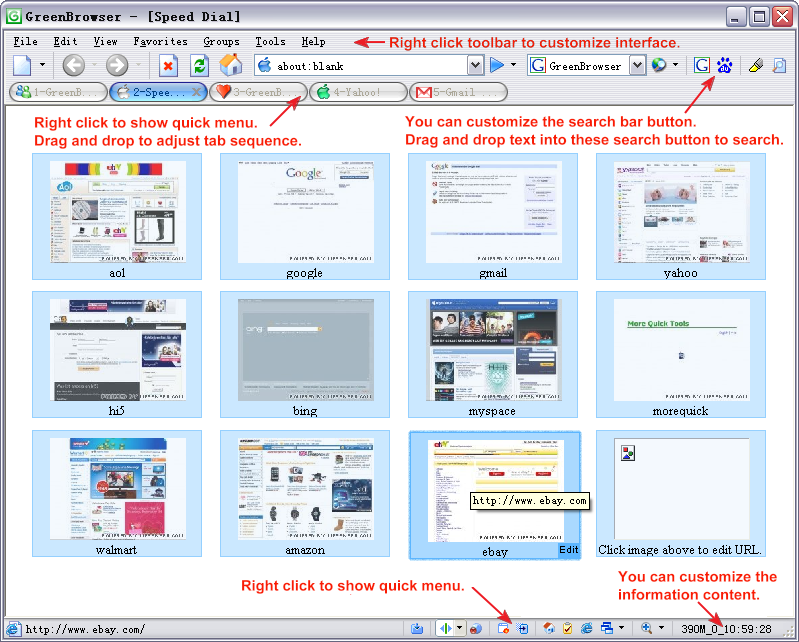
I think the main objective of GreenBrowser is to replace Internet Explorer. As we know that the limitation of all IE, until IE8. I haven't try IE9, so no comment on IE9. GreenBrowser is running on top of the IE engine, therefore it will not be anything faster than IE.

At GreenBrowser's website, it claimed it is a fastest and lightest web browser. However during my testing, the speed still feels like using IE. The only different is you can have a lot of stuffs/feature just like Maxthon/FireFox/Chrome/etc. Other things that I noted are:
1. The nuffnang ads on my blog is not loaded. I tried another blog if mine, but still the same.
2. Some of the embedded youtube video looks like not added correctly although other browsers looks okay.
3. McAfee detected one of the GreenBrowser plug-in when I unzip the portable version.
GreenBrowser plug-in detected as virus on Outdated Penang Uncle blogspot dot com

What I like about GreenBrowser is it has official portable version (just like Opera), therefore we don't need to worry too much if we downloaded a portable version that is might have trojan.[oppsss... except for the plug-in being detected by McAfee as trojan :P]

Summary, GreenBrowser is just a another browser that might suite your surfing needs. I still stick with Chrome and FireFox for now and GreenBrowser will be just another backup browser that I always have (Opera, and Maxthon) :)

To download, go to these links:
http://www.morequick.com/Download.htm
http://www.morequick.com/DownloadGB.htm (Chinese)

For more detail of this browser, go to these links:
http://www.morequick.com/IndexEn.htm
http://www.morequick.co (Chinese)


Like this if you are FB user and you think this post is useful. The button is at top right of content of this post.
+1 this post if you are Google+ users and you think this post is useful.
Hope you will enjoy this post, subscribe to my RSS or mailing list or follow me on blogger or twitter. :)
source: somewhere over the internet

Wednesday, April 18, 2012

Penang Uncle is back!

Hi everyone, Penang Uncle is back from vacation! I have a problem with Google Chrome 18 today, it keep on crashing event thought with just less than 10 tabs, so I switch back to FireFox 11 now. It is better than wait slowly with FireFox than restarting Chrome everything it crash. Sigh.

Stay tune for new post, because I have very fresh mind now after vacation. :D

update: I found out it is Google+ that crashing both FireFox and Chrome. Have to leave Google+ alone for now.

Like this if you are FB user and you think this post is useful. The button is at top right of content of this post.
+1 this post if you are Google+ users and you think this post is useful.
Hope you will enjoy this post, subscribe to my RSS or mailing list or follow me on blogger or twitter. :)
source:I wrote this!

Thursday, August 25, 2011

What if Web Browser were celebrities

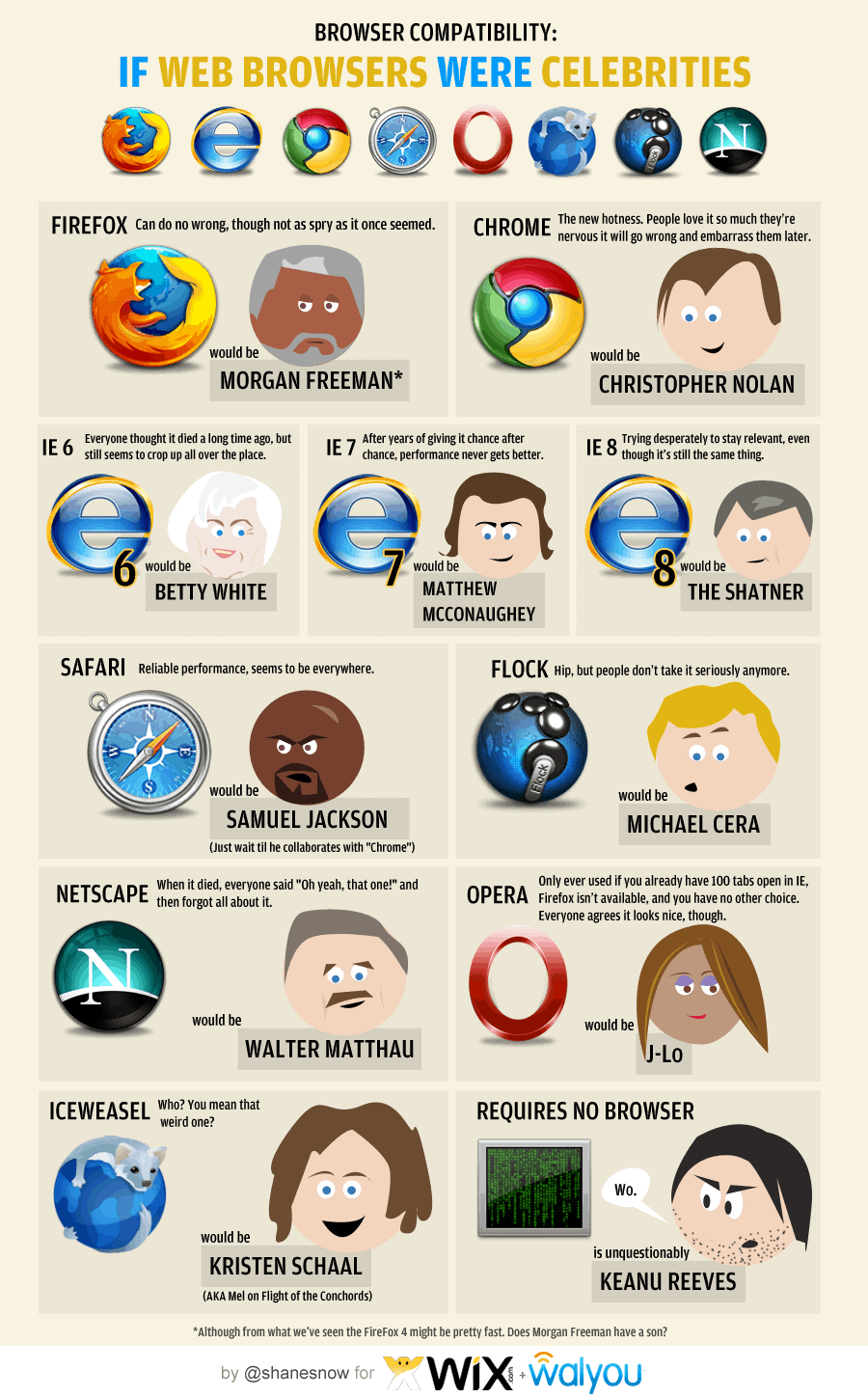
Running a series sometime can be very boring. So to break away from rare keyboard layout series for temporary, I found an interesting infograph regarding web browser. I had run a series of rare browsers last year, click this link to see them.

I use a few web browsers everyday. Here is the list in usage chronology:
1. I use FireFox the most, I tried to move to Chrome some time back, but seem likes Chrome does not fit into my need yet. I like Firefox because of the add-on, but there is one add-on the FireFox don't have but Chrome has, that is Angry Birds! I am using FF5 btw.
2. The second most browser that I use is Chrome, part of it is Angry Birds add-on or Chrome apps to be exact. Another one is the Anti-like apps for Chrome, which I use it to view those pages that locked with Facebook like button, why do we need to like it first before we can read it?
3. The third one has to be IE, duh. I have to use IE in the company that I work with because some in-house tools still need IE.
4. No.4 should be Rockmelt, because of Facebook. Boy, I am so hardworking, coz I seldom login to Facebook. :P
5. Safari is No.5, because I use it just because I feel that I want to use it. But somehow I don't have that feeling a lot. Hence it is at No.5. :D

Okay, now to relate the web browser with celebrity. I like the last one, which is Keanu Reeves. And yes, Samuel Jackson is seems everywhere. :D
Click on the image to see it in full size.

Have a nice day!

Hope you will enjoy this post, subscribe to my RSS or mailing list or follow me on blogger or twitter. :)
source: infograph from http://dailyinfographic.com

Thursday, June 9, 2011

Learn about Browsers and the Web

Someone at Google created this HTML5 website to let everyone to learn (or re-learn) stuffs regarding Web browsers and the World Wide Web and also the hottest WWW technology right now, which is Cloud Computing. Find out the link after the jump......


It is good for children to learn using this website as well as got nice pictures and some animated pictures.
Multi-language has been created, click on the link for the language you interested:
English-US
English-UK
Deutsch
Spanish
French
Bahasa Indonesia
中文(简体)
中文(繁體)
日本語
and many more, you can change the language at the website also.

Enjoy reading! :)

Hope you will enjoy this post, subscribe to my RSS or mailing list or follow me on blogger or twitter. :)
source: WWW

Saturday, April 30, 2011

Super light browser: K-Meleon

I was looking for a very light browser on last weekend to run some experiments. Light meaning it will not hog the system memory, so FireFox (3.xx.xx and 4) and Chrome are out of the picture since they suck up system memory. I tried Safari, but it uses the system CPU power too much, and my system is not so updated [ring a bell? ;) ], after a while, the whole system slow down because of Safari. My rockmelt and other browsers just cannot meet the requirement and I hate IE......
So time for google......


K-Meleon show up in top 10 search from google. And since it got portable version (no installation!), I quickly download it and give it a try.

From the developer:
"K-Meleon is an extremely fast, customizable, lightweight web browser based on the Gecko layout engine developed by Mozilla which is also used by Firefox. K-Meleon is Free, Open Source software released under the GNU General Public License and is designed specifically for Microsoft Windows (Win32) operating systems. "

Okay, K-Meleon is like brother/sister of FireFox, but after some testings and serious reloading, the memory never go more than 300M. And my system did not slow down. NICE!

K-Meleon support tab browsing and also come with mouse gesture which we have to install addon for FireFox to enable that. It can also enable reloading on specific tab for a period of time [that is the main reason I was looking for this kind of browser]. To do that:
Open the webpage -> View -> Reloading -> Continuous Reload...
A windows will pop up asking for how long it wait to reload in seconds. Put 120 for 2 mins or 180 for 3 mins, do not put too short like 60 seconds.

The only drawback of K-Meleon is the update is very slow (3 update only on 2010), which can be an advantage because less update needed. :)
Another drawback (depends on individuals) is the interface looks very outdated, unlike FireFox 4, IE10, Safari, and Opera which have most updated looks.

Here is the link to K-Meleon:
http://kmeleon.sourceforge.net/


Hope you will enjoy this post, subscribe to my RSS or mailing list or follow me on blogger or twitter. :)
Source: me
K-Meleon logo source: http://kmeleon.sourceforge.net

Saturday, April 16, 2011

Flock shutdown

Remember I blogged about Flock sometime back last year:
http://outdatedpenanguncle.blogspot.com/2010/12/what-is-flock.html
It is going to shutdown completely on April 26th, 2011.

 With RockMelt getting more popular, this flock have to go.

It recommend their users to switch to Chrome or FireFox. You can see my posting on browsers to choose your next favorite browsers:
http://outdatedpenanguncle.blogspot.com/search/label/browser


Hope you will enjoy this post, subscribe to my RSS or mailing list or follow me on blogger or twitter. :)
Source: internet

Wednesday, December 15, 2010

What is Maxthon?

I have been using Maxthon 2 for a few years already, but this is not my primary web browser. My primary web browser for now is FireFox and Safari. Maxthon has some nice features which attracted over 536 million downloads!

http://www.maxthon.com

This is Maxthon 2:

This is Maxthon 3:


What I like about Maxthon are:
1. Mouse gesture: it is build-in feature in Maxthon, therefore it works perfectly. FireFox have to install mouse gesture add-on and it is not always stable.

2. Boss key: you can set a combination of keyboard and hide it when ever you press the combination. Maxthon will disappear from taskbar and notification icon all together! It was not included on Maxthon 3 but the latest update has added it back.

3. Pop-up blocker: the best build-in pop up blocker. Especially if you go to China's websites a lot, these websites have too much pop up and since Maxthon is written by Chinese, they know how to deal with these pop-up!

4. Dual display engine (Ultra and Retro mode) (Only on Maxthon 3): Ultra mode supposedly speed up the web browsing experience but if some old sites not display properly on Maxthon3, you can switch back to retro mode.

p/s: spelling error of the update tool of Maxthon 3! Did you see that?


This is the last one of rare browser series from me for now (Maxthon is not rare,but very popular in China though). Let me think what I can write next......


Hope you will enjoy this post, subscribe to my RSS or mailing list or follow me on blogger or twitter. :)

Source: http://www.maxthon.com

Tuesday, December 14, 2010

What is Orca Browser?

From the pageview that I showed, Orca is another type of web browser that visited this blog. So google it and found this:

http://www.orcabrowser.com/

From the website:
Orca Browser is an extremely fast and user friendly web browser, designed to add more functions on to the latest version of Firefox.

Orca also have portable version. Look for it in the download page.

Looks more like avant browser to me, too bad the it cannot perform auto proxy or use IE proxy, hence cannot browse to any webpage:


Verdict: I will skip


Hope you will enjoy this post, subscribe to my RSS or mailing list or follow me on blogger or twitter. :)
Source: http://www.orcabrowser.com/

Monday, December 13, 2010

What is Flock?

From the pageview that I showed (link here), Flock is another web browser that visited this blog. So google it and found this:

http://flock.com/


Supposedly this is a social web browser that is build for Facebook and Twitter. If I remember correctly, this browser exist earlier than RockMelt (a few years maybe), but not as popular as RockMelt right now. Why? Because it is not approved by Zuckerberg! (Just joking :P).

Verdict: I don't even want to try it at all, because I have RockMelt already.


Hope you will enjoy this post, subscribe to my RSS or mailing list or follow me on blogger or twitter. :)

Source: http://flock.com/

Sunday, December 12, 2010

What is Pale Moon?

I found some pageviews are from Pale Moon, so I went to google it to find out what is that. And I found this:

http://www.palemoon.org/

So, Pale Moon is custom-built and optimized Firefox browsers for Windows Operating Systems. The people at Pale Moon claimed that it is 25% faster than the regular FireFox. Other features:
* Highly optimized for current processors
* 100% Firefox sourced: As safe as the browser that has seen years of development.
* Uses slightly less memory because of disabled redundant and optional code
* Significant speed increases for page drawing and script processing
* Support for SVG and Canvas, downloadable fonts, WOFF and some HTML5
* Support for Firefox extensions, themes and personas
* Support for OOPP (Out-of-process plugin execution)
* Able to use existing Firefox profiles, bookmarks and settings


I downloaded the portable version at here: http://www.palemoon.org/palemoon-portable.shtml. If you are using Athlon XP, please download this: http://www.palemoon.org/athlonxp.shtml

Here is the print screen on my laptop:


Remember to donate (thru the donate button at end of the main page of palemoon.org) if you like the software.

Verdict: I got a very slow broadband at home, so don't see the different between Palemoon and FireFox. Do you see any different?


Hope you will enjoy this post, subscribe to my RSS or mailing list or follow me on blogger or twitter. :)

Source: http://www.palemoon.org

Saturday, December 11, 2010

Pageviews by Browsers

I was checking the page view stats on blogger and found out pageviews by browsers this week is like this:


Oh, Chrome is now no. 1! Follow by FireFox and IE. Safari is a lot more than RockMelt, but RockMelt is climbing up (fast!). Opera is very far behind and some very rare browsers.

Follow me to discuss about browsers in these few days.

Click here if you want to know on how to access the blogger stats.


Hope you will enjoy this post, subscribe to my RSS or mailing list or follow me on blogger or twitter. :) source:

Friday, December 3, 2010

Google Chrome 8 is out!

hey people, Google Chrome now is 8!

If you already have Chrome, but not 8 yet, here what you can do:
1. Fire up Chrome
2. Click on the tool button before the close windows button
3. Click "About Google Chrome"
4. It will try to download the update and install the latest version (will take a while, depend on your network/broadband speed)
5. Once it is done, it will ask you to okay or not to restart Chrome.
6. After restart, check again with step 2 and 3, you should able to see something like this:

If you haven't install Chrome, go download, install and try it. Chrome is still not my primary web browser yet, I am still on FireFox most of the time. :)

Or you might want to try RockMelt, the Facebook web browser. See my review:
http://outdatedpenanguncle.blogspot.com/2010/11/more-on-rockmelt.html
http://outdatedpenanguncle.blogspot.com/2010/11/rockmelt-that-not-quite-there-yet.html
http://outdatedpenanguncle.blogspot.com/2010/11/rockmelt-facebook-browser.html

Have nice weekend! :)

Hope you will enjoy this post, subscribe to my RSS or mailing list or follow me on blogger or twitter. :)

Wednesday, November 17, 2010

More on RockMelt

Okay, RockMelt finally working on my laptop. See what I complained about. Anyway, here is my print screen. The icons (apps) on both side are finally appear.It could be previously it cannot login. So your friends are on left hand side; facebook profile/twitter/RSS on right have side.

I can invite friends to RockMelt, but only gave me 3 invites? WHY WHY WHY?
Another problem is I cannot invite some people, most of my friends can be invited, but not all, not sure why yet.

My twitter also added here, so a single click can see my twits.


You can subscribe to RSS, I added this blog's RSS for testing:

Verdict, if you use Facebook 24/7, this could be your browser. Else look for FireFox or Safari (I use both of them).


Previous post on RockMelt:
More on RockMelt
First encounter on RockMel


Hope you will enjoy this post, subscribe to my RSS or mailing list or follow me on blogger or twitter. :)

Thursday, November 11, 2010

RockMelt: that not quite there yet

I have blogged about RockMelt few days ago. And on that very same day I have already got it installed. So here is some snapshot, and some rant on this beta.

After clicking the link in the invitation email, went to RockMelt website again, but now the button on the left of the page changed to Download.

Yes, they have to hope us will love it, it is BETA, did I told you?


The setup file less than 1M, so I figure it need to download again and yes, after double click it, it start to download other setup files from internet. Make sure you are on a fast connection, else you will hate it. :P


You have to login to RockMelt using facebook account, I am sure Zuck is behind this.

And for first time login, it will ask for your permission to allow RockMelt to use all your information (every piece of them!) from Facebook.


After login, here is the very first page of RockMelt. Hey, where is the buttons (they called it apps) on the left and right of the windows? I went to search online for RockMelt review, all of them have the apps on the left and right of the windows, but all of them are using Mac, not windows. Bugs for Windows version? Search the help, search online RockMelt help, didn't help, no one complain about that? My Windows 7 problem?
The interface looks like Google Chrome btw.


Also a task manager to show how much memory each of the RockMelt processes used. Remind me again on Google Chrome.

RockMelt, you want to Rock, but Melt on the way. :P
RockMelt, not quite there yet.


See more update on RockMelt:
More on RockMelt


Hope you will enjoy this post, subscribe to my RSS or mailing list or follow me on blogger or twitter. :)

Monday, November 8, 2010

RockMelt: the Facebook browser?

There are some buzz on the WWW on new browser these few days. A new type of browser called "RockMelt" has came out. It has the Google Chrome look, but with Facebook, and Twitter and some other social media "built" into the browser.

To be able to download the beta (yes, read beta, with bugs and issues), you have to register with Facebook account (is Zuckerberg is behind this?). This remind me of the time when gmail started, you have to have someone to refer invite you. But refer invite is way too old style, so Facebook it is.
This is what I get after "connect" (this is how they called it) with Facebook, I have to wait for a few more days? HUH? Talking about WWW speed.

Anyway, here is the youtube video of the introduction.


If you want to try it, go to here lol:
http://www.rockmelt.com/

Oh, it should be free, who want a paid browser nowadays? :P


See more update:
More on RockMelt
RockMelt that not quite there yet


Hope you will enjoy this post, subscribe to my RSS or mailing list or follow me on blogger or twitter. :)