Outdated Penang Uncle

Showing posts with label Firefox. Show all posts

Friday, June 22, 2012

How to reduce FireFox Memory Usage

FireFox is always my favourite since I start to use it a few years back. But the problem with FireFox is it is hogging too much memory. FireFox also is known for the memory leak issue even though on FireFox 13 and even FireFox 14 beta (they said they fixed it but the truth is the truth). Even though I do nothing on FireFox, I can see the memory usage of FireFox keep on growing.

Personally I am not sure how FireFox will crash every now and then on my laptop, it could be Windows7 trying to kill it because it hogging too much memory. I am sure this could be the truth because if I close FireFox and leave Chrome on only, now it is time for Chrome to crash every now and then.

I searched through FireFox add-ons and found a few add-on that claimed to be able to reduce the memory usage of FireFox. I picked Memory Fox, which works as expected. The memory reduced, but not a lot (reduced 20MB, sigh). But I can feel that the FireFox sometimes will lag a bit, even with just typing on blogger.

pic credit: http://www.datum-forensics.com

Then it is like someone can read my mind. Raymond.cc posted Firemin on one of their post and I give it a try and seriously it works. FireFox on my laptop now will always not more than 20M of memory with 10 tabs opened. It might blow up to more than 50M, but FireMin will lower it down.


To download and understand more about this software, go to this link below:
http://www.datum-forensics.com/2012/05/firemin/

So how to use it?
  1. Download it from the link showed above
  2. Run Firemin.exe to extract it to the same dir where firemin.exe at
  3. Look for Firemin folder, and execute (double click) Firemin.exe
  4. Now you have to close FireFox before you can optimize it
  5. After FireFox is closed, look for the Firemin icon at notification area
  6. Right click on the Firemin icon and select Optimize FireFox
  7. Wait for it to complete.
  8. Now open FireFox and load up your 10 or 20 tabs and enjoy surfing. 
You can check the memory usage by open Windows Task Manager and look for firefox.exe under Processes tab.

Bear in mind that Firemin is not 100% working all the time. The FireFox eventually will need to be restart, but not as often compare to without Firemin.

Happy FireFox-ing. :)


Like this if you are FB user and you think this post is useful. The button is at top right of content of this post.
+1 this post if you are Google+ users and you think this post is useful.
Hope you will enjoy this post, subscribe to my RSS or mailing list or follow me on blogger or twitter. :)
source: saw it first at http://www.raymond.cc/blog/reduce-firefox-memory-leaks-and-usage-with-firemin -> thanks HAL9000


Wednesday, May 30, 2012

Facebook Timeline Remover

Facebook Timeline, like it or hate it, it is here no matter what you think. While most of the Facebook users has been forced to change to Timeline, some still at older Facebook interface. I am lucky that my personal Facebook page still using old Facebook interface, while this blog's Facebook Page has been forced to change to Timeline not too soon after it was being setup.

TimeLineRemove is something you can try if you want to get rid of the TimeLine for now. What actually happen in background is timeline still being loaded, but TimeLineRemove change the look of the TimeLine to become old and good Facebook interface. So you can look at your friend's Facebook profile on old Facebook interface.

TimeLineRemove is available for FireFox, Chrome, Safari and Internet Explorer. All you need to do is go to it's website and install the add-on or extension (allow permission if needed), reload the Facebook and then you are on old and good Facebook interface.

picture source: http://www.timelineremove.com/

To disable Facebook TimeLine, visit this link and download the add-on/extension:
http://www.timelineremove.com/


Like this if you are FB user and you think this post is useful. The button is at top right of content of this post.
+1 this post if you are Google+ users and you think this post is useful.
Hope you will enjoy this post, subscribe to my RSS or mailing list or follow me on blogger or twitter. :)
source: http://www.timelineremove.com/

Wednesday, April 18, 2012

Penang Uncle is back!

Hi everyone, Penang Uncle is back from vacation! I have a problem with Google Chrome 18 today, it keep on crashing event thought with just less than 10 tabs, so I switch back to FireFox 11 now. It is better than wait slowly with FireFox than restarting Chrome everything it crash. Sigh.

Stay tune for new post, because I have very fresh mind now after vacation. :D

update: I found out it is Google+ that crashing both FireFox and Chrome. Have to leave Google+ alone for now.

Like this if you are FB user and you think this post is useful. The button is at top right of content of this post.
+1 this post if you are Google+ users and you think this post is useful.
Hope you will enjoy this post, subscribe to my RSS or mailing list or follow me on blogger or twitter. :)
source:I wrote this!

Thursday, August 25, 2011

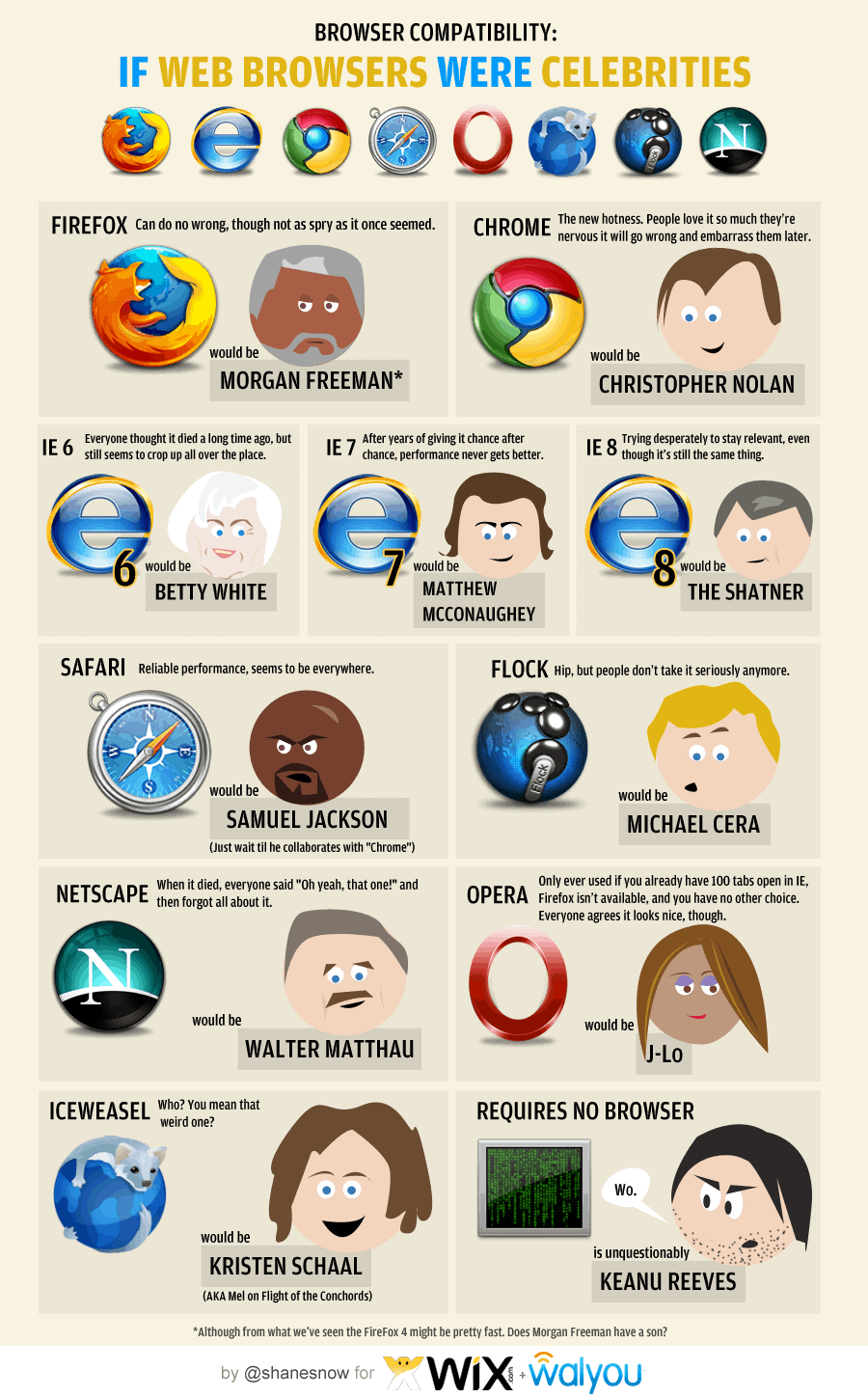
What if Web Browser were celebrities

Running a series sometime can be very boring. So to break away from rare keyboard layout series for temporary, I found an interesting infograph regarding web browser. I had run a series of rare browsers last year, click this link to see them.

I use a few web browsers everyday. Here is the list in usage chronology:
1. I use FireFox the most, I tried to move to Chrome some time back, but seem likes Chrome does not fit into my need yet. I like Firefox because of the add-on, but there is one add-on the FireFox don't have but Chrome has, that is Angry Birds! I am using FF5 btw.
2. The second most browser that I use is Chrome, part of it is Angry Birds add-on or Chrome apps to be exact. Another one is the Anti-like apps for Chrome, which I use it to view those pages that locked with Facebook like button, why do we need to like it first before we can read it?
3. The third one has to be IE, duh. I have to use IE in the company that I work with because some in-house tools still need IE.
4. No.4 should be Rockmelt, because of Facebook. Boy, I am so hardworking, coz I seldom login to Facebook. :P
5. Safari is No.5, because I use it just because I feel that I want to use it. But somehow I don't have that feeling a lot. Hence it is at No.5. :D

Okay, now to relate the web browser with celebrity. I like the last one, which is Keanu Reeves. And yes, Samuel Jackson is seems everywhere. :D
Click on the image to see it in full size.

Have a nice day!

Hope you will enjoy this post, subscribe to my RSS or mailing list or follow me on blogger or twitter. :)
source: infograph from http://dailyinfographic.com

Tuesday, February 22, 2011

Convert offline pages to CHM file (Windows Help file)

Okay, I have showed you to how capture web pages with ScrapBook on Firefox [link here], now sit tight and I will show you how to convert offline pages from ScrapBook to CHM file.


First you need to download and install HTML Help Workshop from Microsoft.
Go to this link. Click "Download Htmlhelp.exe" to download HTML Help Workshop. Install it.
By default it should install at C:\Program Files\HTML Help Workshop or C:\Program Files (x86)\HTML Help Workshop for Windows 7.

Now download ScrapBook CHM Exporter from this link.
Unzip it to a dir that you preferred. And execute it [double click! ;) ]

Not sure about you all, I am seeing error msg, but I still can proceed by clicking the "Continue" button.

Okay, now you need to put the location of the hhc.exe of the HTML Help Workshop into the "HHC" box. For my case I am using Windows 7, so I put the location as:
C:\Program Files (x86)\HTML Help Workshop\hhc.exe

The ScrapBook CHM Exporter will read the location of directory that you store all the offline pages you capture with ScrapBook and list out all the pages that you captures.
Check on the dir or pages that you want to export and then click the "Save" from the "File" option.
Write the name of the chm file that you want [and pick the dir] and click "Save".
Wait for it...... and you got your own Microsoft HTML Help file [a.k.a chm]!


Hope you will enjoy this post, subscribe to my RSS or mailing list or follow me on blogger or twitter. :)
Source: written by me :D

Sunday, February 20, 2011

ScrapBook - The best offline browser......so far

Well, ScrapBook is not exactly an offline browser on its own, because it is only an add-on for Firefox or some would call it Firefox extension.

I have been looking around for offline browser for a while already [since Q4 last year]. I want to keep some of the web pages on my laptop so that I can use the info whenever I want, instead of have to hook it up to broadband again every time I want to find for the info.

Sure some people would say it is very convenient nowadays with broadband, but broadband would have downtime [regularly happen at my place] and also my wife and I try to minimize the electromagnetic field produced by wireless routers [bad for babies], so we choose to disable the wireless and use wired ports whenever we can.

So back to the topic here, how do I keep the web pages offline? To do it directly, we can save the page as html, but what happen if you want to save the bulk of links as well? It wouldn't be problem for a few pages, but how about 100 pages or more?

Okay, with google around you can find many software, the free one like HTTrack Website Copier or paid one like Offline Explorer. These are not too bad, problem come when I want to convert them to windows help file format, so that I don't need to keep these bulk of offline files and copying thousands of files into USB thumb drive is pain in the ass [yes, try that with 1 file of 100M in size and 1000 files with 100M in total size]. I also tried Offline Explorer, the company offer users to use the full feature for free for limited time, but it has one big flaw, it will crash whenever it tries to download one of the website that I want, I have been try to reduce the amount of links it should download but still crash. Only until I found this ScrapBook last month, I like it so much!

okay, enough bullshit, so you have to have Firefox first, then head on to the link here to install the add-on
May not work with Firefox 4.0. You have to restart Firefox to use ScrapBook.

Now you are ready to use it, browse to the web pages that you want to save offline, right click on any place of the web page and "Capture Page" to any directory, depend how you organize it.

[Capture Page] with ScrapBook

[Save Page As] with Firefox

To capture pages that links from current page, use "Capture Page As" and an option windows will pop up, choose how deep you want ScrapBook to download at "In-depth Capture", the more the longer you have to wait.  
Don't be too greedy, else it will take forever!
WHY? Think about if you capturing for a page with 10 links, these 10 link have 10 links each and the following links have 10 link, you will end up capturing for 1+10+(10*10)+(10*10*10)+(10*10*10*10)+......  :D
You can also tell ScrapBook to download linked files like images or sounds or movie or zip files and any file type that you specify.

You can also edit and have hilites on the pages that you captured. This is very nice for people doing research and always use a lot of information from internet. You can save the earth by not printing it out to do hiliting, but just do it on ScrapBook, nice eh?

To understand the full feature of ScrapBook, you can read it here: http://amb.vis.ne.jp/mozilla/scrapbook/
If you like to read PDF manual, here is one: http://amb.vis.ne.jp/mozilla/scrapbook/files/ScrapbookTutorial-1.2.pdf


Technically HHTrack would be more powerful, but I am just too lazy to see it through. :P

p/s: I will write next how to make windows help files from pages captured by ScrapBook.

pp/s: That's why so many people likes apple products because it is very easy to use. Even though they have some flaws, but they catch majority of the population. I am not promoting apple, see the previous post that I making fun of apple, muhahahaha.

ppp/s: contribute to the developer if you like it
https://addons.mozilla.org/en-US/firefox/addon/scrapbook/developers?src=api

Hope you will enjoy this post, subscribe to my RSS or mailing list or follow me on blogger or twitter. :)
Source: written by me, heheh

Friday, February 18, 2011

Keyboard shortcut for most used Windows software

Keyboard shortcut always save time, especially when you need to repeat the command for many times. Here is a list of keyboard shortcut for most used Windows software.

  • Internet Explorer:
    • Control + Shift + P to open an InPrivate browsing window
    • Control + E to go to the Search box
  • Firefox:
    • Control + 1 to 8 to select the exact tab you want [counting from left]
    • Control + 9 go to the right most [last] tab
  • Chrome:
    • Alt and click a link to download its target, such as a picture or PDF file.
  • Word 2010 [and 2007]
    • Shift + F7 to open the Thesaurus
  • Excel 2010 [and 2007]
    • Control + Shift + : to enters the current time. 
    • Control + Shift + & adds a border around the selected cells immediately
  • OneNote 2010 [and 2007]
    • Alt + Shift + up- or down-arrow to move the current paragraph or selected paragraphs up or down in a document
  • Outlook 2010 [and 2007]
    • Control + Shift + I to go to your Inbox
    • Control + Shift + O to go to your Outbox
  • Thunderbird:
    • F8 to toggle the message pane on and off
    • T to jump to the next unread thread
  • Windows Media Player:
    • Alt + Enter toggles full-screen video.
  • Adobe Photoshop:
    • You can either use theirs or build your own shortcuts right in the program.


Hope you will enjoy this post, subscribe to my RSS or mailing list or follow me on blogger or twitter. :)
Source: internet

Tuesday, December 21, 2010

Firefox and robot

What relationship FireFox have with robot? Do this to find out:


Open Firefox, type: "about:robots" in the URL bar, hit enter.

Or if you already in Firefox, click here.

So how? Initially I want to post the print screen here, but that just spoiler, so go ahead try it. :)


How do you find this kind of posting? Nice, if you guys and girls like it, I will do it more often here. Let me know in the comment. :)

Hope you will enjoy this post, subscribe to my RSS or mailing list or follow me on blogger or twitter. :) Source:http://www.blameitonthevoices.com

Thursday, October 8, 2009

Running IE8/7/6 or Firefox3.5/3/2 or Safari4/3 or Google Chrome or Opera10/9 without installing them

Running software without need to install is getting more popular, well, at least I like it, very much, very very much. Because there will be no hassle or worry if want uninstall it. Sometime some software are too stubborn to be remove even though you use the “legal” uninstall process that come with the software. I have been using some software that just can be run from a thumb drive, it is kinda cool coz I could run them on almost all desktop/laptop as long as the OS support them. :)

I found this thing call “Browser Sandbox”few days ago. It actually available since Q1 2009 by a company that famous in virtualization technology called Xenocode. It is not 100% no-installation yet, you still have to install the sandbox for the first time, so that you can launch the browsers from the webpage.

What you need to do is to go to the webpage (link at below), click any of the browser you want to use, install the sandbox for the first time. (I think there was 2 stuffs you need to install, but I might be wrong). After sandbox being install, it will start to load the browser from the server. So it will depend on the network speed, I would not do it at my home, because I am OutdatedPenangUncle that uses the very famous (and always down) Streamyx and the most I get is 512k (actually is 64kbytes, coz 512k is in bits)…… Okay okay, I am too stingy not to upgrade to 1M or 2M, 512k is enough for normal surfing.

The process:

Anyway, I can run IE8, IE7 and Opera10 at same time with the sandbox. I have these below installed, so don’t bother to try on the sandbox:
1. The very outdated IE6 that came with the Windows (many links in my company still have to use this guy)
2. The very updated Firefox3.5.3 (the most use)
3. The long time no use Safari4 beta (coz I fall in love with Firefox…ooppssss, Honey, this kind of love is not the same love that I have with you ya :P)
4. The long time no use Chrome (this guy is too slow, going to uninstall it)
5. and yes, Maxthon (this guys is not a real browser, it just use which ever IE engine in your window, the usage come back up due to a web that still have to use either IE6 or this)

Opera10, IE8 and IE7 in action, the background is the sandbox webpage:

Why need to open so many type of web browser you might ask, because I am a geek, I just want to try out. But I don’t want the trouble to uninstall them in case I don’t like it. Also IE6/IE7/IE8 wouldn’t co-exist if you choose to install any of the newer version.

Oh ya, not to forgot the link to access the page to launch it
http://spoon.net/Browsers/

Tuesday, July 28, 2009

DownThemAll! - The best Firefox add-on

As promised in previous post, I will introduce the best Firefox add-on...for now (I am sure got newer and better add-ons come out everyday, hehe). But for now, this add-on suites my needs.

Introducing "DownThemAll!"

I was looking for something else when I found this add-on. Being curious I install this add-on and went to a blog that provides lots of photos. With a few clicks, this add-on is downloading the photos that I wanted, yeah! I no longer need to open/save the picture one by one. Just right click on the page that links to photos, select the file types you want to download (jpeg, png, html, mp3, you name it), and it will download them all.

DownThemAll! in action!

With this add-on, when ever you click to download a file (zip, exe, etc), Firefox will pop-up the same dialog box to as you where to save it and so on, you can choose to use DownThemAll! to download it instead of the original firefox download manager. I tried it with the snail speed Streamyx 512k line last night, usually it will take more than 10mins to download an 1M file (don't do the math, waste your time only, coz this is streamyx la), but it took less than 1/2 min! I will continue to try download from other website to see if this is consistent, heheh.

Configuration


Some configuration you set for DownThemAll!, but I use the default one, and it works for me. You might want to adjust the number of download concurrently to max if you have a fast broadband, hehe.

Those people that write this add-on are part time only, please donate to them if you think it worth it. I done my part by introducing them, so I guest I don't need to donate kua? :P

p/s: you might notice the pictures are low quality, this is expected since I want to reduce the file size so that they load faster on slow connection. You just want to see see nia, need so high quality mer? :P

Monday, July 27, 2009

Mozilla Firefox 3.5 bug

Last week I came across a web talking about Samsung Omnia2 simulator, being curious (kepo la), I follow the link and look at this Omnia2 simulator. This is really cool, coz it showcase the UI that this Omnia2 has to offer. If I don't have the money constraint, I sure will buy it, coz I heard the hardware also quite hardcore for a ppc. While checking it, I found out the memory on my computer suddenly left very few Meg only. Using Task Manager, I found out this simulator web eat up more than 500M of the memory. No wonder the simulator so nice la, 500M of memory le.

Anyway, this week I found out some people commented Firefox 3.5 got some high memory usage issue. I also experience the same, noticed that Firefox 3.5 could easily use up a few hundreds M when surfing the net. This seldom happen on the maxthon that I use. Not sure about Chrome though, coz I seldom use it nowadays. Although Google is pushing for it, but it is still lack of the features that I found useful on Maxthon and Firefox. Today I found out a very cool add-on for Firefox which works like download manager, but really cool, I hope I will remember to share it in future post. Remind me if you haven't see me share it in 2 weeks time, okay?

Samsung Onmia2 simulator opened on Firefox 3.5 (click to open the full pix):

After closed Samsung Omnia2 simulator (click to open the full pix):

See the memory usage dropped >500M (click to open the full pix)


I just chui sui only la......