Even though quite a lot of people subscribe to data plan or 3G/4G plan with their telco, there are even more people trying to stay out of it to reduce the phone bill cost. One of them is me, Penang Uncle. In my opinion, there is no need to always 'online' with data plan or 3G/4G plan, unless I am a VVIP and I need to check facebook/twitter/viper/whatsapp every minute. If I need to be on internet, I can easily find free wifi hotspot in many places.
Penang Government did a good job in recent years to work with private companies to enable as many as wifi hotspot all over Penang. But where are these wifi hotspots?
Check out this webpage to find the free wifi hotspots in Penang:
http://www.redtone.com/services/penang_wifi.php
You might need to register before use the free wifi service with a valid email account. And speed is not guarantee. Even the free wifi I use at Japan (I went to Japan on Apr 2012) also don't have guarantee speed.
Enjoy your free wifi in Penang!
Like this if you are FB user and you think this post is useful. The button is at top right of content of this post.
+1 this post if you are Google+ users and you think this post is useful.
Hope you will enjoy this post, subscribe to my RSS or mailing list or follow me on blogger or twitter. :)
source: https://twitter.com/#!/cmlimguaneng
Showing posts with label wifi. Show all posts
Showing posts with label wifi. Show all posts
Monday, May 21, 2012

Thursday, March 1, 2012
Using WIFI to access files on Smartphone
Wired or bluetooth, that is only option to access the files on your smartphone from your PC or laptop. While transfer speed over bluetooth is super slow compare to wired method, wired method does not sounds cool. Recently I found an apps that allow me to access the files on my smartphone using WIFI. As we know WIFI speed can reach up to a few Mbps (don't be fool by advertisement of 11Mbps or 54Mbps or 300Mbps), file transfer would be as smooth as 7-11's smoothies.
Introducing WIFI Remote Access Basic. Yes, it is free.
All you need to do is download this apps into your smartphone, install it, turn on the WIFI on your smartphone and get the IP number on the apps.


Then on laptop or PC, using IE (6, 7, or 9) [other web browsers might have problem] to open that same IP to access the files on your smartphone!

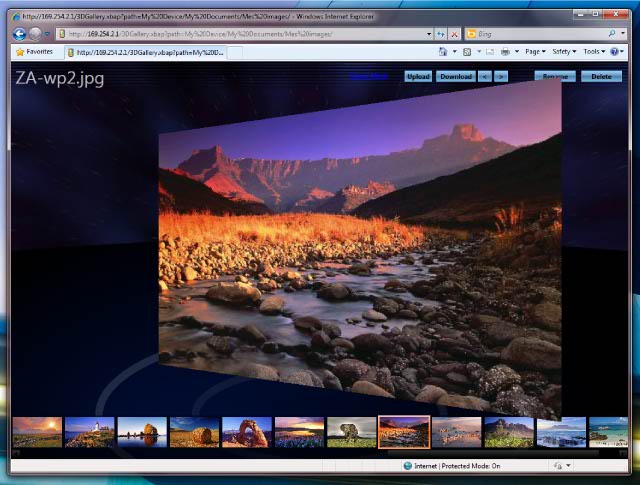
Photos view:

There is also a premium version which cost US$7.99 which includes FTP, text message support and remote control of smartphone.
Too bad this apps only available for Windows Mobile 6.0, 6.1 and 6.5 only. Not available for WP7/7.5, Android and iOS yet.
Who says Windows Mobile is obsolete? :P
Opps...... Not to forget the link to the apps:
http://www.julien-manici.com/windows_mobile_wifi_remote_access/
Look for the blue color "Download" button after "Add a comment" on above link.
Like this if you are FB user and you think this post is useful. The button is at top right of content of this post.
+1 this post if you are Google+ users and you think this post is useful.
Hope you will enjoy this post, subscribe to my RSS or mailing list or follow me on blogger or twitter. :)
pix source: http://www.julien-manici.com/windows_mobile_wifi_remote_access/
Introducing WIFI Remote Access Basic. Yes, it is free.
All you need to do is download this apps into your smartphone, install it, turn on the WIFI on your smartphone and get the IP number on the apps.
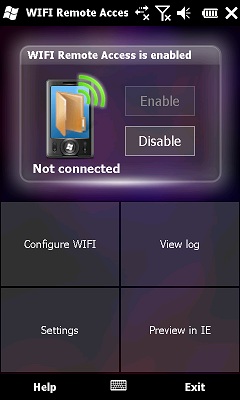
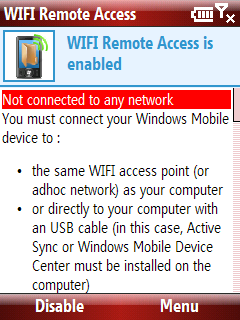
Then on laptop or PC, using IE (6, 7, or 9) [other web browsers might have problem] to open that same IP to access the files on your smartphone!
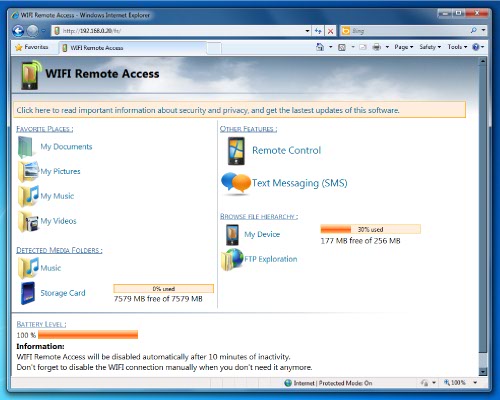
Photos view:
There is also a premium version which cost US$7.99 which includes FTP, text message support and remote control of smartphone.
Too bad this apps only available for Windows Mobile 6.0, 6.1 and 6.5 only. Not available for WP7/7.5, Android and iOS yet.
Who says Windows Mobile is obsolete? :P
Opps...... Not to forget the link to the apps:
http://www.julien-manici.com/windows_mobile_wifi_remote_access/
Look for the blue color "Download" button after "Add a comment" on above link.
Like this if you are FB user and you think this post is useful. The button is at top right of content of this post.
+1 this post if you are Google+ users and you think this post is useful.
Hope you will enjoy this post, subscribe to my RSS or mailing list or follow me on blogger or twitter. :)
pix source: http://www.julien-manici.com/windows_mobile_wifi_remote_access/
Saturday, November 6, 2010
Freeware PPC: WiFi File Sender
Tiny program for files transfer via WiFi.
How to use:
1. You have to connect two devices via WiFi.
2. Run program on both devices. On first device fill "Recepient IP" (IP from "Your IP" on second device).
3. On second device set directory for files store.
4. On first device choose file and click "Send file".

To download, goto http://forum.xda-developers.com/showthread.php?t=828429
Hope you will enjoy this post, subscribe to my RSS or mailing list or follow me on blogger or twitter. :)
How to use:
1. You have to connect two devices via WiFi.
2. Run program on both devices. On first device fill "Recepient IP" (IP from "Your IP" on second device).
3. On second device set directory for files store.
4. On first device choose file and click "Send file".

To download, goto http://forum.xda-developers.com/showthread.php?t=828429
Hope you will enjoy this post, subscribe to my RSS or mailing list or follow me on blogger or twitter. :)
Subscribe to:
Posts (Atom)