Outdated Penang Uncle

Tuesday, July 31, 2012

What is Google Fiber?

Do you want a 1000Mbit internet connection? I am sure everyone would want it. Google is going to offer that for US. What you have to do to get it? Watch this video:


I am still using the turtle speed of 'narrow'band (broadband) in Malaysia. Okay, there is UniFi, but it is super expensive for the average Malaysian's income. How fast (or slow) it is? Example:

This is the best one already.

More example here:
http://outdatedpenanguncle.blogspot.com/p/speed-test.html


Like this if you are FB user and you think this post is useful. The button is at top right of content of this post.
+1 this post if you are Google+ users and you think this post is useful.
Hope you will enjoy this post, subscribe to my RSS or mailing list or follow me on blogger or twitter. :)
source: youtube and my rant!

Monday, July 30, 2012

Infographic: Olympics: Then vs. Now

Since now is the Olympics games time, why not we look at some Olympics facts:


Like this if you are FB user and you think this post is useful. The button is at top right of content of this post.
+1 this post if you are Google+ users and you think this post is useful.
Hope you will enjoy this post, subscribe to my RSS or mailing list or follow me on blogger or twitter. :)
source: http://dailyinfographic.com

Sunday, July 29, 2012

Free Stock Image Worth over $5000

There is a problem for blogger or web writer that is picture. If you are posting your own pictures then should be no problem at all. But for most of us, we don't write stuffs about our-self only, we write topic for the benefit of others and pictures would be a big problem. I always go to look for pictures in google, you can use the advanced search to filter out those that need to be pay, and left with free for commercial use. However, usually there are very few quality pictures we can use. There are other free picture website but you still have to filter out those with copy right. It took some times to do it every time you write a post, and that is very troublesome.

I found a collection of 1000+ royalty-free photos. According to the website if each photo worth $5, it would be over $5000 worth of photos, free for everyone!

You can download the sample of the collection in low resolution to see if they are worth it to download all of them in full resolution. I am in progress of downloading the full resolution by the way.

The preview links:
http://www.filefactory.com/file/lwjqrdsynip/n/Carbon_full_preview_exe
http://depositfiles.com/files/twg41wwox

For the full resolution, go to this link for all of them:
http://www.datum-forensics.com/2012/06/free-stock-images/

 
Like this if you are FB user and you think this post is useful. The button is at top right of content of this post.
+1 this post if you are Google+ users and you think this post is useful.
Hope you will enjoy this post, subscribe to my RSS or mailing list or follow me on blogger or twitter. :)
source: http://www.datum-forensics.com/2012/06/free-stock-images/

Saturday, July 28, 2012

Caffeine: coffee for PC?

This Caffeine is not Starbucks or instant coffee. This Caffeine is a simple program to keep your PC or laptop awake.
Here are the situations I can think of that this Caffeine could useful:
1. you are using someone else laptop/PC, the sleep time on this laptop/PC could just a few minutes and if you are doing a presentation on it, it will be very annoying if every few minutes you need to shake the mouse to get it up from screen off or sleep mode.
2. you are day-dreaming in office, but you don't want the boss to notice it because the screen will be turn-off.
3. some websites will expire if your screen is off and locked, you want the website thinks you are still on it, even though you are not there.

Caffeine might be useful in these situation.
pic credit: http://www.zhornsoftware.co.uk/caffeine/


How it works? Simple, by emulating pressing of F15 key. F15 does not exist on most of the keyboard, therefore it will not change your program or anything, but keep the computer/laptop/PC awake. You can also change the default setting to something else, but you have to do it using switches and launch it via command prompt. You can also make a .bat file with the switches that you want and double click on the .bat file every time you want to keep your PC/laptop awake.

Get your Starbucks for your PC/laptop here:
http://www.zhornsoftware.co.uk/caffeine/


Like this if you are FB user and you think this post is useful. The button is at top right of content of this post.
+1 this post if you are Google+ users and you think this post is useful.
Hope you will enjoy this post, subscribe to my RSS or mailing list or follow me on blogger or twitter. :)
source: http://www.zhornsoftware.co.uk/caffeine/

Friday, July 27, 2012

Stickies: replacement for Sticky Note

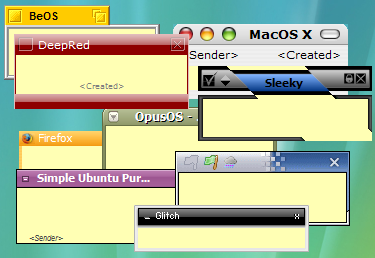
I believe a lot of Windows 7 (and Windows Vista) users have used Sticky Note gadget at least once. For those that like to use it or depend on it very often, the sad news is the later version of Windows 7 does not include Sticky Note. This happen to me as well. My first Win7 OS does has Sticky Note, and it did save some tree from some forest on this Earth. However when I got my new laptop, it is a more matured Win7, but Sticky Note disappear from the gadgets. Did Microsoft want to destroy more tree? I don't know.

Anyway, I found this freeware, or free apps which more people call it that way on every single software (except OS). This apps is Stickies.
pix credit:http://www.zhornsoftware.co.uk/stickies/

Not only this Stickies does the same thing that the Sticky Note does, but better [my comment in square bracket]:
1. Stickies appearance can be customized for fonts, colors. Buttons may be changed, and styles can be saved [reduce boredom]
 pix credit:http://www.zhornsoftware.co.uk/stickies/

2. Stickies can store text or images [yea, don't think original Sticky Note can store picture]

3. Stickies can snap to each other and to the sides of the screen to keep them neatly lined up [tidiness?]

4. Stickies can be attached to a web site, document or folder so they only show when it's on screen [I like this feature very much and it make sense!]


5. Stickies can be transferred from one machine to another either over a TCP/IP network connection, or by using an SMTP mail server or MAPI client. [okay, you have to do this for 1001 stick notes? otherwise who would need to do this]

6. Stickies can be hidden for a certain period, until a specified date and time, or to wake every day, week or month, to act as reminders [stick note the can remind me at the right time, nice!]

7. Stickies can have alarms set to ensure you notice them at a point you choose [nice!]

8. Free [yes!!!!!!]

To download Stickies:
http://www.zhornsoftware.co.uk/stickies/download.html

To download more skins for Stickies, go to:
http://www.zhornsoftware.co.uk/stickies/skins/search.pl

If you prefer portable version, here you go:
http://portableapps.com/apps/office/stickies_portable


Like this if you are FB user and you think this post is useful. The button is at top right of content of this post.
+1 this post if you are Google+ users and you think this post is useful.
Hope you will enjoy this post, subscribe to my RSS or mailing list or follow me on blogger or twitter. :)
source: Internet!

Thursday, July 26, 2012

Waste Time Friday

Hey, this is the 4th post of waste time post on this week! I am breaking my own record on this blog. Yippee yeah?

Anyway, enjoy this Batman Theme from Pomplamoose.


Like this if you are FB user and you think this post is useful. The button is at top right of content of this post.
+1 this post if you are Google+ users and you think this post is useful.
Hope you will enjoy this post, subscribe to my RSS or mailing list or follow me on blogger or twitter. :)
source:TARGET="_blank"

Wednesday, July 25, 2012

BUG-A-SALT: ultimate fly killing machine

Since I already posted 2 waste time post this week, why not make it three waste time post?

Alright. Here we go, today waste time post is about a fly-killer, named BUG-A-SALT (patent pending somemore!)


Can't wait to get one. Probably will wait for China's replica. :P


Like this if you are FB user and you think this post is useful. The button is at top right of content of this post.
+1 this post if you are Google+ users and you think this post is useful.
Hope you will enjoy this post, subscribe to my RSS or mailing list or follow me on blogger or twitter. :)
source: youtube!