Are you getting Google Keep? I know I did it first time I saw it on Google Play. Why I choose Google Keep when most EverNote users said they will not use Google Keep? Because I don't need to maintain another account. Everything from email, blog, cloud storage and now Keep, keeping my note!
Like this if you are FB user and you think this post is useful. The button is at top right of content of this post.
+1 this post if you are Google+ users and you think this post is useful.
Hope you will enjoy this post, subscribe to my RSS or mailing list or follow me on blogger or twitter. :)
source: youtube!
Showing posts with label google. Show all posts
Showing posts with label google. Show all posts
Thursday, April 4, 2013

Tuesday, July 31, 2012
What is Google Fiber?
Do you want a 1000Mbit internet connection? I am sure everyone would want it. Google is going to offer that for US. What you have to do to get it? Watch this video:
I am still using the turtle speed of 'narrow'band (broadband) in Malaysia. Okay, there is UniFi, but it is super expensive for the average Malaysian's income. How fast (or slow) it is? Example:

This is the best one already.
More example here:
http://outdatedpenanguncle.blogspot.com/p/speed-test.html
Like this if you are FB user and you think this post is useful. The button is at top right of content of this post.
+1 this post if you are Google+ users and you think this post is useful.
Hope you will enjoy this post, subscribe to my RSS or mailing list or follow me on blogger or twitter. :)
source: youtube and my rant!
I am still using the turtle speed of 'narrow'band (broadband) in Malaysia. Okay, there is UniFi, but it is super expensive for the average Malaysian's income. How fast (or slow) it is? Example:
This is the best one already.
More example here:
http://outdatedpenanguncle.blogspot.com/p/speed-test.html
Like this if you are FB user and you think this post is useful. The button is at top right of content of this post.
+1 this post if you are Google+ users and you think this post is useful.
Hope you will enjoy this post, subscribe to my RSS or mailing list or follow me on blogger or twitter. :)
source: youtube and my rant!
Monday, July 9, 2012
Nexus Q Teardown and Unlock, Root, Install Apps
What is Nexus Q? Google named it "The world's first social streaming media player". Well, it is like the media players that you can get from China, but with Google brand on it, and looks much more cooler than the Chinese designed media players.
First, lets look at the tech specs:
So here is the teardown:
If you prefer to read it at iFixIt, here is the link:
Nexus Q Teardown
Members of XDA already posted the instruction on how to unlock and root Nexus Q, here is the original thread:
http://forum.xda-developers.com/showthread.php?t=1748575
How to install Apps on Nexus Q, here is the original thread:
http://forum.xda-developers.com/showthread.php?t=1749903
Like this if you are FB user and you think this post is useful. The button is at top right of content of this post.
+1 this post if you are Google+ users and you think this post is useful.
Hope you will enjoy this post, subscribe to my RSS or mailing list or follow me on blogger or twitter. :)
source: iFixIt!
First, lets look at the tech specs:
- SIZE
- Diameter: 4.6 inches (116mm)
- WEIGHT
- 2 pounds (923 grams)
- FINISH
- Die-cast, precision machined zinc bottom housing
- Injection-molded, interactive balanced top dome with precision bearing and satin touch coating
- HARDWARE CONTROLS
- Rotating top dome volume control
- Capacitive touch sensor for mute
- LIGHTING
- 32 RGB perimeter LEDs
- 1 RGB LED for mute indicator
- CPU
- OMAP4460 (dual ARM Cortex-A9 CPUs and SGX540 GPU)
- MEMORY
- 1GB LPDDR RAM
- 16GB NAND flash memory
- OS
- Android 4.0 (Ice Cream Sandwich)
- SUPPORTING APPLICATIONS
- Google Play Music
- Google Play Movies and TV
- YouTube
- CONNECTORS AND PORTS
- Micro HDMI (Type D)
- TOSLink Optical audio (S/PDIF)
- 10/100BASE-T Ethernet (RJ45)
- Micro AB USB (for service and support)
- Banana jack speaker outputs
- WIRELESS
- Wi-Fi 802.11a/b/g/n
- Bluetooth
- NFC
- AMPLIFIER
- 25W class D (12.5 watt per channel)
- POWER
- Integrated 35W switching power supply
- World-ready 50/60Hz 85-265V AC input
- Automatic shutdown for audio amp supply when not in use
So here is the teardown:
If you prefer to read it at iFixIt, here is the link:
Nexus Q Teardown
Members of XDA already posted the instruction on how to unlock and root Nexus Q, here is the original thread:
http://forum.xda-developers.com/showthread.php?t=1748575
How to install Apps on Nexus Q, here is the original thread:
http://forum.xda-developers.com/showthread.php?t=1749903
Like this if you are FB user and you think this post is useful. The button is at top right of content of this post.
+1 this post if you are Google+ users and you think this post is useful.
Hope you will enjoy this post, subscribe to my RSS or mailing list or follow me on blogger or twitter. :)
source: iFixIt!
Friday, February 24, 2012
How to Google with More Effective
Google, Yahoo, Bing! are 3 major search engine. However I use only Google daily, I will use Yahoo and Bing! when I cannot find the info on Google, but Google always give me what I ask it to search. Secret? Using this infographic. I found out I have been using some of the methods frequently, therefore this is a very good reference for you too and I should share it here!
Thing to note: Some of the tips showed here are for MacOS, might not work for Windows.
Keyboard Shortcuts:
1. Press CRTL on Windows vs Command on MacOS
2. CTRL+~ and CTRL+tab does nothing on Windows unless you have apps use these shortcut or you assigned them on special tasks.
3. Press "Print Screen" or "Prt Sc" to capture whole screen on Windows
4. Press "Alt+Print Screen" to capture only the Windows you working on
5. Press "Windows+s" to select the area for print screen if you have Microsoft OneNote

Like this if you are FB user and you think this post is useful. The button is at top right of content of this post.
+1 this post if you are Google+ users and you think this post is useful.
Hope you will enjoy this post, subscribe to my RSS or mailing list or follow me on blogger or twitter. :)
infographic source: http://dailyinfographic.com/the-power-of-google-infographic
Thing to note: Some of the tips showed here are for MacOS, might not work for Windows.
Keyboard Shortcuts:
1. Press CRTL on Windows vs Command on MacOS
2. CTRL+~ and CTRL+tab does nothing on Windows unless you have apps use these shortcut or you assigned them on special tasks.
3. Press "Print Screen" or "Prt Sc" to capture whole screen on Windows
4. Press "Alt+Print Screen" to capture only the Windows you working on
5. Press "Windows+s" to select the area for print screen if you have Microsoft OneNote

Like this if you are FB user and you think this post is useful. The button is at top right of content of this post.
+1 this post if you are Google+ users and you think this post is useful.
Hope you will enjoy this post, subscribe to my RSS or mailing list or follow me on blogger or twitter. :)
infographic source: http://dailyinfographic.com/the-power-of-google-infographic
Monday, January 2, 2012
Google Chinese Input - offline English to Chinese
Google knows that China is a huge market. If add in Chinese population outside of China, that is even huge. There is saying you can find China Town in every major city around the globe, well, not all, but most of them. I can even find Chinese Restaurant at somewhere of nowhere in Utah, believe it or not, I did stop by to have dinner in that restaurant, since my friends insisted. :P
Okay, enough of non-sense. I have been using Google Chinese Input as alternative for default Chinese Input from Microsoft. As a known fact, MS's stuffs simply okay only, if you want something better, you have to find another software, hence Google Chinese Input. Since I was grown up in China's PinYin system (Malaysia Chinese Education system uses PinYin system, so as Singapore), I am too used to PinYin system. Google Chinese Input is actually Google PinYin Input System.
To understand PinYin System, read this wiki:
http://en.wikipedia.org/wiki/Pinyin
The most important feature of Google PinYin Input System is that I can key-in only first character of PinYin of the Chinese phrase (usually from 2 to 4 Chinese characters, sometimes more than that), it will show me the right Chinese phrase. This is super fast compare to MS Chinese input.
Google Chinese Input has been there for few years, recently I noticed that Google Chinese Input have released version 3. Actually the latest version was on Jan 2011, boy, I am really outdated. :P Even though the software is not updated so frequent, the dictionary is being updated weekly, if not daily.
What so special about version 3? It included an offline English to Chinese dictionary. That is the dictionary that I mentioned in paragraph above. This is very useful for English educated people that start to learn Chinese or people like me which has been away from Chinese for too long. When you switch on Google Chinese Input, if you press "shift" key once, it will allow you to type in English directly, press "shift" again, it will go back to detect PinYin input. While writing English, it will start translate the English to Chinese.

Even I have problem spell an English word, it will try to suggest the correct answer.


It will also suggests synonym of the English word.

More synonym can be find in another tab.

You can turn this feature off in setting if you find it annoying or no use for you.

Set your preference on how many characters you key-in before Google Chinese Input start to suggest.

To download Google Chinese Input version 3 with English to Chinese Translation:
http://www.google.com/intl/zh-CN/ime/english/
To download Google Chinese Input version 2, the classic:
http://www.google.com/intl/zh-CN/ime/pinyin/
Like this if you are FB user and you think this post is useful. The button is at top right of content of this post.
+1 this post if you are Google+ users and you think this post is useful.
Hope you will enjoy this post, subscribe to my RSS or mailing list or follow me on blogger or twitter. :)
picture source: google [I don't need to recreate the wheel :P ]
Okay, enough of non-sense. I have been using Google Chinese Input as alternative for default Chinese Input from Microsoft. As a known fact, MS's stuffs simply okay only, if you want something better, you have to find another software, hence Google Chinese Input. Since I was grown up in China's PinYin system (Malaysia Chinese Education system uses PinYin system, so as Singapore), I am too used to PinYin system. Google Chinese Input is actually Google PinYin Input System.
To understand PinYin System, read this wiki:
http://en.wikipedia.org/wiki/Pinyin
The most important feature of Google PinYin Input System is that I can key-in only first character of PinYin of the Chinese phrase (usually from 2 to 4 Chinese characters, sometimes more than that), it will show me the right Chinese phrase. This is super fast compare to MS Chinese input.
Google Chinese Input has been there for few years, recently I noticed that Google Chinese Input have released version 3. Actually the latest version was on Jan 2011, boy, I am really outdated. :P Even though the software is not updated so frequent, the dictionary is being updated weekly, if not daily.
What so special about version 3? It included an offline English to Chinese dictionary. That is the dictionary that I mentioned in paragraph above. This is very useful for English educated people that start to learn Chinese or people like me which has been away from Chinese for too long. When you switch on Google Chinese Input, if you press "shift" key once, it will allow you to type in English directly, press "shift" again, it will go back to detect PinYin input. While writing English, it will start translate the English to Chinese.

Even I have problem spell an English word, it will try to suggest the correct answer.


It will also suggests synonym of the English word.

More synonym can be find in another tab.

You can turn this feature off in setting if you find it annoying or no use for you.

Set your preference on how many characters you key-in before Google Chinese Input start to suggest.

To download Google Chinese Input version 3 with English to Chinese Translation:
http://www.google.com/intl/zh-CN/ime/english/
To download Google Chinese Input version 2, the classic:
http://www.google.com/intl/zh-CN/ime/pinyin/
Like this if you are FB user and you think this post is useful. The button is at top right of content of this post.
+1 this post if you are Google+ users and you think this post is useful.
Hope you will enjoy this post, subscribe to my RSS or mailing list or follow me on blogger or twitter. :)
picture source: google [I don't need to recreate the wheel :P ]
Thursday, December 8, 2011
How Google Impacting Our Memory
Ever since search engine become part of our life, the way how we find information changed completely. Before search engine, we have to go to library and look for whole day just for a small project or homework, but with Google/Yahoo/Bing, we can find the information we want in less than 30 mins or less.
See how Google impacting our memory. Click on the image to see in fullsize:

Hope you will enjoy this post, subscribe to my RSS or mailing list or follow me on blogger or twitter. :)
source:http://dailyinfographic.com/is-google-making-us-e-tards-infographic/googleandmemory
See how Google impacting our memory. Click on the image to see in fullsize:
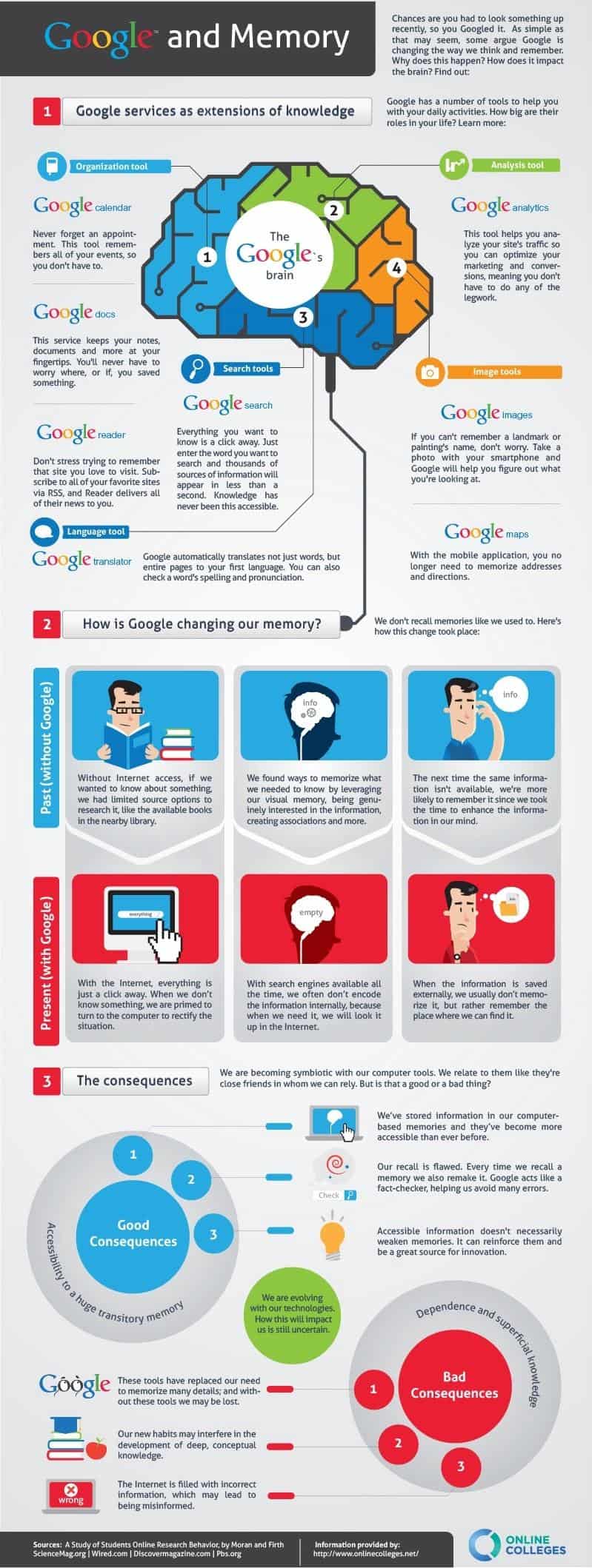
Hope you will enjoy this post, subscribe to my RSS or mailing list or follow me on blogger or twitter. :)
source:http://dailyinfographic.com/is-google-making-us-e-tards-infographic/googleandmemory
Sunday, December 4, 2011
Google and its numbers
I have posted a series of tutorial on how to run Android apps on Windows 7, now to take a break, lets look at how Google impacting the world and the environment.
Click on the picture to see it in full size.

Hope you will enjoy this post, subscribe to my RSS or mailing list or follow me on blogger or twitter. :)
source: http://dailyinfographic.com
Click on the picture to see it in full size.

Hope you will enjoy this post, subscribe to my RSS or mailing list or follow me on blogger or twitter. :)
source: http://dailyinfographic.com
Wednesday, August 17, 2011
The truth of Google buying Motorola Mobility
Larry (G's CEO): Ms secretary, could you buy me that Motorola?
Ms Secretary: Already bought it.
Larry: Which model?
Ms Secretary: Excuse me? Which model? I thought youto want to buy the whole Motorola Mobility?
Larry: !@#$%^&*
Okay okay, it is a joke only. Have a nice day! :)
Hope you will enjoy this post, subscribe to my RSS or mailing list or follow me on blogger or twitter. :)
source: saw this at facebook
Ms Secretary: Already bought it.
Larry: Which model?
Ms Secretary: Excuse me? Which model? I thought you
Larry: !@#$%^&*
Okay okay, it is a joke only. Have a nice day! :)
Hope you will enjoy this post, subscribe to my RSS or mailing list or follow me on blogger or twitter. :)
source: saw this at facebook
Friday, July 15, 2011
I am on Google Plus, finally
I was waiting for invitation to Google Plus, the supposedly rival of Facebook. I joined Facebook because some of my friends only share their photos in Facebook. Not sure how good is it in Google Plus. But anyway, here is my first post:

Thanks to Jayce Ooi for the google plus invitation. :)
Leave a comment if you want to be invited to Google Plus. :)
Some of the post the I wrote previously regarding Facebook:
http://outdatedpenanguncle.blogspot.com/2010/05/why-you-should-quit-facebook.html
http://outdatedpenanguncle.blogspot.com/2010/05/see-video-why-you-should-quit-facebook.html
http://outdatedpenanguncle.blogspot.com/2010/05/more-reason-why-you-should-quit.html
Hope you will enjoy this post, subscribe to my RSS or mailing list or follow me on blogger or twitter. :)
source: I wrote this!
Thanks to Jayce Ooi for the google plus invitation. :)
Leave a comment if you want to be invited to Google Plus. :)
Some of the post the I wrote previously regarding Facebook:
http://outdatedpenanguncle.blogspot.com/2010/05/why-you-should-quit-facebook.html
http://outdatedpenanguncle.blogspot.com/2010/05/see-video-why-you-should-quit-facebook.html
http://outdatedpenanguncle.blogspot.com/2010/05/more-reason-why-you-should-quit.html
Hope you will enjoy this post, subscribe to my RSS or mailing list or follow me on blogger or twitter. :)
source: I wrote this!
Thursday, April 14, 2011
Google on Charlie Chaplin
I was going to google for something and saw this one google:
 Clicking the play logo would run a youtube video on the same place. Go to google now, not sure how long it will be there. :)
p/s: btw, today is Charlie Chaplin's 122nd birthday.
Hope you will enjoy this post, subscribe to my RSS or mailing list or follow me on blogger or twitter. :)
Source: google

p/s: btw, today is Charlie Chaplin's 122nd birthday.
Hope you will enjoy this post, subscribe to my RSS or mailing list or follow me on blogger or twitter. :)
Source: google
Saturday, December 18, 2010
25 laptops were harmed in the making of this video
Google want to demonstrate how good is Google Chrome OS. So they made a video showing it why it is so good for you. 25 laptops were harmed in the making of this video. I like the angrybird style to break the laptop at near end of the video. Enjoy after the jump :)
Hope you will enjoy this video, subscribe to my RSS or mailing list or follow me on blogger or twitter. :)
Source: youtube
Hope you will enjoy this video, subscribe to my RSS or mailing list or follow me on blogger or twitter. :)
Source: youtube
Friday, December 3, 2010
Google beatbox
Google going into music business? HAHA. Actually it is someone found it out on Google Translate.
The tricks?
1. Go to Google Translate
2. Set the translator to translate from German to German
3. Copy + paste the following into the translate box: pv zk pv pv zk pv zk kz zk pv pv pv zk pv zk zk pzk pzk pvzkpkzvpvzk kkkkkk bsch
4. Click “listen” (Fire up your speaker/earphone before that).
5. Amazing!
You can even make your own beats, http://news.ycombinator.com/item?id=1952356
zk = suspended cymbal
bschk = snare
pv = brush
bk = bass
tk = flam1
vk = roll tap
kt = flam2
kttp = flam tap
krp = hi hat tap
pv = short roll
th = better hi hat
thp, ds = instant rimshot.
So far only works for German to German translation only. :) Let me know if you find out others.
Hope you will enjoy this post, subscribe to my RSS or mailing list or follow me on blogger or twitter. :)
source: http://www.reddit.com/user/harrichr
The tricks?
1. Go to Google Translate
2. Set the translator to translate from German to German
3. Copy + paste the following into the translate box: pv zk pv pv zk pv zk kz zk pv pv pv zk pv zk zk pzk pzk pvzkpkzvpvzk kkkkkk bsch
4. Click “listen” (Fire up your speaker/earphone before that).
5. Amazing!
You can even make your own beats, http://news.ycombinator.com/item?id=1952356
zk = suspended cymbal
bschk = snare
pv = brush
bk = bass
tk = flam1
vk = roll tap
kt = flam2
kttp = flam tap
krp = hi hat tap
pv = short roll
th = better hi hat
thp, ds = instant rimshot.
So far only works for German to German translation only. :) Let me know if you find out others.
Hope you will enjoy this post, subscribe to my RSS or mailing list or follow me on blogger or twitter. :)
source: http://www.reddit.com/user/harrichr
Monday, October 25, 2010
let me google that for you
If you have friends or co-workers that always ask questions that the answers always available on google, here is the thing to shut their mouth forever, HAHAHAHA.
Introducing, "LET ME GOOGLE THAT FOR YOU".

First you type the questions and click any of the button (that would work!), then get the tiny url and send it to your friends or co-workers, this website will tell them how to to google it! :)
The link:
http://lmgtfy.com/
Introducing, "LET ME GOOGLE THAT FOR YOU".

First you type the questions and click any of the button (that would work!), then get the tiny url and send it to your friends or co-workers, this website will tell them how to to google it! :)
The link:
http://lmgtfy.com/
Wednesday, September 22, 2010
Google empire
I use gmail , blogger
 and some other free services that Google
 provide, could I get into trouble or account shutdown by posting this? I hope not. :P
p/s: you might also interested to watch other videos
http://outdatedpenanguncle.blogspot.com/search/label/video
, blogger and some other free services that Google provide, could I get into trouble or account shutdown by posting this? I hope not. :Pp/s: you might also interested to watch other videos
http://outdatedpenanguncle.blogspot.com/search/label/video
Thursday, February 11, 2010
Still remember the resistor color code?
I bought a power adapter last month to power an air ionizer. This air ionizer was used on mum's old car, now the car mainly sit still. So I figure if I could use the ionizer in my room, I can save some money not to buy a new air ionizer. I bought the power adapter from a HongKong online shop.
This is the power adapter I bought:
http://www.dealextreme.com/details.dx/sku.15646
Unfortunately, as expected the quality of this power adapter not so good, after a week or two, it stop functioning. Opening it up and the only thing that does not looks right is a resistor that has part of it's skin come out. I think that should be the one that got burned. So my next step is to replace the resistor, but somehow I couldn't remember this resistor color code that I was so proud of during uni time.
So go to google:
http://www.google.com.my/images?q=resistor+color+code
Going to buy that resistor and fix that power adaptor. But I still have the old soldering iron to dig out, it should be somewhere in the house, but just couldn't remember where is it......
See also the google ads for superbowl:
http://ahsiangboringdiary.blogspot.com/2010/02/super-bowl-commercial-that-i-like.html
This is the power adapter I bought:
http://www.dealextreme.com/details.dx/sku.15646
Unfortunately, as expected the quality of this power adapter not so good, after a week or two, it stop functioning. Opening it up and the only thing that does not looks right is a resistor that has part of it's skin come out. I think that should be the one that got burned. So my next step is to replace the resistor, but somehow I couldn't remember this resistor color code that I was so proud of during uni time.
So go to google:
http://www.google.com.my/images?q=resistor+color+code
Going to buy that resistor and fix that power adaptor. But I still have the old soldering iron to dig out, it should be somewhere in the house, but just couldn't remember where is it......
See also the google ads for superbowl:
http://ahsiangboringdiary.blogspot.com/2010/02/super-bowl-commercial-that-i-like.html
Subscribe to:
Posts (Atom)