Outdated Penang Uncle

Saturday, June 30, 2012

Personality Test: Keirsey Temperament Sorter

I were asked to try out Kingdomality personality test few days ago. However I would think the result is not too convincing because the questions was too few and the result can be too generic. Then I remembered I did another type of personality test, it is called Keirsey Temperament Sorter®-II.

Keirsey Temperament Sorter®-II is the most widely used personality test. It has 70 questions and yes it will take a while to complete them, but I think it gives a more accurate answer. Of course this test was being created to help the sales of a few books. Nevertheless the result can be a good source of reference when we want to understand our characteristic.

pix source: http://www.keirsey.com/

To take the test, go to this link:
http://www.keirsey.com/sorter/instruments2.aspx


Like this if you are FB user and you think this post is useful. The button is at top right of content of this post.
+1 this post if you are Google+ users and you think this post is useful.
Hope you will enjoy this post, subscribe to my RSS or mailing list or follow me on blogger or twitter. :)
source: I wrote this!

Friday, June 29, 2012

Find The Best Smartphone: bias or without?

How to choose the best smartphone? By instinct? By talking to friends and family? By asking the salesman? By reading reviews on the internet? Yes, I did all that, but I still haven't made the decision yet. Until few days ago I stumble (is this an outdated term? :P ), I saw this website that do all the comparisons for us.

FindTheBest.com will do the data-driven comparisons for business and finance services, child care to adoption agencies, bicycles to guns, air tickets to hostels, and various consumers electronics including smartphones. So I give a try on the smartphone department.

I am looking for a mid-range smartphone. Probably around RM 1000 to RM 1500 (~US$313 to US$469). Has to be an Android (iPhone is out the range because the pricing). And ICS upgradable, the best is ICS out of the box. So I nailed down to a few, too bad the website don't have Samsung Galaxy S Advance, could because it is not sold at US. Anyway, Samsung Galaxy S 2 vs a few within the price range that I mentioned just now. And I get this:

SmartphonesEMBED

Looks like Samsung Galaxy S 2 has the highest score even though HTC One V and all 3 Sony Xperia are one year newer than Samsung Galaxy S 2.

One thing I noticed while using FindTheBest.com is it said that they are unbiased, data-driven comparisons, however the data are based on reviews from the internet, so it might not always as reliable as we thought. A lot of websites nowadays are being paid by the manufacturers to promote their products. Example iPhone 4 S is 1 point better than Samsung Galaxy S 2 even though so many aspect are worse than Samsung Galaxy S 2.
SmartphonesEMBED

HTC One series are in bad score. I wonder why Samsung Galaxy S 3 ended up at lower score.
SmartphonesEMBED


At the end of the day, it is still back to us to make up own decisions. Reviews and advices are still for reference only. Good luck to me for finding my next smartphone. :)

Here is the Find The Best smartphone department:
http://smartphones.findthebest.com

And this is the Find The Best main page:
http://www.findthebest.com

Like this if you are FB user and you think this post is useful. The button is at top right of content of this post.
+1 this post if you are Google+ users and you think this post is useful.
Hope you will enjoy this post, subscribe to my RSS or mailing list or follow me on blogger or twitter. :)
source: I wrote this!

Thursday, June 28, 2012

Samsung Galaxy S 3 vs Samsung Galaxy S 3

Okay, it is actually Samsung Galaxy S 3 International version vs Samsung Galaxy S 3 Sprint version. Sprint version as the name have told the clue, it is available for US only.

What is the different between these 2 version? There are 2 main different:
1. International version equipped with quad-core Exynos CPU, while Sprint/US version come with dual-core krait CPU
1. International version equipped with 1GB of RAM, which Sprint/US version come with 2GB of RAM.

See the comparison video made by pocketnow.com.


Looks like there is not much different and the result is not consistent, meaning there is no clear winner here.
For me, I will either choose to buy Samsung Galaxy S 2 or Samsung Galasy S Advanced because their price drop significantly after S 3 came out, so this should be a good time to get them.


Like this if you are FB user and you think this post is useful. The button is at top right of content of this post.
+1 this post if you are Google+ users and you think this post is useful.
Hope you will enjoy this post, subscribe to my RSS or mailing list or follow me on blogger or twitter. :)
source: youtube!

Wednesday, June 27, 2012

Samsung Galaxy S 3 Official TV Commercial at US

Whenever a new smartphone or gadget being launched by another company other than Apple, they will boost about how good is their hardware, software and other services. However usually they rarely connect to the customers. Apple, especially Steve Jobs always did a good job relate the product to the customer.

This Samsung Galaxy S 3 Official TV commercial is really did it. I feel like it is connected to what I need for my next smartphone. Kudos to the team that produce this video.


Probably I should just skip the mid-range smartphone and head to this Samsung Galaxy S 3. What do you think?

Like this if you are FB user and you think this post is useful. The button is at top right of content of this post.
+1 this post if you are Google+ users and you think this post is useful.
Hope you will enjoy this post, subscribe to my RSS or mailing list or follow me on blogger or twitter. :)
source: youtube!

Tuesday, June 26, 2012

Kingdomality: who are you in Medival Kingdom

My friend forwarded me a link to a personality test. She did the questions on the website and have to do a report based on the result. So I just give it a try as well. 

Kingdomality was created based on a book called "Kingdomality: An Ingenious New Way to Triumph in Management". Meaning the purpose of the test is to encourage the sales of the book. The result of the test is show who are you in the time of Medieval.

pix source: kingdomality.com

My result is Dreamer-Minstrel. The result will also show the good and bad of each type of the character. You are not necessary to agree to what it is written on your character, but some of them will be true.

pix source: kingdomality.com

Anyway, this is just for your reference only. It would be an interesting topic to talk about for a few days within your office.

Go to this link to take your test:
http://www.kingdomality.com/


Like this if you are FB user and you think this post is useful. The button is at top right of content of this post.
+1 this post if you are Google+ users and you think this post is useful.
Hope you will enjoy this post, subscribe to my RSS or mailing list or follow me on blogger or twitter. :)
source: my neighbor at office

Monday, June 25, 2012

Remove Empty Directories

The longer we use our PC/laptop, the more files and folders being created and accumulated on the hard disk(s). I always tell myself to do some housekeeping, but where is the time left for that after I use the time for work, family and writing blogs as well as reading 100+ of RSS everyday?

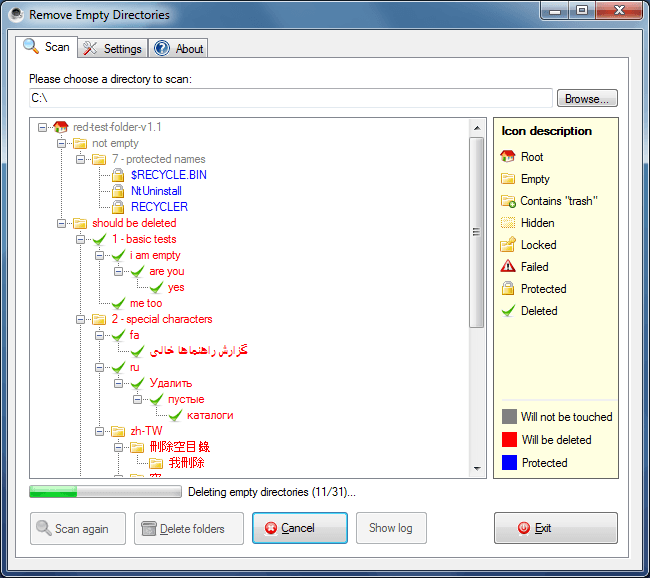
Then I found this. RED is Remove Empty Directories and it is a free apps.

pix source: http://www.jonasjohn.de/red.htm

I downloaded that portable version. After unzip, I execute it directly but some directories cannot be access. So I restart it as administrator, in slightly more than 1min, there are 2241 empty directories has been listed by it. Wow, I can't imagine how I am going to find all of them, unless I do a disk format. :P

Remove Empty Directories also use different icons to describe each of these kinds of dirs:
  • Root
  • the really empty
  • dirs with trash (you have to define what is trash)
  • hidden dirs
  • locked dirs
  • protected dirs
  • Failed (meaning no reading access, I fixed it by run it with administrator permission)
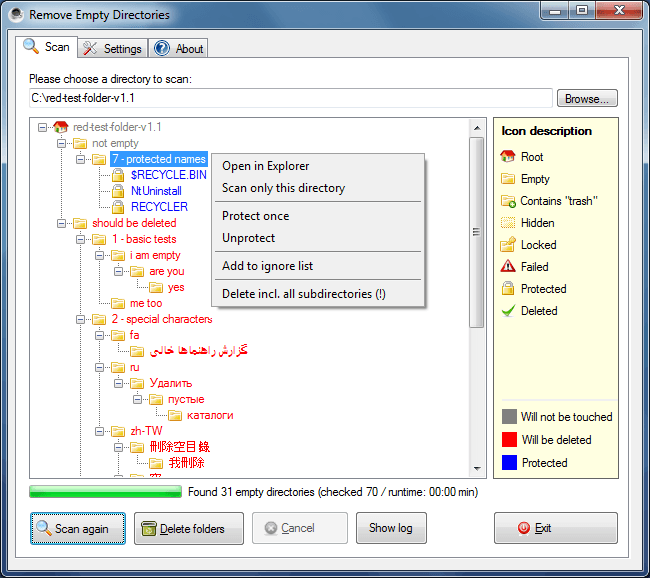
After it listed out the dirs, it is time to review and exclude or protect the dirs you want to keep.
pix source: http://www.jonasjohn.de/red.htm


Remove Empty Directories available as installer or portable version. The author of this apps also very kind to post his coding at internet, so that if you want to use it for other OS(s), you can compile on your own.

To download Remove Empty Directories, go to:
http://www.jonasjohn.de/red.htm


Like this if you are FB user and you think this post is useful. The button is at top right of content of this post.
+1 this post if you are Google+ users and you think this post is useful.
Hope you will enjoy this post, subscribe to my RSS or mailing list or follow me on blogger or twitter. :)
source: internet!

Sunday, June 24, 2012

Disable Intel Graphic Automatic Reduce to 40Hz Refresh Rate

Last year I posted a method on how to change Intel Graphic to 60Hz refresh rate, because 40Hz refresh rate sometime can make our eyes very tired after long hours of looking at it. 
http://outdatedpenanguncle.blogspot.com/2011/12/making-intel-graphics-more-comfortable.html

The above method however is not permanent and Intel Graphic and Media Control Panel will eventually automatically change 60Hz refresh rate back to 40Hz. At some forum, someone explained that this is method of slowing down the refresh rate to 40Hz is to reduce the power usage, therefore prolong the battery life. However I don't find it much different with the battery life with both setting. The biggest different with battery life is turning on the WiFi.

Intel Graphics and Media Control Panel at http://outdatedpenanguncle.blogspot.com/

So what can I do to disable the Intel Graphic and Media Control Panel that automatically reduced refresh rate to 40Hz?


So here is the method:
  1. Open Registry Editor by typing "regedit" with the double quote in the "Search Program and Files" box after click the Windows button. Click Yes if UAC ask the usual question.
  2. Go to this registry key:
    •  HKEY_LOCAL_MACHINE\SYSTEM\CurrentControlSet\Control\Class
  3. Now hit Ctrl+F or select find from the edit menu.
  4. Search for: FeatureTestControl
  5. When you find it, change whatever it currently is to f840 (as hex) or 63552(decimal).
  6. Click OK to save it. 
  7. Close Registry Editor and restart. You should noticed that the refresh rate on Intel Graphics and Media Control Panel is always stick with 60Hz refresh rate.
I hope that this tutorial will help you somehow. Happy hacking. :)


Warning: editing registry can be harmful to Windows OS. Please be extra careful, and backup the Windows via Windows Restore or other backup system you use. I am not responsible if your Windows behave strangely or crash due to this registry hacking.


Like this if you are FB user and you think this post is useful. The button is at top right of content of this post.
+1 this post if you are Google+ users and you think this post is useful.
Hope you will enjoy this post, subscribe to my RSS or mailing list or follow me on blogger or twitter. :)
source: this tutorial I learned from http://forum.tabletpcreview.com/hp-elitebooks/46411-disable-intels-automatic-60hz-40hz-refresh-rate-change-batt.html