Android and iOS can be activated without any PC or Mac. However for some it would be more convenient to manage their Android from PC or Mac. Example for those that don't like to sign up data plan.
SnapPea is written in China. What is not made in Chine nowadays? :P
It can organized your contacts, musics, and pictures on your Android. You can download free apps through SnapPea and SnapPea will install into your Android, no need to sign up any data plan. You can also write text message on your PC and send through the phone. Another attractive point of SnapPea is your can import music from iTunes, no need to manage another list.
Here is the feature video from SnapPea.
One thing I could not understand is the English version and Chinese version setup file as well as website are called different name. Just curious.
English website:
http://www.snappea.com/
Chinese website:
http://www.wandoujia.com/
Like this if you are FB user and you think this post is useful. The button is at top right of content of this post.
+1 this post if you are Google+ users and you think this post is useful.
Hope you will enjoy this post, subscribe to my RSS or mailing list or follow me on blogger or twitter. :)
source: wild wild web
Showing posts with label pc. Show all posts
Showing posts with label pc. Show all posts
Sunday, December 23, 2012

Thursday, May 24, 2012
Mini-Android Computer for US$74 only!
How much it cost you the last time you bought your last computer or laptop? At least a few hundred dolars (more than RM1k) right? Would you want to buy a secondary computer or laptop for your family that just want to surf net and email that cost as much as your first computer? I don't.
How about a mini computer that cost about US$74? Of course this is come without screen/monitor.

pix source: http://www.aliexpress.com/product-fm-img/563764893-New-released-Android4-0-IPTV-google-tv-smart-android-box-allwinner-A10-Model-MK802-Notice-just-wholesalers.html
Powered by a 1GHz Cortex-A8 ARM CPU, 512MB of memory and 4GB storage, this guy can run ICS (Android 4.0)! With WiFi b/g, expandable storage up to 32GB, a micro USB port, you can turn this this into your secondary PC just for net surf and email.
The website also claimed that the HDMI ports supports 1080p and 2160p. Come with pre-installed apps such as Youku, Tudou, QQ, Youtube, Twitter, AngryBird, Office, Gmail, Browser and Skype. However there are 4 question marks after Skype, I wonder that is some sort of fine print. You know what I mean.
It is free shipping via China Post Air Mail to most of the country world wide. I think it is a great deal for a secondary PC. And it is sold out at the moment, you can order now, but you have to wait for the supply to come in to the seller.
Go to this website to look for more detail and fine print :P
http://www.aliexpress.com/product-fm/563764893-New-released-Android4-0-IPTV-google-tv-smart-android-box-allwinner-A10-Model-MK802-Notice-just-wholesalers.html
Update: EnGadget had land their hand on the actual product, see this video:
Please be patient for the video to stream, it was super slow for me yesterday.
Like this if you are FB user and you think this post is useful. The button is at top right of content of this post.
+1 this post if you are Google+ users and you think this post is useful.
Hope you will enjoy this post, subscribe to my RSS or mailing list or follow me on blogger or twitter. :)
source: saw this at http://www.technologyreview.com/blog/helloworld/27867/?ref=rss
How about a mini computer that cost about US$74? Of course this is come without screen/monitor.
pix source: http://www.aliexpress.com/product-fm-img/563764893-New-released-Android4-0-IPTV-google-tv-smart-android-box-allwinner-A10-Model-MK802-Notice-just-wholesalers.html
Powered by a 1GHz Cortex-A8 ARM CPU, 512MB of memory and 4GB storage, this guy can run ICS (Android 4.0)! With WiFi b/g, expandable storage up to 32GB, a micro USB port, you can turn this this into your secondary PC just for net surf and email.
The website also claimed that the HDMI ports supports 1080p and 2160p. Come with pre-installed apps such as Youku, Tudou, QQ, Youtube, Twitter, AngryBird, Office, Gmail, Browser and Skype. However there are 4 question marks after Skype, I wonder that is some sort of fine print. You know what I mean.
It is free shipping via China Post Air Mail to most of the country world wide. I think it is a great deal for a secondary PC. And it is sold out at the moment, you can order now, but you have to wait for the supply to come in to the seller.
Go to this website to look for more detail and fine print :P
http://www.aliexpress.com/product-fm/563764893-New-released-Android4-0-IPTV-google-tv-smart-android-box-allwinner-A10-Model-MK802-Notice-just-wholesalers.html
Update: EnGadget had land their hand on the actual product, see this video:
Please be patient for the video to stream, it was super slow for me yesterday.
Like this if you are FB user and you think this post is useful. The button is at top right of content of this post.
+1 this post if you are Google+ users and you think this post is useful.
Hope you will enjoy this post, subscribe to my RSS or mailing list or follow me on blogger or twitter. :)
source: saw this at http://www.technologyreview.com/blog/helloworld/27867/?ref=rss
Sunday, February 5, 2012
Ultrabook
At last CES at Las Vegas recently, ultrabook is everywhere and every PC manufacturers. Even though I am not using ultrabook yet, but the Sandybridge platform on my HP Elitebook 8460p can make my happy enough. Why? Because:
1. on wired network, it can last up to 7 hours of normal surfing and office works with stock battery only (not the extended battery)
2. on wifi network, it can last up to 5 hours of normal surfing and office works with stock battery only (not the extended battery)
It is still a distant to the 9.5hours of iPad2. But does iPad2 really last that long on single charge on wifi? Nobody bother to verify that now right? Can't you sit at Starbucks for 9.5hours? :P
Here is quite brilliant ads from HP on it's ultrabook. Yes, it is normal to see people sitting at awkward spot at StarBucks, McD, airport, and many more, not that they are nerd, but they just want to charge the laptop, pre-sandybridge laptop to be exact. I don't have the problem if I bring my sandybridge laptop but I haven't try it out at airport honestly because I don't want to bring laptop to my vacation.
Vacation should be free of gadget, okay, just the smartphone and tablet. No? Okay, just the smartphone, I still need that to show the 2D barcode to print boarding pass.
Like this if you are FB user and you think this post is useful. The button is at top right of content of this post.
+1 this post if you are Google+ users and you think this post is useful.
Hope you will enjoy this post, subscribe to my RSS or mailing list or follow me on blogger or twitter. :)
source: I wrote this! video is from pre-SOPA youtube :D
1. on wired network, it can last up to 7 hours of normal surfing and office works with stock battery only (not the extended battery)
2. on wifi network, it can last up to 5 hours of normal surfing and office works with stock battery only (not the extended battery)
It is still a distant to the 9.5hours of iPad2. But does iPad2 really last that long on single charge on wifi? Nobody bother to verify that now right? Can't you sit at Starbucks for 9.5hours? :P
Here is quite brilliant ads from HP on it's ultrabook. Yes, it is normal to see people sitting at awkward spot at StarBucks, McD, airport, and many more, not that they are nerd, but they just want to charge the laptop, pre-sandybridge laptop to be exact. I don't have the problem if I bring my sandybridge laptop but I haven't try it out at airport honestly because I don't want to bring laptop to my vacation.
Vacation should be free of gadget, okay, just the smartphone and tablet. No? Okay, just the smartphone, I still need that to show the 2D barcode to print boarding pass.
Like this if you are FB user and you think this post is useful. The button is at top right of content of this post.
+1 this post if you are Google+ users and you think this post is useful.
Hope you will enjoy this post, subscribe to my RSS or mailing list or follow me on blogger or twitter. :)
source: I wrote this! video is from pre-SOPA youtube :D
Monday, January 9, 2012
PC that cost 25 dolar only
Would you buy a PC that just the size of a credit card (thicker than credit card of course!) and it only cost you 25 dollar? Yes, 25 US Dollar. Better still, this PC can connect to TV/monitor/other display via USB2.0 or HDMI, capable of playing Quake and 1080p HD video. I don't mind to try it out.
Raspberry Pi (Pi is π ) is being developed by a NGO which is called Raspberry Pi. Got you, haha. Anyway, back to the topic.
This ultra-low-cost PC recently won an award at ARM TechCon, which aim to solve most of the costly PC problem in this world (sort of).


They are not selling the PC for making profit, all the money being put back into the business. And they don't mind other copy the design with hope that everyone and every company could develop clone of Raspberry Pi.
Here is a video of Eben, the Executive Director of Raspberry Pi Foundation explaining the product:
Personally I would think this is a very good product for education since conventional PC until nowadays still more than 100 dollar. If going forward all school can get this Raspberry Pi or clone with cost less than 25 dollar, more school kids can benefit from that.
Go to the website find out more detail:
http://www.raspberrypi.org/
Like this if you are FB user and you think this post is useful. The button is at top right of content of this post.
+1 this post if you are Google+ users and you think this post is useful.
Hope you will enjoy this post, subscribe to my RSS or mailing list or follow me on blogger or twitter. :)
source: saw this at EE times
Raspberry Pi (Pi is π ) is being developed by a NGO which is called Raspberry Pi. Got you, haha. Anyway, back to the topic.
This ultra-low-cost PC recently won an award at ARM TechCon, which aim to solve most of the costly PC problem in this world (sort of).
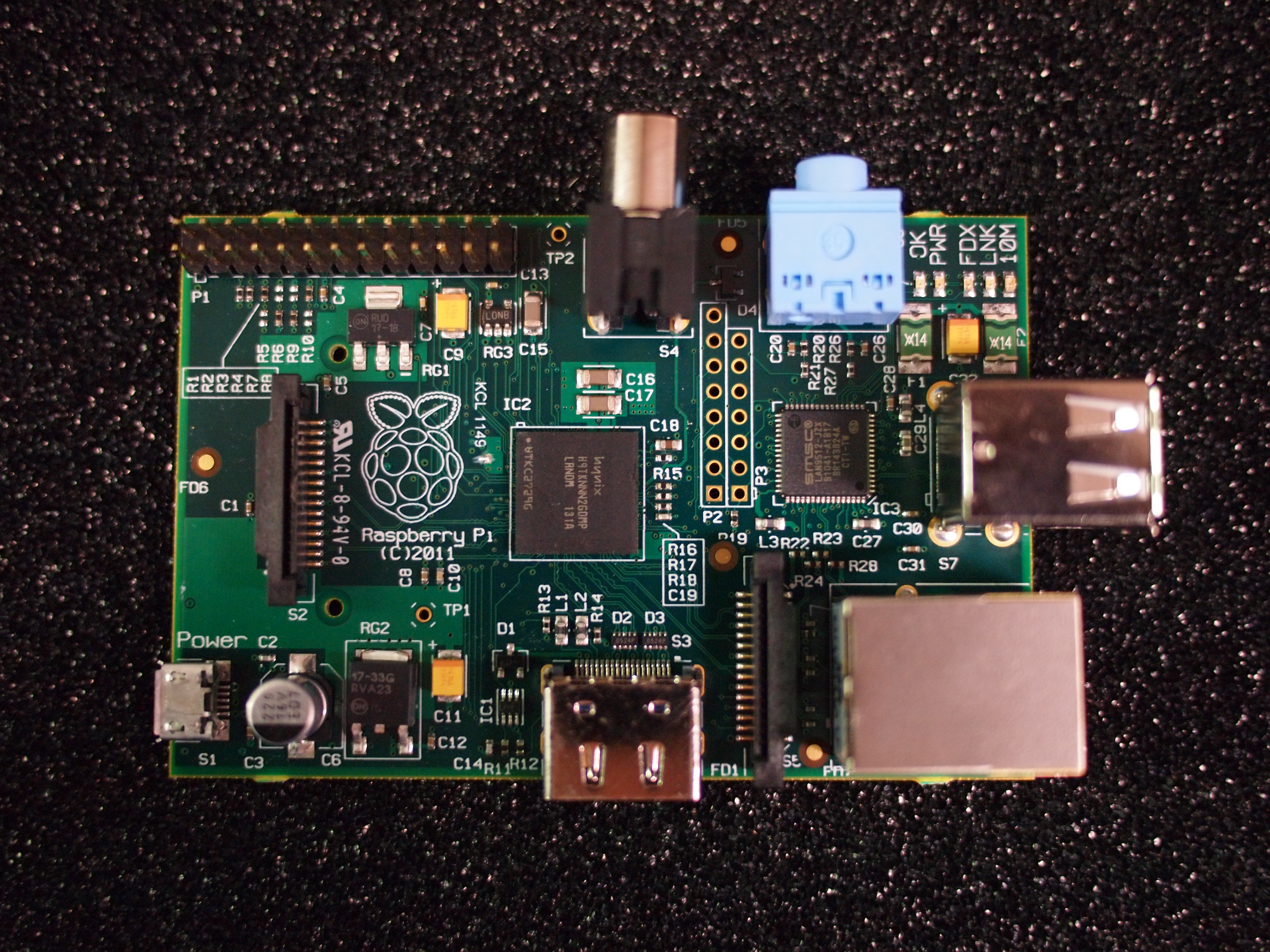
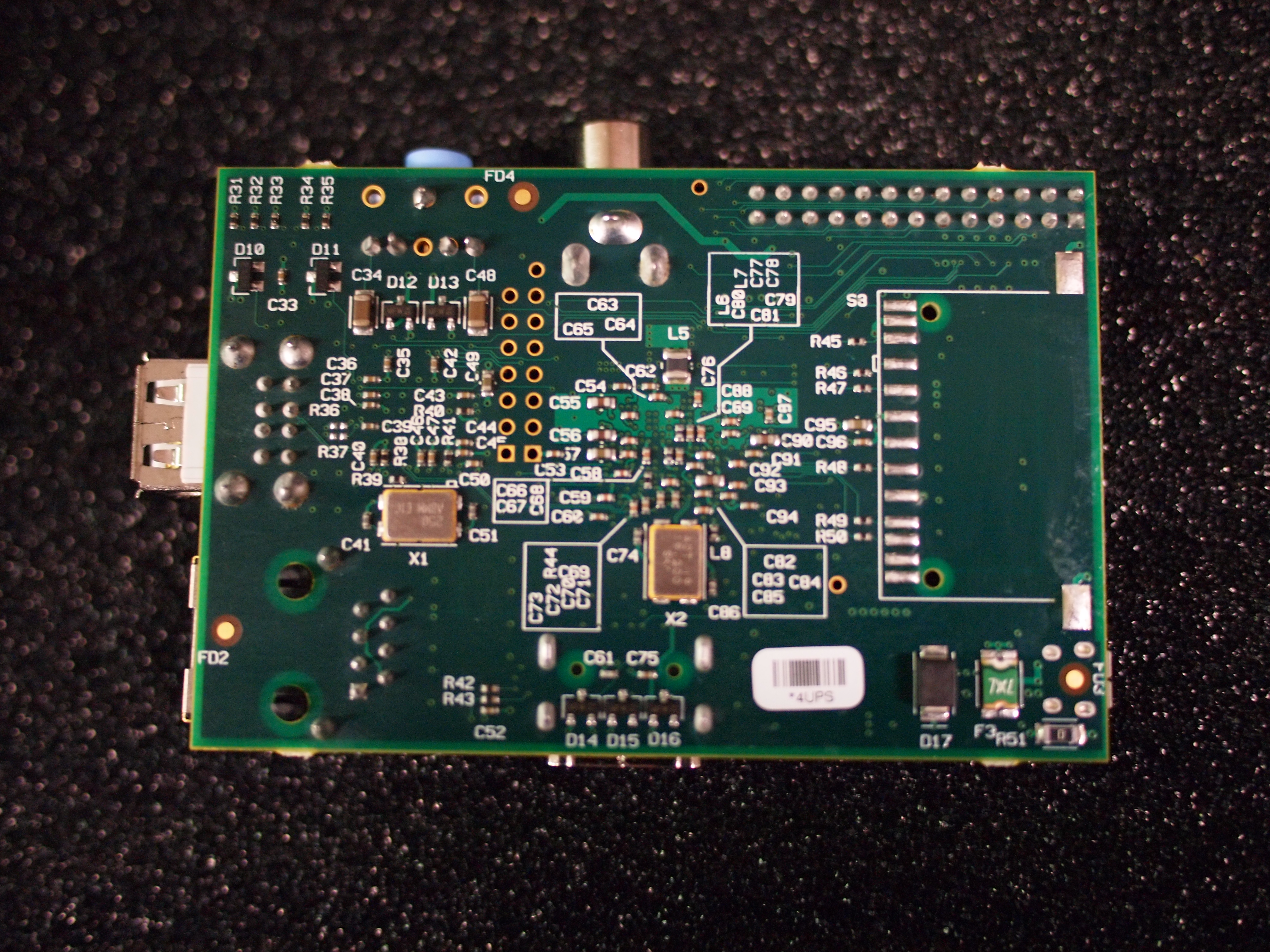
They are not selling the PC for making profit, all the money being put back into the business. And they don't mind other copy the design with hope that everyone and every company could develop clone of Raspberry Pi.
Here is a video of Eben, the Executive Director of Raspberry Pi Foundation explaining the product:
Personally I would think this is a very good product for education since conventional PC until nowadays still more than 100 dollar. If going forward all school can get this Raspberry Pi or clone with cost less than 25 dollar, more school kids can benefit from that.
Go to the website find out more detail:
http://www.raspberrypi.org/
Like this if you are FB user and you think this post is useful. The button is at top right of content of this post.
+1 this post if you are Google+ users and you think this post is useful.
Hope you will enjoy this post, subscribe to my RSS or mailing list or follow me on blogger or twitter. :)
source: saw this at EE times
Friday, May 21, 2010
Edit EXIF info and file's date and time
What is EXIF info? It is additional information added to the photo (jpeg/jpg/raw) by digital camera. Depend on your camera, the EXIF will cover info such as camera manufacturer, model number, data and time, exposure, etc etc.
My mum got a new digital camera from Panasonic, not sure either the shop that sell the camera or the friend who help my wife to set it up, he/she set the time to be 12 hours slower. Obviously he/she didn't notice the AM/PM or 24 hours setting. Anyway, after getting the camera, I also didn't check, and start away taking photos. Until I copy the pictures into my computer, then I notice that the time are incorrect, because all 12 hours slower. Not only the file's time and date, but the EXIF info as well. I don't like this happen, because usually I sort my photos during the time and date they taken. So I went to google around. And I found 2 useful software and they are freeware.
1. Microsoft Pro Photo Tools 2
Not only you can edit the date and time of your photos' EXIF info, you can do it in bulk. The best feature that I like about this software is all I need to do is to adjust the time different I want to change. Example, all the photos I took on my mum's camera was 12 hours late, so I use the "Adjust the date(s) by:" to add in 12 hours.

2. SetFileDate 2.0
Although Microsoft Pro Photo Tools 2 able to edit the EXIF, once I save them, the date and time changed to current date and time, which I don't want. So I found this piece of software to change the create/modified/accessed date of the pictures to the exact date and time you want. Also you can do it in bulk. It can modify for any file, not only pictures. Yes, it is free. However it is lack of the feature like MS Pro Photo Tools 2 to adjust the date and time by adding the days/hours. But good enough for me, because I have a small bunch of them to edit only.

See other post regarding life saver for PC:
http://outdatedpenanguncle.blogspot.com/search/label/life%20saver
See other post regarding freeware:
http://outdatedpenanguncle.blogspot.com/search/label/freeware
See more detail about EXIF:
http://en.wikipedia.org/wiki/Exchangeable_image_file_format
Hope you will enjoy this post, subscribe to my RSS or mailing list or follow me on blogger or twitter. :)
My mum got a new digital camera from Panasonic, not sure either the shop that sell the camera or the friend who help my wife to set it up, he/she set the time to be 12 hours slower. Obviously he/she didn't notice the AM/PM or 24 hours setting. Anyway, after getting the camera, I also didn't check, and start away taking photos. Until I copy the pictures into my computer, then I notice that the time are incorrect, because all 12 hours slower. Not only the file's time and date, but the EXIF info as well. I don't like this happen, because usually I sort my photos during the time and date they taken. So I went to google around. And I found 2 useful software and they are freeware.
1. Microsoft Pro Photo Tools 2
Not only you can edit the date and time of your photos' EXIF info, you can do it in bulk. The best feature that I like about this software is all I need to do is to adjust the time different I want to change. Example, all the photos I took on my mum's camera was 12 hours late, so I use the "Adjust the date(s) by:" to add in 12 hours.

2. SetFileDate 2.0
Although Microsoft Pro Photo Tools 2 able to edit the EXIF, once I save them, the date and time changed to current date and time, which I don't want. So I found this piece of software to change the create/modified/accessed date of the pictures to the exact date and time you want. Also you can do it in bulk. It can modify for any file, not only pictures. Yes, it is free. However it is lack of the feature like MS Pro Photo Tools 2 to adjust the date and time by adding the days/hours. But good enough for me, because I have a small bunch of them to edit only.

See other post regarding life saver for PC:
http://outdatedpenanguncle.blogspot.com/search/label/life%20saver
See other post regarding freeware:
http://outdatedpenanguncle.blogspot.com/search/label/freeware
See more detail about EXIF:
http://en.wikipedia.org/wiki/Exchangeable_image_file_format
Hope you will enjoy this post, subscribe to my RSS or mailing list or follow me on blogger or twitter. :)
Tuesday, October 20, 2009
Stop and relax for a moment
I found this site by accident and it is kind of fun to play with it once in a while. Try it la.
Making your own tone by clicking on the boxes. Click at same box for 2nd time to clear it.
http://lab.andre-michelle.com/tonematrix
Making your own tone by clicking on the boxes. Click at same box for 2nd time to clear it.
http://lab.andre-michelle.com/tonematrix
Subscribe to:
Posts (Atom)